
On MyFitnessClient, your clients buy or subscribe to a course on the website and pay on Stripe, directly into your account. Course access opens and closes automatically based on payments, refunds and disputes, and each sale is recorded in Payments. To turn on sales and choose the price, see Sell a course online: one-time purchase, subscription and price.
Who can buy and where
- Only your active clients who can see the course can buy it: the course must be published and the Who can discover this course option must show it to that client. There is no public sales page: anyone who is not your client cannot see the course.
- The client buys on the MyFitnessClient website, in the browser or in the app installed from the website. In Courses, on the Discover tab, they open the course and select Buy course or, for a subscription course, Subscribe, and pay on a Stripe page. The client’s steps are in Buy or subscribe to a course.
- Your Stripe account must be ready to receive payments. If the client’s plan (the monthly plan or pack you gave them) does not include Courses, they do not see the catalog.
- The purchase is refused when the course has no places left, when the client has not yet completed the required course, when they already have access, when they made a one-time purchase of this course that was fully refunded, when a purchase or subscription they made for this course is in dispute, and when you are closing your account. For a subscription course, it is also refused for anyone with paused or expired access to this course, given by you or coming from a one-time purchase. The messages the client sees are in Can't buy or subscribe to a course.
- When the If they don't pay rule set to Read-only limits a client’s access, they also stop seeing the course catalog until they catch up. The courses they already have stay open. See Choose what happens when a client does not pay.
Who sells and what the client accepts
The course is sold by you, not by MyFitnessClient. On the course page and on the Stripe payment page, the client reads that the contract is with you. The Stripe page adds that cancellations, refunds and the right of withdrawal are handled with you, and shows your contact: the contact email from your public profile or, if you don’t have one, your account email. These notices only appear when your name is filled in on your profile.
Before paying, the client ticks two boxes: one for access guaranteed for 12 months and one for immediate access, in which they agree to lose the 14-day right of withdrawal. After payment, they receive a confirmation email with what they accepted. The text of the boxes is in 12-month access guarantee for a purchased course.
What you receive
The payment goes into your connected Stripe account, the same one that receives your clients’ charges. MyFitnessClient takes no commission: you receive the amount paid minus Stripe’s fees. See Connect Stripe to receive online payments from clients and Fees on client online payments.
Access after payment
- Access opens when Stripe confirms the payment. Until then, the client sees “Confirming payment”.
- On the course’s Students tab, the client appears with the Purchased or Subscription tag.
- With a one-time purchase, access has no end date while you have a paid plan. With a subscription, access lasts until the end of the paid period and is extended with each payment.
- This access cannot be paused, removed or given an end date on the Students tab. If you try, “This access comes from a purchase and cannot be removed here.” or “This access is managed by a subscription and cannot be removed here.” appears. What pauses or ends it is a refund, a dispute or the end of the subscription.
- A client you give access to manually is never charged. In a course that is for sale, they appear with the Courtesy tag.
The 12-month guarantee
The guarantee protects buyers if you no longer have a paid plan or you close your account. On the course’s Page tab, the One-time purchase card says: “They get 12 months of guaranteed access from the purchase, even if you leave MyFitnessClient. After that, the course stays available while you have a paid plan and until 90 days after you stop paying.”
| Situation | One-time purchase | Subscription |
|---|---|---|
| You have a paid plan | The course stays available, with no end date. | Renews each period as long as the client pays and does not cancel. |
| You no longer have a paid plan | The course stays available for at least 12 months after the purchase. | Stops renewing, after a notice you receive by email. The client keeps access until the end of the period they paid for. |
| You close your account | The course is kept for the client until 12 months after the purchase, with no refunds. | The course is kept for the client until the end of the period they paid for, with no refunds. |
The subscription deadlines are in what happens to course subscriptions when your paid plan ends. When you close your account, the content and files of courses with guarantees still running are kept until the last one ends. See Close your professional account.
Sale notifications
| Who | When | Notification |
|---|---|---|
| The client who buys | When Stripe confirms the purchase or the first subscription payment | “Purchase confirmed” notification or, for a subscription, “Subscription confirmed”, and a confirmation email. |
| You and the team members with permission to view that client’s payments | When Stripe confirms the purchase or the first subscription payment | “New course purchase” or “New course subscription” notification, which opens Charges with the Course type. No push or email. |
| The client you enroll manually | When you enroll them for the first time | “New course” notification and push, if the client has push notifications turned on. A reactivated client is not notified. |
You don’t receive an email for each sale, and there is no notification when a client completes a lesson or the course.
Where to see sales
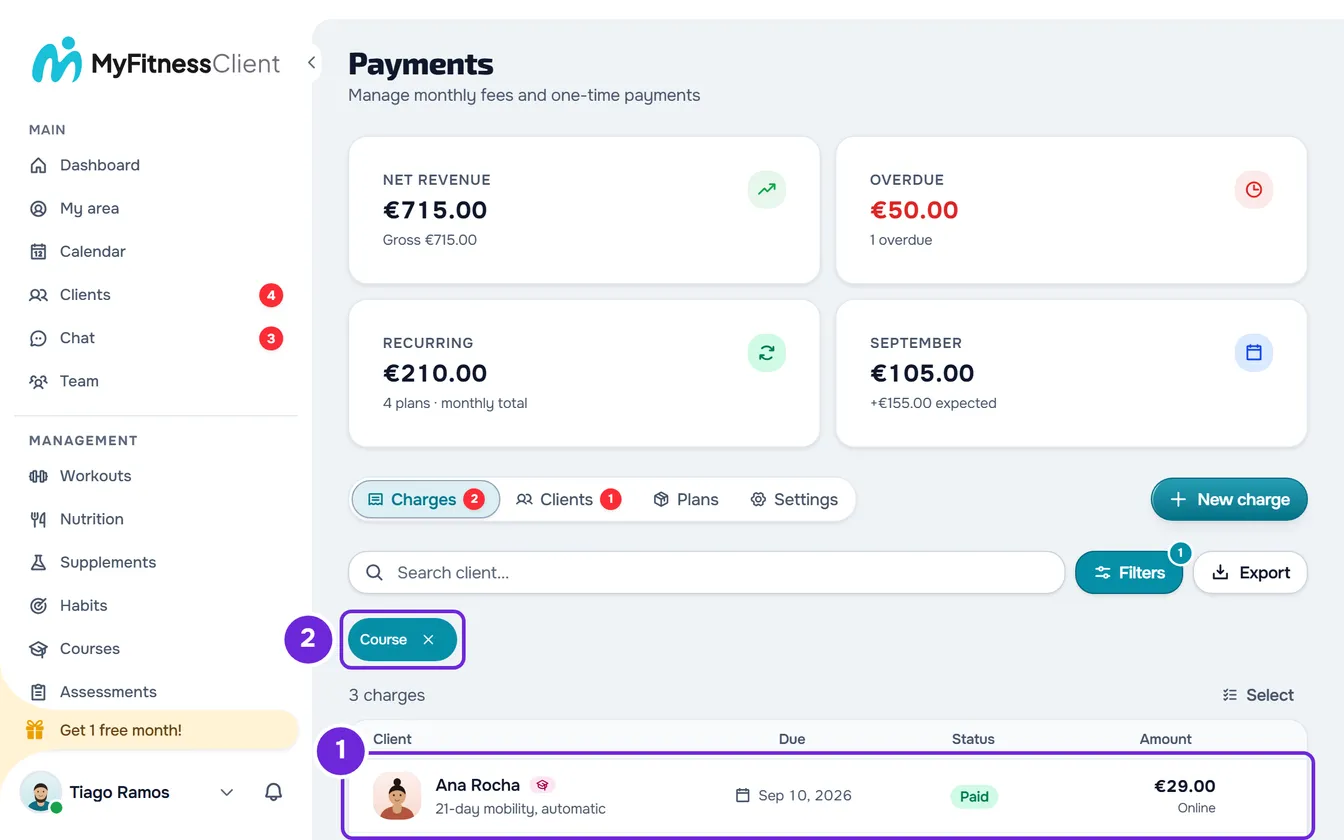
- In Payments, on the Charges tab, course sales appear with the Course type, the client, the course name, the date, the status and the amount. To see only courses, choose Course in the Type filter. See Search, filter and open client charges.
- A one-time purchase appears as one row, with the status Paid or, after a full refund, Refunded. Selecting the row opens the Stripe receipt, when there is one.
- A subscription appears as one row for each payment received, with the status Paid. These rows do not open a receipt.
- Course rows are read-only: they cannot be edited, marked as paid or deleted.
- On the Dashboard, the Business card adds course sales to Received this month, minus refunds. In a month with course sales, the card also shows how much came from clients and how much came from courses.
Refunds, disputes and places
Refunds are made in your Stripe dashboard: MyFitnessClient has no refund button. When Stripe reports a refund or a dispute, MyFitnessClient updates the client’s access automatically. See Refunds and disputes for online payments.
| Situation | What happens |
|---|---|
| Full refund of a one-time purchase | The client’s access is paused and they can no longer buy the course online. In Charges, the sale changes to Refunded. On the course’s Students tab, the row changes to Paused, or stays Completed if they had already finished the course. |
| Partial refund of a one-time purchase | Access stays and the sale remains Paid. |
| Refund of a subscription payment | Access does not change because of the refund: it ends when the subscription ends on Stripe. That payment’s row remains Paid and Received this month deducts the refund. |
| Dispute open or lost | The client’s access is paused. While the dispute is open, you cannot enroll the client manually: “This purchase needs to be reviewed by support.” appears. In Charges, the sale remains Paid. |
| Dispute won | The client’s access comes back. |
| Places run out while the client is paying | The client does not get access and the payment is refunded automatically. For a subscription, the subscription is also canceled. |
In the mobile app
The MyFitnessClient app from the stores does not sell courses, because of the app store rules: it has no Discover tab and no purchase buttons. It shows the courses the client already has, and a course bought on the website also opens in the app.
Questions
Can I edit a sale or mark it as paid?
No. Course sales in Charges are read-only: payment and refunds are handled on Stripe.
Why does the sale still show Paid if the client opened a dispute?
In Charges, only a full refund changes a sale’s status. During the dispute, the client’s access is paused and, on the course’s Students tab, their row shows Paused, or Completed if they had already finished the course.
Is the client charged if I enroll them manually?
No. In a course that is for sale, the course’s Students tab says “Anyone given access here is not charged.”
Does the client see the course in the mobile app after buying it on the website?
Yes. The course bought on the website appears in the app’s course list and opens there.