
Before you start
- Only the workspace owner removes plans from the catalog and archives them. A team member with access to Payments sees the plan list and the archived plans, without the ⋮ on each plan, and the tab shows the label Only the owner creates plans and changes prices.
- Both actions apply right away, without asking for confirmation, and can be undone in the same menu.
- Custom plans, created for a single client, are not in this list. To stop charging for one of them, see Cancel a client's plan.
Steps
To remove a plan from the catalog or archive it:
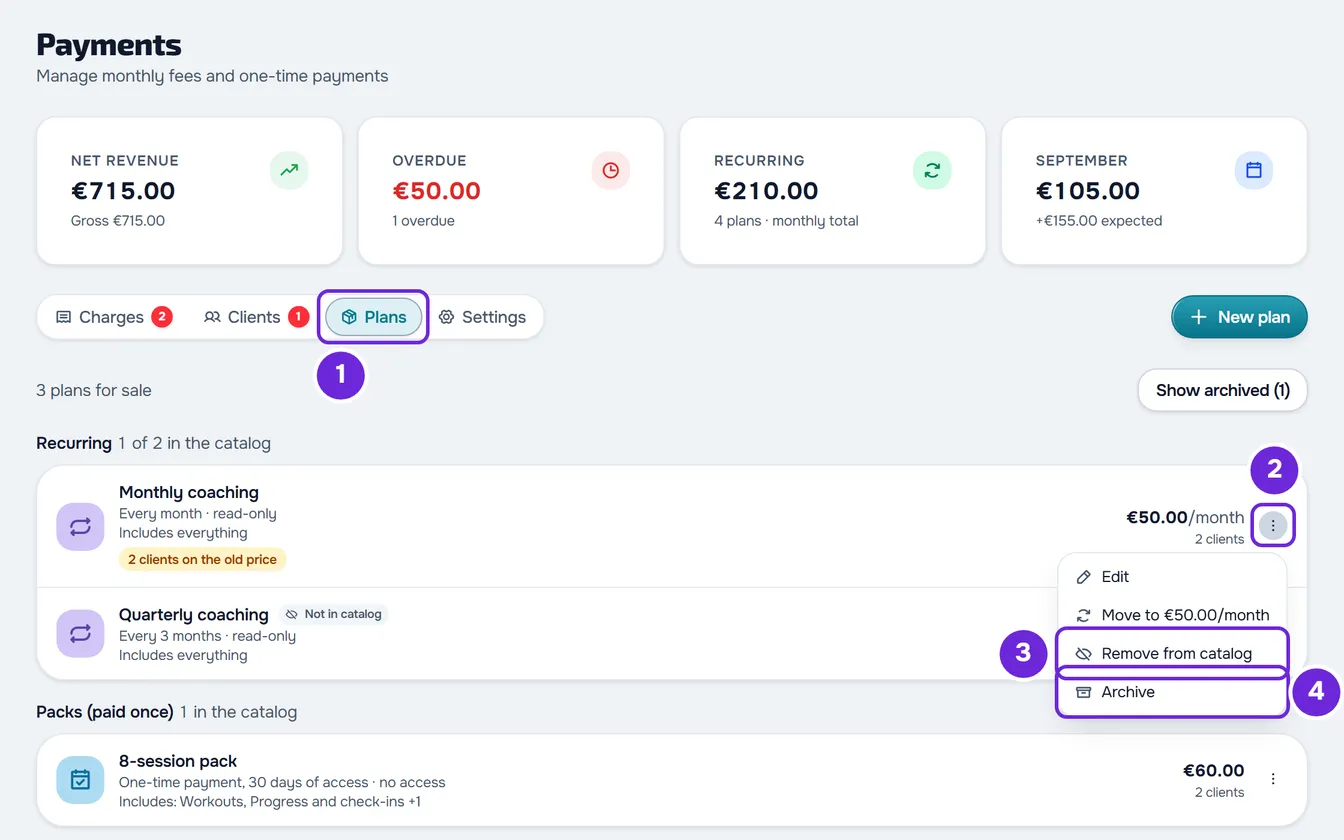
- In the side menu, under Management, select Payments.
- Select the Plans 1 tab. The list shows the recurring plans and packs you sell.
- On the plan's row, select ⋮ 2, or right-click the row.
- Select Remove from catalog 3, so the client can no longer choose it on their own, or Archive 4, so you stop selling it and giving it to anyone.
The notice “Removed from catalog” or “Plan archived” appears. A plan that is not in the catalog stays in the list with the label Not in catalog, and the group header now says how many are in the catalog, for example “1 of 2 in the catalog”. An archived plan leaves the list and moves behind the Show archived button, which shows in parentheses how many there are.
Remove from the catalog or archive
Neither action affects clients who already have the plan. The difference is who can still receive it:
| Where | Not in catalog | Archived |
|---|---|---|
| List of plans the client chooses on their own | Does not appear | Does not appear |
| Give a plan window, when you give a plan to a client | Stays in the list, with “Not in catalog” in the description | Does not appear |
| New invitation that asks for a package payment | Does not appear | Does not appear |
| Invitation with a package already sent | Still offered | No longer offered |
| Plans tab | Stays in the list, with the label Not in catalog | Only appears in Show archived, with the label Archived |
| Clients who already have it | Keep the plan, the charges and access | Keep the plan, the charges and access |
| Undo | ⋮ > Add to catalog | Show archived > ⋮ > Unarchive |
Clients who already have the plan keep it: recurring payments are still charged, manually or by automatic payment, and an unpaid plan can still be paid. When a pack ends, the client can no longer buy it again on their own: you give it to them in Give a plan, if it is not in the catalog, or after unarchiving it, if it is archived.
Who sees the list of plans to choose from, and when, is covered in Let clients choose and pay for their plan themselves. Invitations with a package are covered in Require a package payment before a client joins.
Remove from the catalog in the plan form
The Show to clients switch, in the plan form, does the same as Remove from catalog and Add to catalog. If you turn it off when creating the plan, the plan is out of the catalog from the start. On an existing plan, select Edit in the ⋮, change the switch and select Save. Creating and editing plans is covered in Create recurring plans and packs for clients.
View and unarchive archived plans
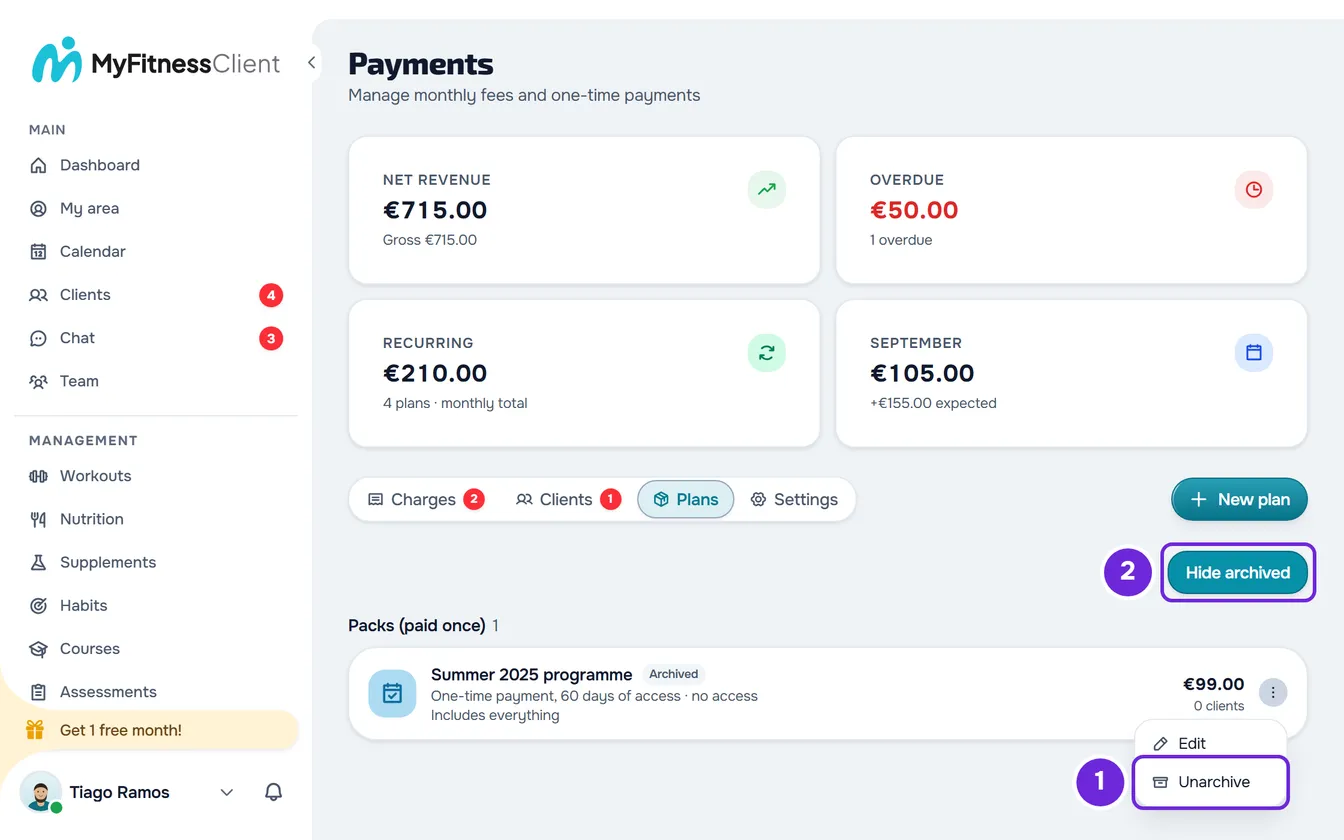
When you have archived plans, the Plans tab shows the Show archived button, with the number in parentheses:
- Select that button. The list now shows only the archived plans, with the label Archived.
- In the plan's ⋮, or by right-clicking the row, select Unarchive. “Plan unarchived” appears and the plan goes back to the list of plans on sale.
- Hide archived returns to the normal list. When you unarchive the last archived plan, the normal list comes back on its own.
If you archived all your plans, the tab shows “Create your first plan”, as in an account with no plans, and the archived plans remain in Show archived.
Common problems
“This package has been archived.”
Appears when you give a plan to a client and that plan was archived after you opened the Give a plan window. Close the window and open it again to see the current list. To give that plan, unarchive it first in Show archived.
“You have more active clients than your plan allows. Choose which to keep or upgrade your plan.”
With more active clients than your MyFitnessClient plan allows, the workspace is frozen and does not accept changes to plans, including removing from the catalog, archiving and unarchiving. See You have more active clients than your plan allows.
I don't see the ⋮ on the plans
Only the workspace owner sees it. If you are a member of a team, ask the owner to remove the plan from the catalog or archive it.
If this did not solve it, contact support with the plan name and the exact message that appeared.
Questions
Does archiving delete the plan or cancel it for the clients who have it?
No. The plan stays saved in Show archived and clients who already have it keep the plan, the charges and access. To stop a client's charges, see Cancel a client's plan.
Can I delete a plan?
No. The plan list has no delete option: archive the plan you no longer sell.
Can I give a client a plan that is not in the catalog?
Yes. The plan stays in the Give a plan window, with “Not in catalog” in the description. See Give a client a recurring plan or a pack.
When I unarchive a plan, does it go back to the catalog?
Unarchiving does not change the catalog: a plan that was not in the catalog when you archived it stays out. To show it to clients, select Add to catalog in the ⋮.