
Before you start
- Your phone number and tax ID (NIF) are optional. Gender, date of birth, height and weight are used to calculate your body composition and your calorie needs.
- The tax ID is there so your professional can invoice you with it. Only a Portuguese tax ID (NIF) is accepted.
- You must be at least 13 to have an account. If you change your date of birth to an age between 13 and 15, you have to confirm that you have the authorization of your parents or your legal representative: see Minimum age and accounts for minors.
Interactive tutorial
Opens in the app and needs you to be signed in.
Steps
The phone, the tax ID and the My details card each save separately: only do the part you want to change. To update your details on the web:
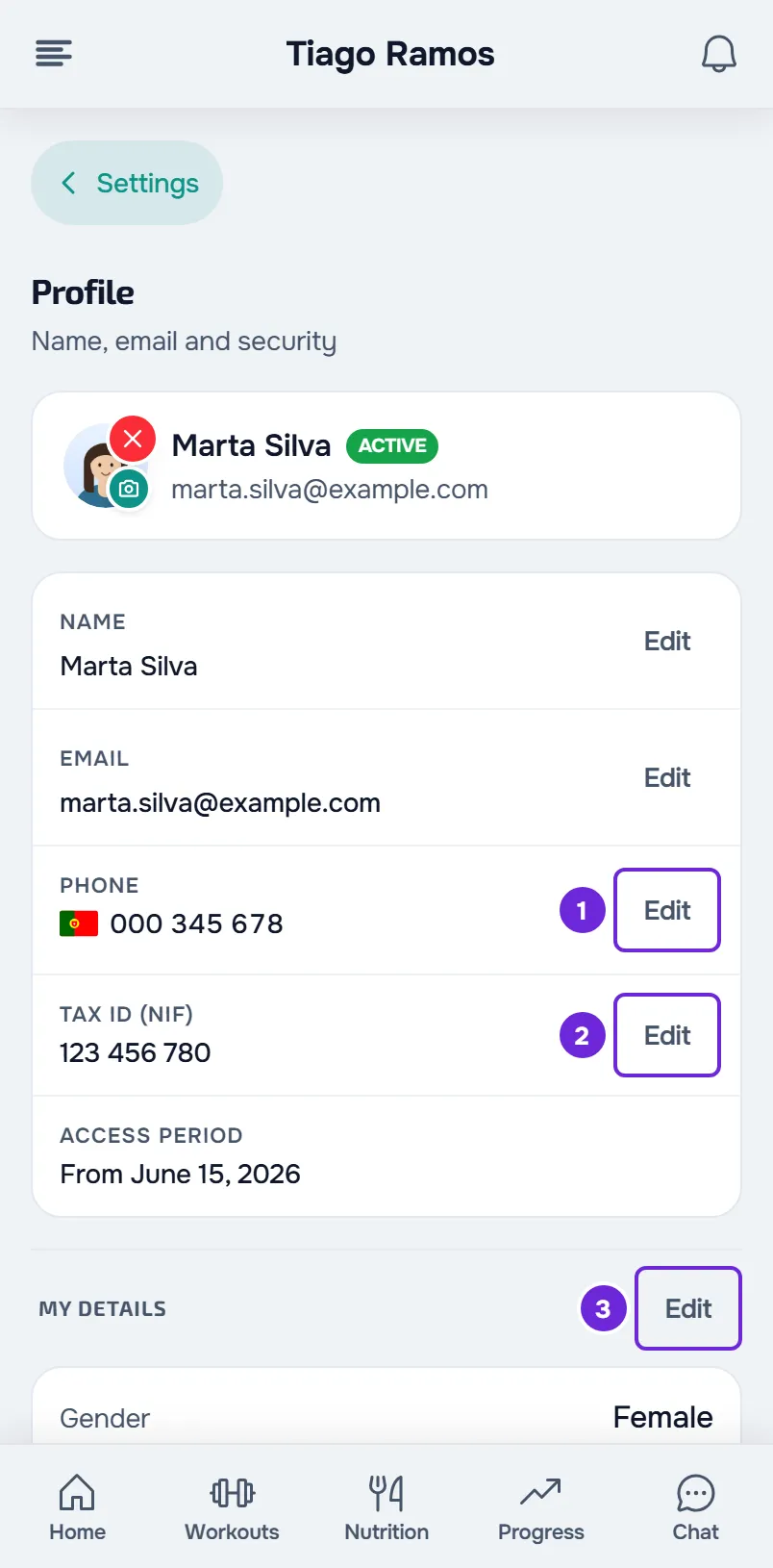
- Open Settings. On a computer, select your photo and name at the bottom of the side menu, then Settings. On a phone, open the menu with the button in the top-left corner and select Settings at the bottom of the menu.
- Select Profile.
- In the Phone row, select Edit 1.
- In the selector with the flag, confirm the country, type the number and select Save.
- In the Tax ID (NIF) row, select Edit 2.
- Type the 9 digits of the tax ID and select Save.
- On the My details card, select Edit 3.
- Choose the Gender 1 and the date in Birth date 2, and type the Height 3 in centimeters and the Weight 4 in kilograms.
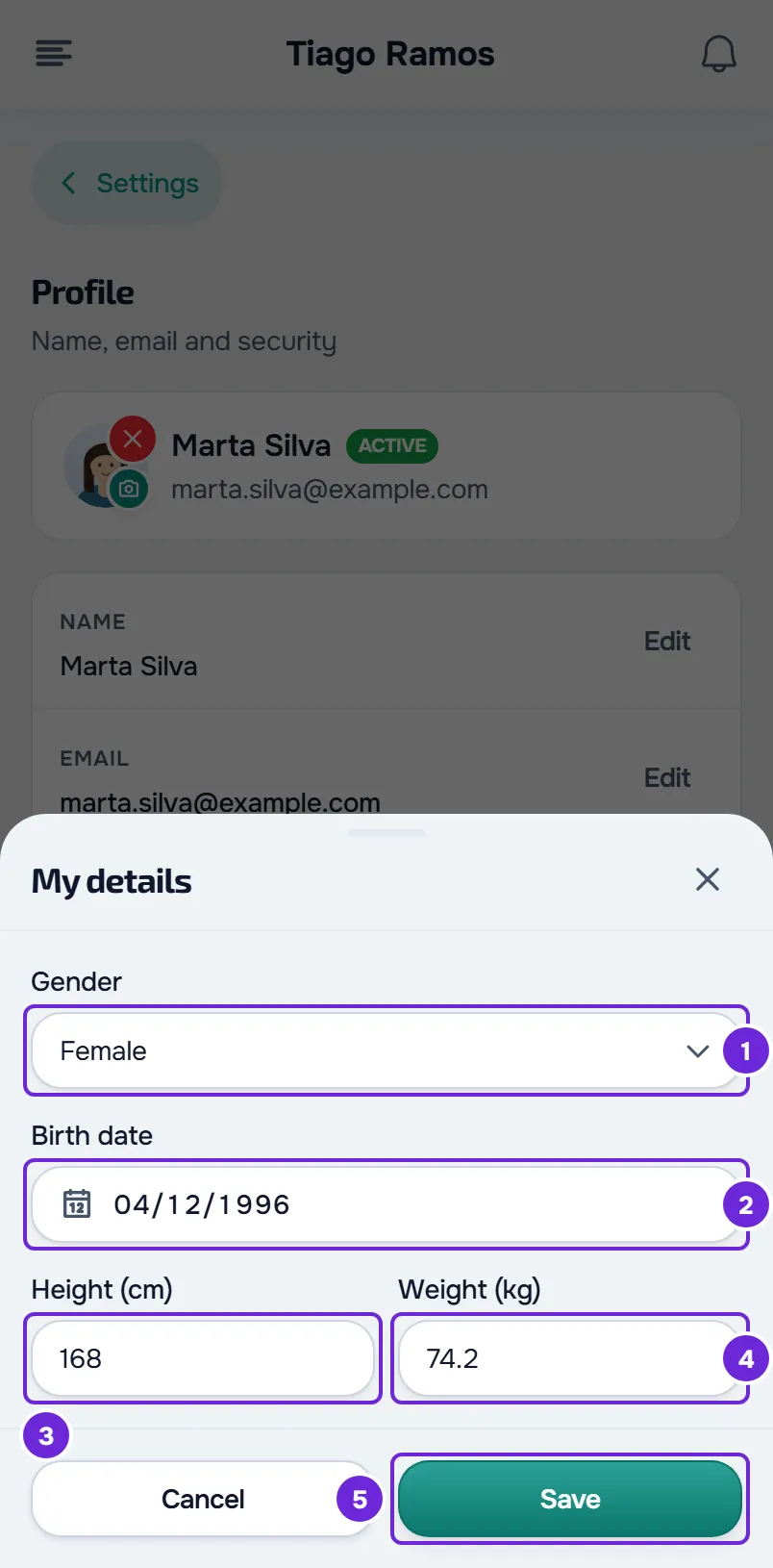
- Select Save 5.
Profile shows the new values. The My details card also shows your age, calculated from your date of birth, and the day your height and weight changed.
Shortcut from Home, on the web
While your date of birth or height is missing, Home shows the notice “A few details are missing for your assessment”. Complete opens the My details window straight away. Not now hides the notice for 7 days in that browser.
In the app
- Open the menu with the button in the top-left corner and select your name at the bottom of the menu. In Settings, select the card with your name and email at the top to open Profile.
- In the Phone row, select Edit. In Change phone, type the number with the country code, starting with +, as in +351 912 345 678. Without a country code, the app uses the country set on your device. Select Save.
- In the Tax ID (NIF) row, select Edit, type the 9 digits in Change tax ID and select Save.
- Next to My details, select Edit. Gender has three options, Male, Female and Prefer not, and the date of birth goes in three boxes: day, month and year. Type your height in centimeters and your weight in kilograms, and select Save.
- On Home, while your date of birth, height or weight is missing, a row appears that opens the steps to complete your profile: see Complete your profile when you open the app.
What each field accepts
The same rules apply on the web and in the app.
| Field | What it accepts |
|---|---|
| Phone | On the web, the country in the selector and the number; with the field empty, the selector starts on the country of the site language. In the app, the number with the country code, starting with + or 00; without a country code, the app uses your device's country. Leaving it empty deletes the number. |
| Tax ID (NIF) | The 9 digits of a Portuguese tax ID, with the correct check digit. Spaces, dots, dashes and the PT prefix are removed when you save. Leaving it empty deletes the tax ID. |
| Gender | Male or Female. In the app, also Prefer not. |
| Date of birth | A day in the past, up to 100 years ago. A new date must make you at least 13. In the app, the day, month and year, with a 4-digit year: an incomplete date gives “Invalid date of birth”. |
| Height | From 50 to 260 cm. Leaving it empty deletes the height. |
| Weight | From 20 to 300 kg. Leaving it empty deletes the weight. |
What your professional sees
Your professional sees your phone and tax ID on your client profile. They also see your gender, age, height and weight, which come pre-filled in your assessments.
Height and weight are the current value, not a history: changing them here does not create a check-in. To record your progress, do a check-in. On the web, the link “Want to track progress? Log a check-in” under the card opens Progress.
Common problems
“Invalid tax ID (NIF). Check the 9 digits.”
The number does not have 9 digits, or the last digit, the check digit, does not match the others. Check the digits and type them again. To delete the tax ID, leave the field empty and select Save.
“Height must be between 50 and 260 cm” or “Weight must be between 20 and 300 kg”
The value is out of range or in another unit. Type the height in centimeters, such as 175, not in meters, and the weight in kilograms.
“You must be at least 13 to have an account.”
The new date makes you younger than 13, the minimum age for an account. In the app, the message says “You must be at least 13 to use the app.” Check the date. If the date gives an age between 13 and 15, the window shows the parental authorization box and, if it is not ticked, “Confirm that you have your parents' authorization.” appears.
“Enter the number with the country code, starting with +.”
In the app, you typed the number without a country code and the app did not recognize your device's country. Type the number starting with + and the country code, such as +351 912 345 678. If “Invalid phone number.” appears, the number does not have the form of a phone number with a country code: check the country code and the digits.
Questions
Can I delete my phone or tax ID?
Yes. Select Edit in the row, clear the field and select Save. The row then shows a dash on the web and “Not set” in the app.
My weight changed without me changing it. Why?
Height and weight show the most recent value. A more recent check-in or assessment with weight or height updates them, and your professional can also correct them on your client profile. The day under each value says when it changed.
Can I leave my gender out?
Yes. In the app, choose Prefer not in My details and select Save. On the web, the field only has Male and Female: you can leave it unselected, but a gender that is already saved can only be removed in the app.