
Before you start
- Only the workspace owner sees the ⋮ menu of the monthly fees in Extras and, with it, Switch to automatic.
- Online payments must be active, with the Stripe account ready to receive: see Connect Stripe to receive online payments from clients.
- The Extras section only appears when the client has charges that repeat outside a plan. A monthly fee you gave with Give plan sits on the Plan card and can't be switched to automatic here: see the Questions section.
- Only monthly fees of 1 to 12 months and of 1 year can be switched to automatic, with an amount within the limits for online payments (in euros, from €0.50 to €10,000).
- If you have more active clients than your account's limit allows, MyFitnessClient refuses to switch to automatic and to cancel the migration until you fix that: see You have more active clients than your plan allows.
Steps
To switch a monthly fee charged by hand to automatic payment:
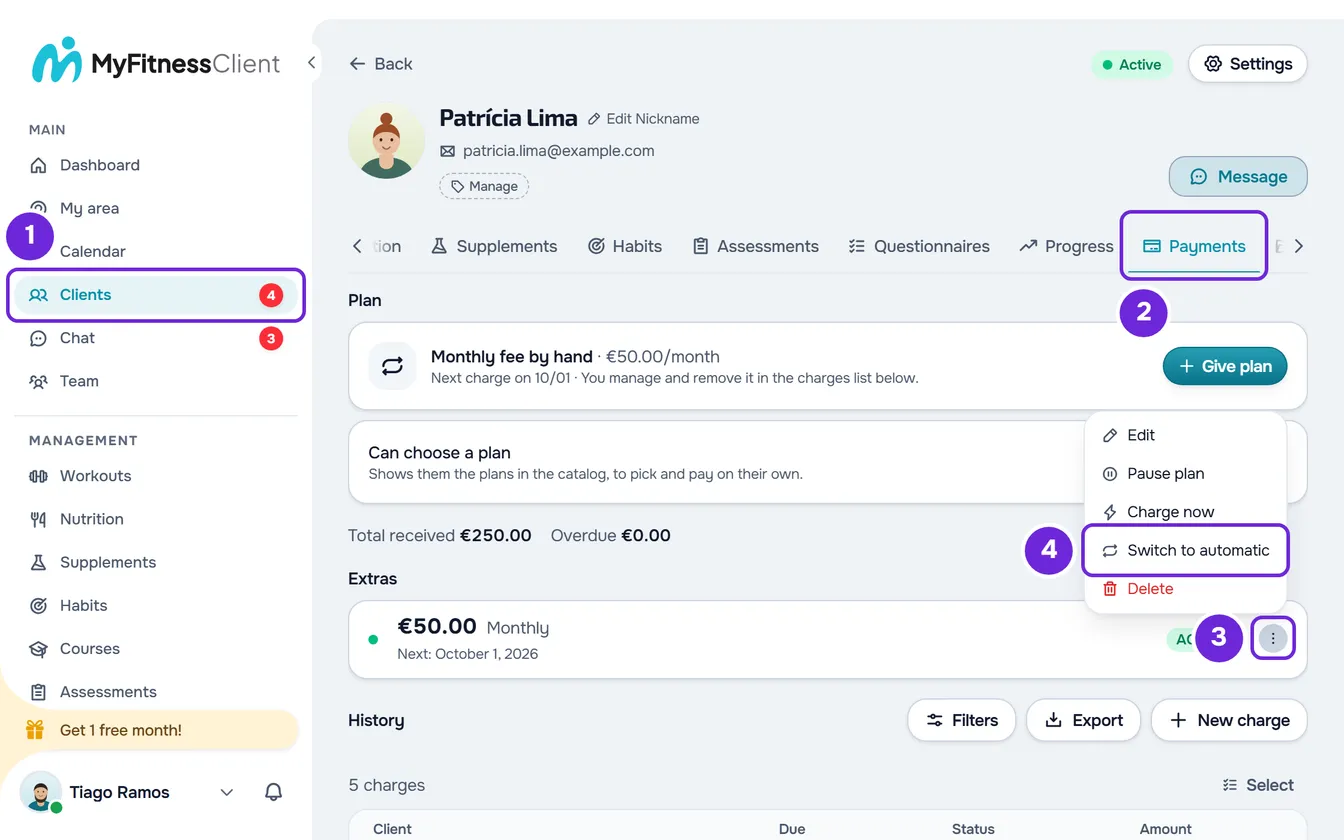
- In the side menu, select Clients 1 and open the client's profile.
- Select the Payments 2 tab.
- In the Extras section, on the monthly fee's row, open the ⋮ 3, or right-click the row.
- Select Switch to automatic. The “Switch to automatic payment?” window 1 opens and explains what changes for the client.
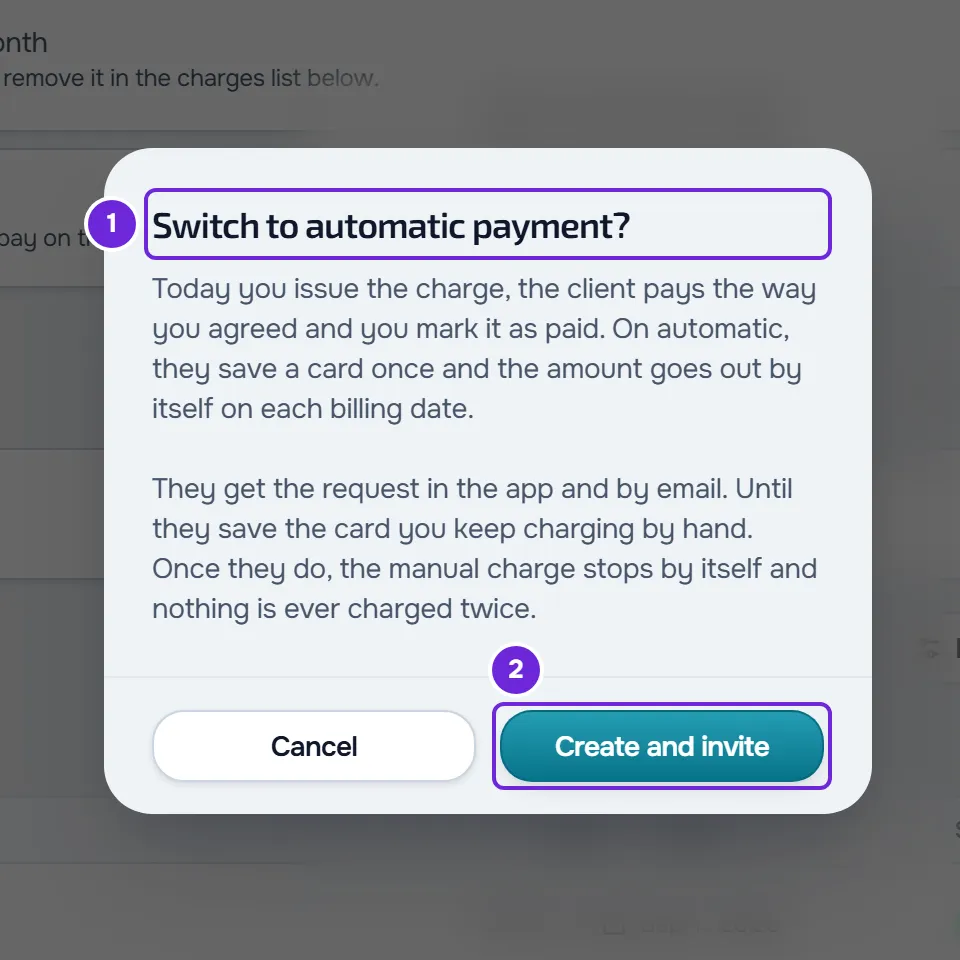
- Select Create and invite 2.
The “Client invited to automatic payment” notice appears and the monthly fee's row gets the Migrating tag, which doesn't appear on narrow screens such as a phone's. If the client has no plan, the Plan card says “Waiting for {name} to save a card. Until then you charge by hand.”
Until the client saves the card
- The monthly fee is still charged by hand: charges keep being created each cycle and you mark them as paid when you get paid.
- The client gets the “Automatic payment available” notification in the app and an email with the “View plan” button. In their account, the plan MyFitnessClient prepared appears for them to subscribe to, named “Recurring plan”, and the monthly fee's row has the Automate button. Both lead to the same subscription: see Switch a monthly fee you pay manually to automatic payment.
- If you change the monthly fee's amount or frequency with Edit, the automatic plan changes too, and the client subscribes with the new values. This doesn't happen while the client is in the middle of saving the card.
When the client starts paying by card
When the client saves the card and the subscription starts:
- The monthly fee by hand stops by itself. The row then says “No longer charges: the client pays through the automatic subscription”, with the Replaced tag.
- The subscription appears in Extras, on a row with the Automatic tag, the last payment (“No payment yet” before the first one) and the date it renews. If the client has no plan, the Plan card shows it as Automatic subscription.
- When the first automatic charge is paid, you get the “New subscription” notification.
The day of the first automatic charge depends on how much time is left, at the moment the client saves the card, until 00:00 on the first cycle not yet paid: the date under “Next”, the end of a “To confirm” cycle, or the day of a cycle created with Charge now that is still “To pay”:
| Until that day | First automatic charge |
|---|---|
| 49 hours or more are left, and 730 days or fewer, usually because the current cycle is already paid | On that day, at 00:00. Until then, the subscription is Trialing and the client pays nothing. |
| Less than 49 hours are left, or more than 730 days | The moment the client saves the card. With less than 49 hours, the client may pay for 1 to 2 days twice. |
| That day is today or has already passed, because the current cycle isn't paid yet | The moment the client saves the card. |
When the subscription starts, the manual charge marked “To pay” or “Overdue” for the cycle it now covers is cancelled, so the client doesn't pay for the same cycle twice. A charge for a cycle that has already ended stays unpaid. A “To confirm” charge isn't cancelled and counts as paid: the first automatic charge waits for the end of that cycle. If you reject it, it stays unpaid, to be paid by hand. The rules for the first charge are in Delayed first charge of an automatic plan.
Cancel the migration
As long as the client hasn't saved the card, you can undo the change:
- On the monthly fee's row, open the ⋮, or right-click the row, and select Cancel migration.
- In the “Cancel the migration?” window, select Cancel migration.
The “Migration cancelled” notice appears. The request to the client is no longer valid, the Migrating tag leaves the row and you keep charging by hand.
Make a subscription the plan
An automatic subscription that isn't a plan, like the one that comes from Switch to automatic, stays in Extras and has no Cancel plan. To end it, select End subscription in its ⋮, as explained in Cancel a client's plan. To manage it as a plan:
- In Extras, open the subscription's ⋮, or right-click it, and select Make it the plan.
- In the “Make this subscription the plan?” window, select Make it the plan. The “The subscription is now the plan” notice appears.
The subscription becomes the client's plan, with the same name, price and frequency, your default rule and grace period for when they don't pay, and access to all sections. Nothing is charged and the client keeps paying the same. From then on, you change the rule and the sections with Change plan, which doesn't change the price, and you end the subscription with Cancel plan: see Cancel a client's plan.
Make it the plan only appears while the client has no plan and the subscription is active, in trial or with a payment past due. In practice, only the owner sees it. If the situation has changed in the meantime, “This client already has a plan.” or “This subscription cannot become a plan.” appears.
Manage the monthly fees in Extras
New monthly fees are no longer created in Extras: a charge that repeats is given as a plan, with Give plan. See Give a client a recurring plan or a pack. The owner manages the existing ones, in each row's ⋮ or with a right-click:
| Action | What it does |
|---|---|
| Edit, or select the row | Changes the amount, the frequency, the date of the next charge and the name. Changing the date of the next charge changes the day of the following charges. |
| Pause plan or Resume plan | Stops or resumes the creation of charges. A paused row says “Paused: editing reactivates it”. A Replaced row has no Resume plan: it only gets it back when the subscription ends. |
| Charge now | Creates the next cycle's charge right away. Only on an active row. |
| Switch to automatic and Cancel migration | As this article explains. |
| Delete | Asks for confirmation in “Remove payment configuration?”. The row stops creating charges and the charges already created stay in the history. On a Migrating row, the request to the client is no longer valid. |
How the date of the next charge sets the day of each cycle is in Charge day of a manual monthly fee and end of access.
Common problems
Switch to automatic doesn't appear in the menu
It only appears to the owner, on a monthly fee of 1 to 12 months or of 1 year that isn't migrating yet. On a monthly fee in days, in weeks or of more than 12 months, change the frequency with Edit or keep charging by hand. If the row shows Migrating, the change is already under way: you sent the invitation, or the client started it with Automate.
“Online payments are not accepted yet.”
Your Stripe account isn't connected, was disconnected or isn't ready yet to receive payments and payouts. Nothing was sent to the client. Complete the connection as Connect Stripe to receive online payments from clients explains, and try again.
“This amount can't be automated.”
The monthly fee's amount is outside the limits for online payments in its currency (in euros, less than €0.50 or more than €10,000). If the currency can't be paid online, the message is “Payments in this currency cannot be made online.” In both cases, nothing changes and the monthly fee is still charged by hand.
Cancel migration is refused
“{name} is in the middle of saving a card. Wait a few minutes and try again.” appears when the client opened the payment page and hasn't completed it yet: wait and try again. “{name} already pays by card. To charge by hand again, cancel the automatic payment first.” appears when they have already saved the card: reload the page and end the subscription with End subscription, in its ⋮ in Extras.
If that didn't solve it, contact support with the client's name, the monthly fee's amount and the message that appeared: see Contact Support and create a request.
Questions
Can I switch a monthly fee I gave with Give plan to automatic?
Not here: that monthly fee is a plan and sits on the Plan card, not in Extras. For the client to start paying by card, give them an automatic plan: for a catalog plan, with Change plan; for a custom plan, with Give plan. See Change a client's plan.
Can the client switch to automatic without my invitation?
Yes. In their account, the monthly fee by hand has the Automate button, also after you cancel the migration, as long as your Stripe account is ready to receive and the monthly fee has the frequency and amount from Before you start. When they use it without an invitation, the row gets the Migrating tag, you get the “Automatic payment starting” notification, and the rest is the same as in this article.
If I change the monthly fee's amount after inviting, which one does the client pay?
The new one, if they haven't saved the card yet and aren't in the middle of saving it: Edit also changes the automatic plan. The frequency must stay between 1 and 12 months or at 1 year; otherwise “This frequency can't be automated.” appears and you have to cancel the migration first.
What happens if the client cancels the subscription?
When the subscription ends, you get the “Client no longer billed” notification and the monthly fee by hand stays paused, so nobody charges the client. To charge by hand again, select Resume plan in the row's ⋮.