
In MyFitnessClient, each client's health questionnaire is in the Overview tab of their profile, in the Health questionnaire section: that is where you ask the client to fill it in, fill it in yourself or open the full record. Find the case that matches what you see: missing buttons, a message or a client who cannot fill it in.
The health questionnaire buttons do not appear
In the section, the buttons are Fill Out, Request, Fill Myself, Cancel and Customize. In the full record, they are Reopen for client and Edit.
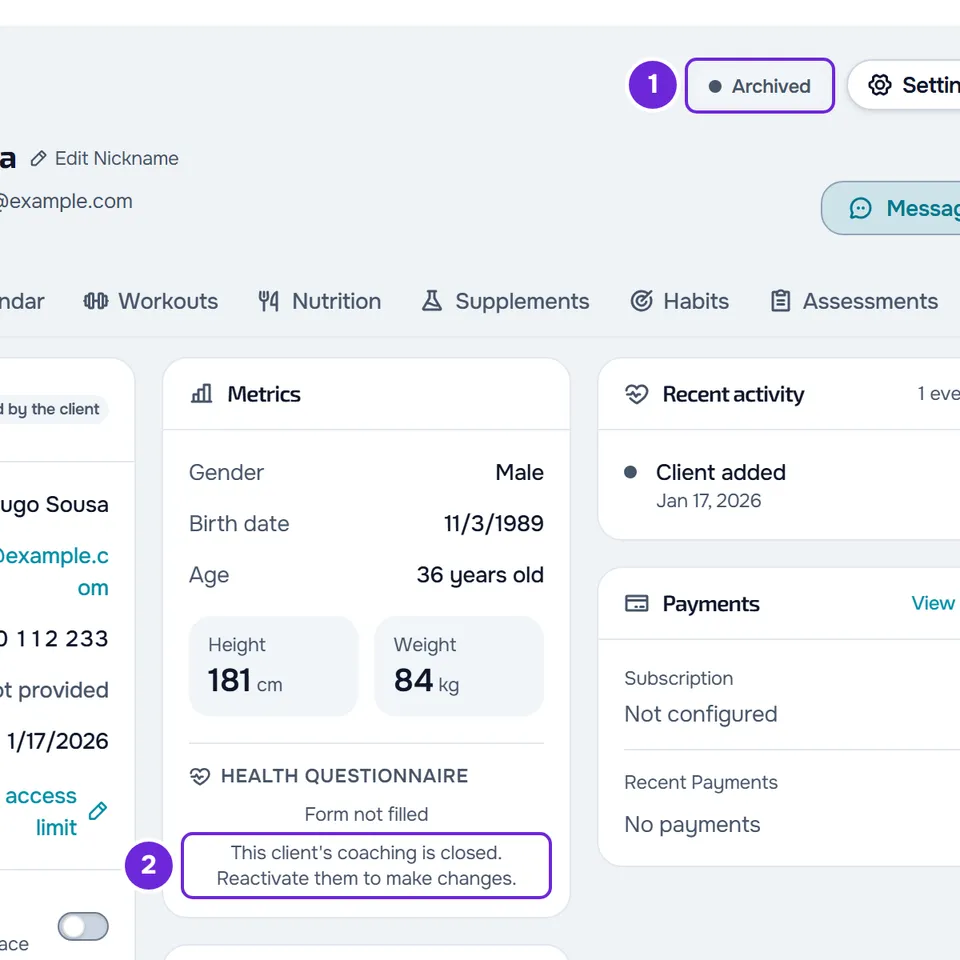
| Cause | How to confirm | What to do |
|---|---|---|
| The client's coaching is closed. | The client's profile has the status Archived or Ended. In the full record, and in the section when the health questionnaire is not complete, “This client's coaching is closed. Reactivate them to make changes.” appears. | Reactivate the client. Until then, a completed health questionnaire stays readable in View Full Record. |
| You are a member of a team without the Manage permission for Health questionnaires. | The client is Active or Scheduled, but the section does not show the buttons, and the full record does not show Reopen for client, Edit or row correction. | Ask the team owner for the Manage permission for Health questionnaires. |
| You are a member of a team without the View permission for Health questionnaires. | The section shows “You do not have access to this area” instead of the health questionnaire. | Ask the team owner for the View permission for Health questionnaires. |
The closed coaching message also appears when you save the health questionnaire or open the customization, if the client was archived while the page was open. Closed coaching hides other profile actions: see Fix problems in a client's profile. For a member's permissions, see “No permission to access” and menu items missing for a member.
Messages and what to do
| Message | When it appears | What to do |
|---|---|---|
| “This form was changed in another tab. Reload before saving.” | When you save the health questionnaire, if it was saved somewhere else after you opened the page: by the client, by someone on the team or by you in another tab. Also when you finish the customization or reset the form, if someone saved the form layout in the meantime. | Reload the page and make the changes again: whatever you did not save is lost. In the customization, if you select the finish button again, your version is saved over the other one. |
| “This record changed elsewhere. Reload before saving.” | When you correct a row in the full record, if the health questionnaire was saved somewhere else after you opened the page. | Reload the page and correct the row again. |
| “You have more active clients than your plan allows. Choose which to keep or upgrade your plan.” | On any change to the health questionnaire, when the account has more active clients than the plan allows. You can still see the health questionnaire, and the client can still fill in a request they already received. | The account owner chooses which clients stay active or moves to a higher plan. |
| “This health questionnaire is already completed. Reopen it to change it.” | When you select Request, if the client already has a completed health questionnaire. | Reload the page. If the section shows Complete, open the health questionnaire in View Full Record and, for the client to review their answers, select Reopen for client. |
| “The answers are over the size limit.” | When you save the health questionnaire, if the answers together exceed about 50,000 characters, for example with very long texts pasted into the boxes. | Shorten the longest texts and save again. |
| “Invalid data. Check the fields.” | When you correct a row in the full record, if the value is outside what the field accepts, for example hours of sleep outside 0 to 24 or resting heart rate outside 25 to 250 bpm. | Correct the value and save again. |
| “This health questionnaire is with another professional.” | When you select Request or save the health questionnaire, if it is with another professional. | See the next section. |
| “You don't have permission for this action.” | When you select Request, Cancel or Reopen for client, or correct a row, if the client was archived or the coaching ended after you opened the page. | Reload the page. If the closed coaching message appears, reactivate the client. |
| “The form is over a limit: at most 20 sections, 30 fields per section and 50 options per field.” | When you finish the customization, with more than 20 custom sections, more than 30 fields in a section or more than 50 options in a choice field. | Fix what went over the limit and finish again. |
| “Invalid input data.” | When you finish the customization, if the form has a choice field with no options, a section or field name longer than 200 characters, or a section, field or option name with something that looks like HTML code, such as <b>. | Fix that field and finish again. |
| “Too many requests. Wait a moment.” | When you select Request more than 15 times in one minute. The count is per account, across all clients. | Wait one minute and select Request again. |
| “Not found.” | When you cancel the request, if the client already sent the health questionnaire or someone already cancelled the request. When you reopen the health questionnaire, if it is no longer complete, for example because someone already reopened it. When you finish the customization for one client only, or reset their form, if they were archived after you opened the page. | Reload the page and check the status in the Health questionnaire section. |
To fix an account with too many clients, see You have more active clients than your plan allows.
The health questionnaire is with another professional
Each client has only one health questionnaire in MyFitnessClient. If another professional requested or filled it in, it stays with them: you do not see it, request it or fill it in. When you select Request or save, “This health questionnaire is with another professional.” appears.
The health questionnaire becomes free when the client, in their account, ends coaching with that professional or disconnects from them (see End coaching or disconnect from your professional), or when that professional's account is deleted. The next time you select Request or save the health questionnaire, what that professional filled in is erased and the client's own answers move to you. At that moment you may see “This health questionnaire is already completed. Reopen it to change it.” or “This form was changed in another tab. Reload before saving.”: reload the page and the health questionnaire appears in the Health questionnaire section.
The client cannot fill it in
The client fills in the health questionnaire in the app or on the web when they have a request from you waiting. If they see “No health questionnaire”, they have no open request from you. This happens when:
- you have not requested the health questionnaire yet, or you cancelled the request;
- the coaching is closed: while the client is Archived or Ended, they do not see the request.
If the client's profile shows Invite to the app or Invitation pending, they do not have access to the app yet and have nowhere to fill it in: fill in the health questionnaire yourself, or select Invite to the app to invite them. If the client already sent the health questionnaire and wants to change answers, open the full record and select Reopen for client: they get a notification and can edit it again, with the answers they already had.
To check the request and send it again:
- In Clients, open the client's profile.
- In the Overview tab, in the Health questionnaire section, check the status: “Waiting for the client to fill it in” means the request exists.
- If the section says “Form not filled”, select Request.
“Health questionnaire request sent” appears, the section changes to Awaiting Client and the client gets a notification and an email with the request.
If this did not solve it
Contact support (see Contact Support and create a request) with the client's name, the time it happened and the exact message you saw. Do not send the health questionnaire answers: they are health data.