
When it happens
You enter the right email and password, or sign in with Google or Apple, and MyFitnessClient does not let you in:
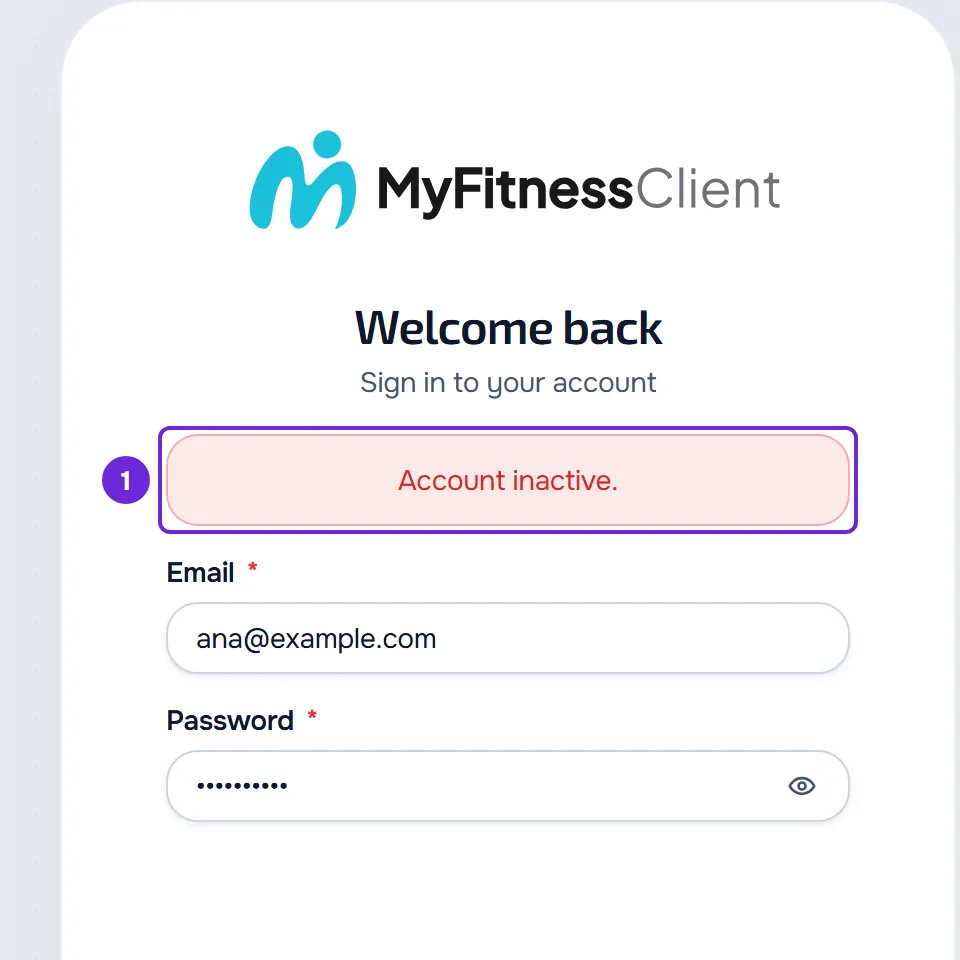
- On the website, the sign-in page shows “Account inactive.”.
- In the app, you see “This account is deactivated. Contact support to reactivate it.”.
- If you had a session open on a device, the session ends: on the website you go back to the sign-in page and in the app to the welcome screen.
With email and password, the message only appears if the password is right. With the wrong password, you see the incorrect email or password message, as with any account. If the session ended and you sign in again without this message, see Why was I signed out of my account?
Causes and what to do
The message is the same for both causes. The email MyFitnessClient sent to the account's address tells you which one is yours:
| Cause | Email you received | What to do |
|---|---|---|
| The MyFitnessClient team suspended the account. | “We have suspended your MyFitnessClient account” | Ask for a review within six months: reply to that email or write to [email protected]. Only the team can lift the suspension. |
| The account was deactivated for inactivity and the 30 days to recover it have passed. | “Your account has been deactivated”, with the “Recover account” button | Signing in no longer reactivates the account. Write to [email protected]: if the account has not been deleted yet, the team can reactivate it. Once deleted, the account cannot be recovered. |
If you got “Your account has been deactivated” less than 30 days ago, you do not see this message: sign in as usual and the account is active again.
How to recover the account
To get back into the account:
- In the account's mailbox, including the spam folder, look for the latest message about the account, which may come from MyFitnessClient or from your professional's brand. The subject tells you the cause: “We have suspended your MyFitnessClient account” or “Your account has been deactivated”.
- If you got “Your account has been deactivated” less than 30 days ago, sign in as usual, with email and password or with Google or Apple: the account is active again. The “Recover account” button in that email opens the sign-in page. The sign-in methods are in Sign in and sign out.
- If you got “We have suspended your MyFitnessClient account”, ask for a review within six months: reply to that email or write to [email protected].
- In any other case, write to [email protected] from the account's email, with what is listed in “If this did not solve it”.
- When the team reactivates the account or lifts the suspension, sign in again. No automatic notice tells you that the account is active again.
You get back into the account with your data. After a deactivation for inactivity, the files and images that were deleted do not come back and, if you had Google Calendar connected, you have to connect it again.
If the team suspended the account
- The email “We have suspended your MyFitnessClient account” gives the reason, under “Facts and reason”, the ground in the Terms of Service and the ways to respond, under “How you can respond”. It also says that the decision was taken by a person on the team, not by automated means.
- The suspension takes effect immediately: open sessions end on every device and push notifications stop arriving. On a professional's account, the public profile leaves the directory and the public page no longer opens.
- The suspension stays in place until the team lifts it. Resetting the password does not lift it.
- If the ground is age, the email asks for proof of your age or your legal representative's authorization, and the account stays suspended until the team receives it. The age rules are in Minimum age and accounts for minors.
- The grounds and the ways to respond are in sections 14 and 23 of the Terms of Service.
How deactivation for inactivity works
An account that goes unused for 12 months can enter this process, in this order:
- The notice “Your account will be deactivated in about 30 days” arrives. Signing in to the account is enough to stop the process.
- About 23 days later, the final notice arrives, “Your account will be deactivated in 7 days”.
- 7 days after the final notice, if you still have not signed in, the account is deactivated: sessions end, the files and images stored in the account are deleted and the Google Calendar connection, if you had one, is removed. The email “Your account has been deactivated” arrives, with the “Recover account” button.
- For 30 days, signing in with email and password, or with Google or Apple, reactivates the account with your data, except the deleted files.
- After those 30 days, signing in no longer reactivates the account, which is deleted and can no longer be recovered.
The account is only deactivated after at least one of the notices has been sent to your email, unless that address no longer receives emails. If you sign in after a notice and the account then goes unused for 12 months again, the process starts over at the first notice. If you are the client of a professional with their own brand, the notices may arrive with that brand's name.
Accounts that are not deactivated for inactivity
While one of these situations lasts, the account stays out of the process:
- a professional with a current subscription to a paid MyFitnessClient plan, including a trial or a complimentary plan;
- a professional who paid a subscription invoice in the last 12 months;
- a professional with active clients;
- a professional with sold courses they still have to provide to the people who bought them;
- a client who pays a professional, with a plan or a course that keeps renewing, or with monthly payments, at least one of them paid in the last 12 months;
- an account that the MyFitnessClient team exempted from the process or whose process it postponed.
Questions
Why does the message not say the reason?
The website message, “Account inactive.”, and the app message are the same for every cause. The reason and what to do are in the email MyFitnessClient sent to the account's address.
I did not get any email. What do I do?
Check the spam folder of the account's email: the suspension and inactivity emails arrive even if you turned off MyFitnessClient emails. They do not arrive when the account's address no longer receives emails. If you do not find any, write to [email protected].
I forgot my password. Will resetting it help?
While the account is deactivated for inactivity, the password reset request does not send an email: sign in with Google or Apple, with the same email as the account or with a Google or Apple account already linked to it, or write to [email protected]. On a suspended account, you can set a new password, but you keep seeing the same message when you sign in until the team lifts the suspension.
Will I lose my data?
A suspension does not delete the account's data. With a deactivation for inactivity, the files and images stored in the account are deleted right away, and the rest comes back if you sign in within the following 30 days. After that, signing in no longer reactivates the account, which is deleted.
If this did not solve it
Write to [email protected] from the account's email. Send:
- the account's email;
- the subject and date of the last email you got from MyFitnessClient about the account, if you got one;
- whether you tried to sign in on the website or in the app, and with which method: email and password, Google or Apple;
- the day and approximate time of the attempt;
- the message that appeared.
For other sign-in errors, see I can't sign up, sign in or reset my password.