
Before you start
- A plan that is still awaiting payment can be cancelled by the workspace owner or by a team member with the Mark paid and assign plans permission. An active monthly fee that still renews, paid by hand or automatic, can only be cancelled by the owner. For anyone who can't cancel it, the Cancel plan button doesn't appear.
- A pack that is already paid can't be cancelled, because its days of access come from the paid charge. A monthly fee that has already stopped renewing doesn't have the button either: there are no charges left to stop. To remove a client's access before the end of what they paid for, see Access end date and the client's paid plans.
- To swap the plan for another one, you don't need to cancel it first: see Change a client's plan.
- If you have more active clients than your account's limit allows, MyFitnessClient refuses the cancellation until you fix that: see You have more active clients than your plan allows.
Steps
To cancel a client's plan:
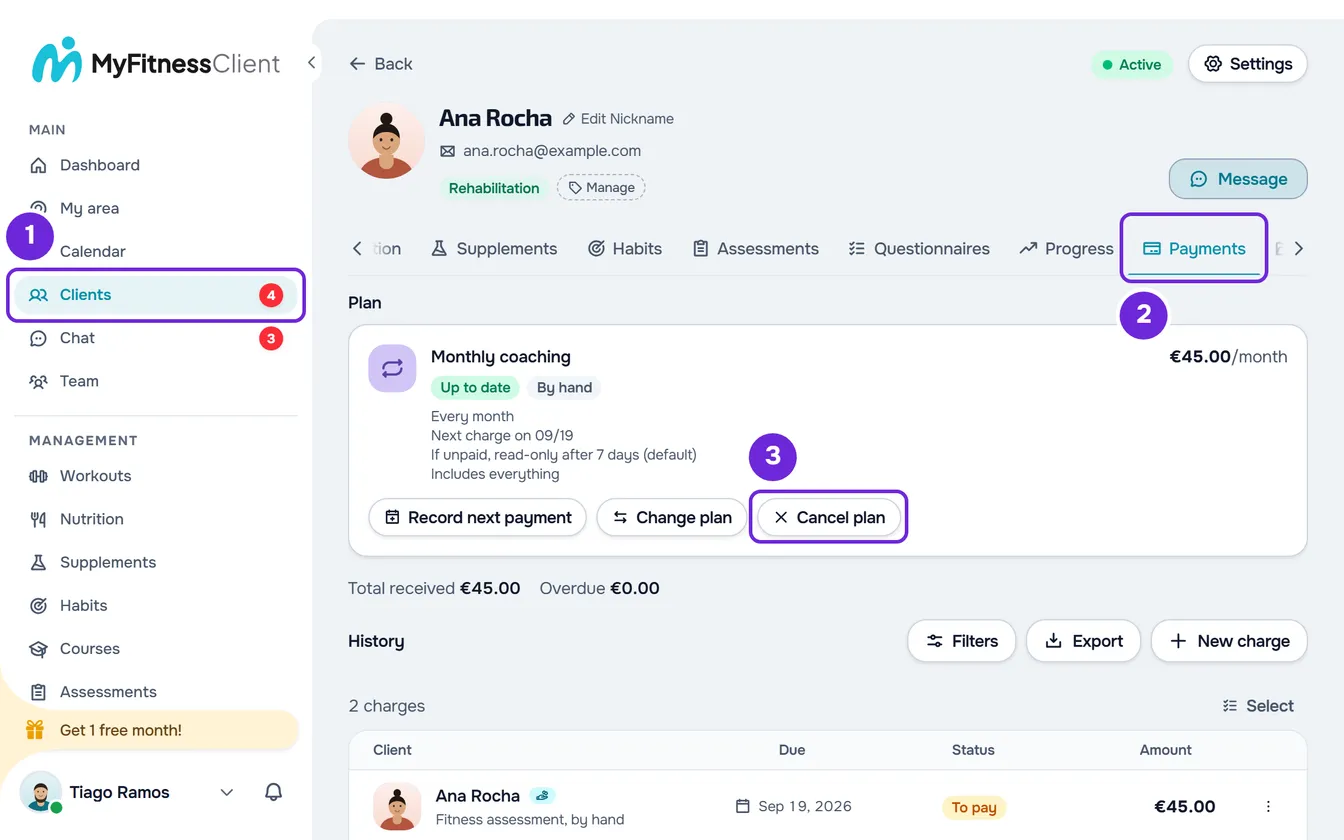
- In the side menu, select Clients 1 and open the client's profile.
- Select the Payments 2 tab.
- In the Plan section, on the plan card, select Cancel plan 3. The “Cancel this plan?” window opens.
- Read the message in the window 1, which changes with the plan. For a plan awaiting payment: “The unpaid charge is cancelled. If the client only had access because of this request, they lose it.” For an active monthly fee: “Future charges stop. With “No access”, the client loses access at the end of the paid period.”
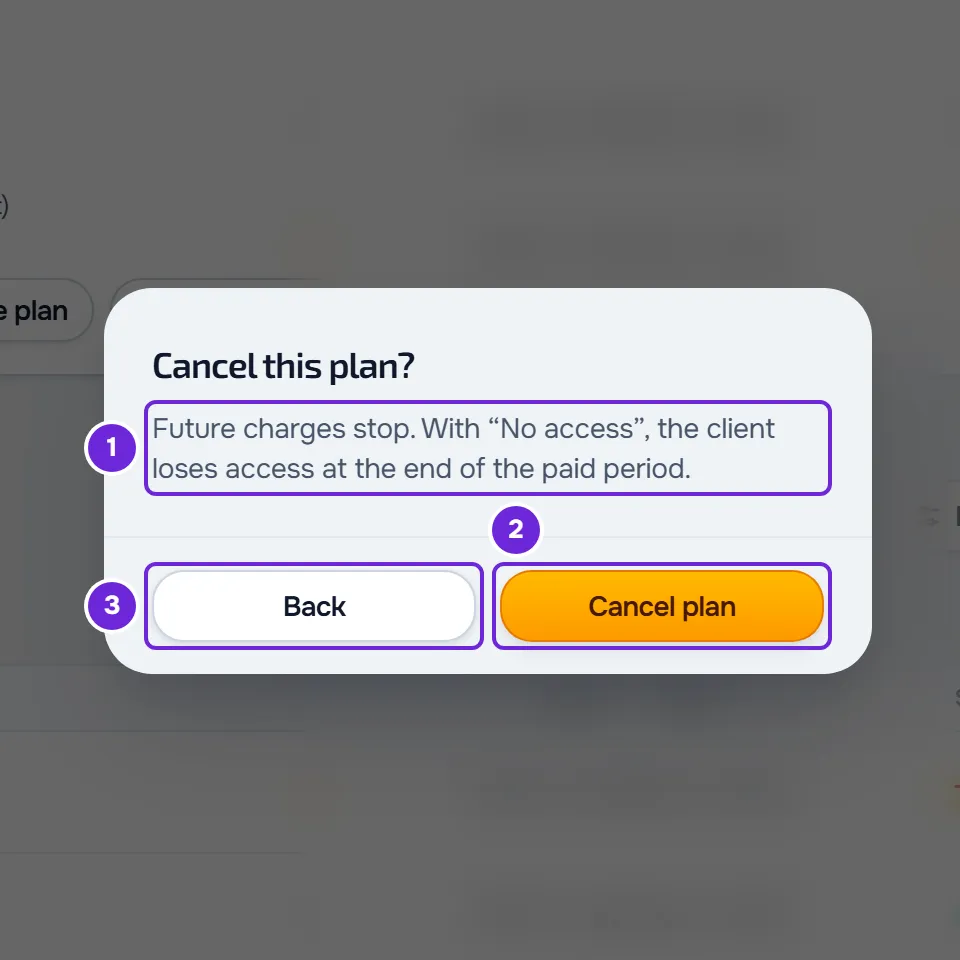
- Select Cancel plan 2 to confirm, or Back 3 to close the window without cancelling.
The “Plan cancelled” notice appears and the tab reloads. For an active monthly fee, the client gets the “Subscription ended” notice in the app and by email. A plan awaiting payment leaves the card, which then shows another of the client's plans, if there is one, or No plan. An active monthly fee stays on the card with the date it ends, for example “Access until 11/12” or “Ends on 11/12”, or “Ended on 11/12” if that day has already passed, and without the Cancel plan button.
The same card is in Payments > Clients: select the client's row and use it under Current plan, in the window that opens. The list's ⋮ menu doesn't have Cancel plan.
What happens in each case
The cancellation depends on the plan's status and on how it is paid:
| Plan | What happens |
|---|---|
| Awaiting payment, paid by hand (monthly fee or pack) | The plan's charges that are awaiting payment are cancelled and the plan creates no more. If the client only had access through the deadline to pay this plan, they lose it. |
| Awaiting payment, automatic (Awaiting card) | Nothing was charged. The plan is cancelled and any online payment the client has open stops working. |
| Active monthly fee, paid by hand | The monthly fee stops creating charges. Charges already created that are awaiting payment are not cancelled and stay in Charges. The client keeps the days they already paid for. |
| Active monthly fee, automatic | The Stripe subscription stops renewing and ends at the end of the current period. The client keeps the days they already paid for. |
For an active monthly fee, the plan's If they don't pay rule decides access after the cancellation. With No access, the access the monthly fee gave ends on the last paid day, without the grace days. For an overdue monthly fee, that day may already have passed, and the client loses access straight away if they have no other paid plan and no later end date set by you. With Stays the same or Read-only, the cancellation doesn't create an end date. If the client also has a pack or another paid plan with No access, that plan's end date applies again, because only a monthly fee that keeps access was setting it aside. See Access end date and the client's paid plans.
If you aren't going to collect the unpaid charges left over from an active monthly fee, cancel them: see Cancel or delete charges, one at a time or in bulk.
Cancel the next plan
When the client has a second plan waiting behind the main one and still awaiting payment, the card shows its line underneath, for example “Next: 10-session pack, awaiting payment”, with the Cancel next plan button. When you select it, the “Cancel the next plan?” window opens, with the message for a plan awaiting payment: confirm with Cancel plan. In Payments > Clients, the same action is in the ⋮ on the client's row, or when you right-click the row, as Cancel next plan.
- The owner or a member with the Mark paid and assign plans permission can do this.
- Only while it is awaiting payment: a next plan that is already paid, which starts later, can't be cancelled.
- The main plan doesn't change.
Automatic subscription without a plan
A client can pay through an automatic subscription that isn't a plan. The card shows it as Automatic subscription, it appears in the tab's Extras section and it has no Cancel plan. To end it:
- In Extras, open the subscription's ⋮, or right-click it, and select End subscription.
- Confirm in “End this subscription?” with End. The “Subscription ended” notice appears.
- The subscription stops renewing and stays active until the end of the period the client already paid for. The client is told by email and in the app.
End subscription only appears to the account owner, while the subscription is active, trialing or with a payment due and has not been ended yet. In the same menu, while the client has no plan, Make it the plan turns it into the client's plan, with the default rule and grace period, and you cancel that plan with the steps in this article. A Monthly fee by hand outside a plan is also in Extras, and only the owner manages it, in its ⋮: see Switch a monthly fee charged by hand to automatic payment.
Common problems
“This was already cancelled.”
Someone else on the team, or you in another window, cancelled the plan first. Reload the page to see the current status. If “This payment changed in the meantime. Reload and try again.” appears, one of the plan's charges changed while you were cancelling, for example it was paid or a new one was created: reload the page and try again.
“An online payment is in progress. Wait a few minutes and try again.”
The client is paying this plan online, or the payment is still being confirmed. Wait a few minutes and try again. If the payment goes through, the plan is no longer awaiting payment.
“Couldn't cancel. Try again in a moment.”
For an automatic plan, Stripe didn't confirm the end of the subscription. Nothing changed and the subscription keeps renewing: try again in a moment.
The Cancel plan button doesn't appear
It only appears for those who can cancel the plan on the card: see Before you start. It doesn't appear on a pack that is already paid, on a monthly fee that has already stopped renewing, on an active monthly fee for a team member, or on an automatic subscription or monthly fee by hand outside a plan.
If that didn't solve it, contact support with the client's name, the plan's name and the message that appeared: see Contact Support and create a request.
Questions
Does the client lose access straight away?
For a plan awaiting payment, only if their access came from the deadline to pay this plan. For an active monthly fee, they keep the days they already paid for; with the No access rule, they lose access at the end of the last paid day, with no grace period, which for an overdue monthly fee can be straight away.
Does the unpaid charge disappear?
For a plan awaiting payment, it is cancelled. For an active monthly fee, no: only the following charges stop, and those already created stay in Charges until you mark them as paid or cancel them.
Can I cancel only the next plan?
Yes, while it is awaiting payment, with the Cancel next plan button on its line. The main plan stays as it is.
Can I undo the cancellation?
No. For the client to have a plan again, give them a new one: see Give a client a recurring plan or a pack.