
Courses you create, give and sell to your clients.
Build the course in sections and lessons, with video, text, files and your workouts. Enroll clients by hand or sell the course through your Stripe account, and follow each one's progress. On the Pro plan.
- Lessons with video, text, audio, files, checklists and workouts
- One-time payment or subscription, through your Stripe account
- Completion rate and clients at risk of dropping out
Cancel anytime
Lessons made of blocks
Text, uploaded or linked video, images, audio, files, buttons, checklists and callouts. Link your workouts, meal plans, habits and questionnaires, preview it as your client sees it and publish.
Give or sell
Enroll clients by hand or show the course in your active clients' catalog. With Stripe connected, set a one-time price or a subscription, and your client buys in the app in the browser.
Your client moves on, you follow
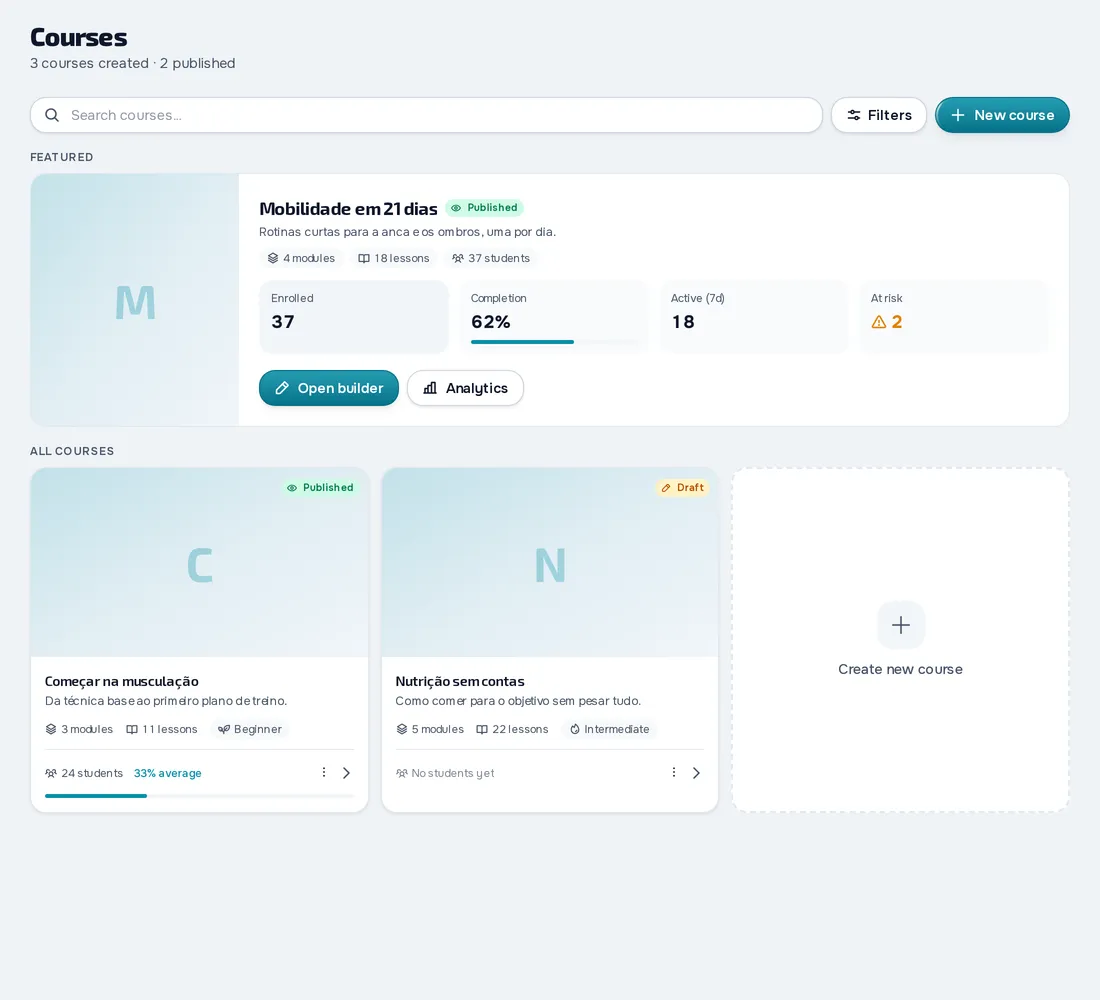
Your client follows the lessons and marks each one as completed, in the app or in the browser. You see who's enrolled, the completion rate, who was active in the last 7 days and who's at risk of dropping out.
Everything you can do in Courses
9 features to create, sell and follow courses on the Pro plan: you build them in the web dashboard and your client takes the course in the app.
Build the course
4 features
Sections and lessons
Build the course in sections and lessons with text, video, images, audio, files, links, buttons, checklists and callouts, and link your own workouts, meal plans, habits and questionnaires. Preview it as your client sees it and publish.
For: ProfessionalWhere: DashboardPlan: Pro
Videos in lessons
A lesson's video is uploaded by you or comes from a link. You can also import a video file of up to 2 GB into your space from a web address.
For: ProfessionalWhere: DashboardPlan: Pro
Course settings
Choose the category, level (beginner, intermediate or advanced), an enrollment limit and a course that has to be done first. With Required completion, lessons unlock in order.
For: ProfessionalWhere: DashboardPlan: Pro
Duplicate and copy lessons
Duplicate a whole course and copy lessons and modules from one course to another.
For: ProfessionalWhere: DashboardPlan: Pro
Give and sell
3 features
Enrollments and catalog
Enroll clients by hand, or show the course in the catalog to all your active clients or only the ones you choose.
For: ProfessionalWhere: DashboardPlan: Pro
Sell courses
Put a price on a course, with a one-time payment or a monthly (every 1 to 12 months) or yearly subscription, and the money goes to your Stripe account. Your client buys from the catalog and manages the subscription in the portal.
For: Professional and clientWhere: Dashboard and appPlan: Pro
Your client buys in the client app in the browser. With Stripe connected.
Sales page
A course for sale has a page with a short description, up to 8 learning outcomes, a trailer video and lessons that can be watched before buying.
For: Professional and clientWhere: Dashboard and appPlan: Pro
Your client sees it in the client app in the browser.
Your client and their progress
2 features
Take the course
Your client follows the lessons, marks each one as completed, fills in the checklists and does the course workouts like any other workout.
For: ClientWhere: Client appPlan: Pro
In the store apps, they open the courses they already have. The professional's plan is what counts.
Progress and analytics
See enrolled clients, the completion rate, average progress, who was active in the last 7 days, how many completed each lesson and up to 8 clients at risk of dropping out. You also get the list of clients with each one's progress, which you export to CSV.
For: ProfessionalWhere: DashboardPlan: Pro
Frequently asked questions
Which plan includes courses?
The Pro plan. To sell them, you also connect your Stripe account.
Can I sell courses to people who aren't my clients?
No. The catalog only shows to your active clients.
Do clients buy courses in the phone app?
No. Because of Apple's and Google's rules, the purchase happens in the client app in the browser. After that, the course also opens in the store apps.
Can courses have quizzes or daily content with a reminder?
No. Lessons unlock in order with Required completion, and your client marks each lesson as completed.
Can I put videos in lessons?
Yes. Upload the video, use a link or import a video file of up to 2 GB from a web address.