
See who has paid and who's overdue.
Create one-off charges or give your client a plan from your catalogue, and each cycle's charge is created on its own, with a notice to your client. On Basic and Pro, your client can also pay online through Stripe.
- Monthly fees and packs in your catalogue, or a custom plan for each client
- Net revenue and overdue amounts at a glance, with CSV export
- If your client doesn't pay, you choose: Stays the same, Read-only or No access
Cancel any time
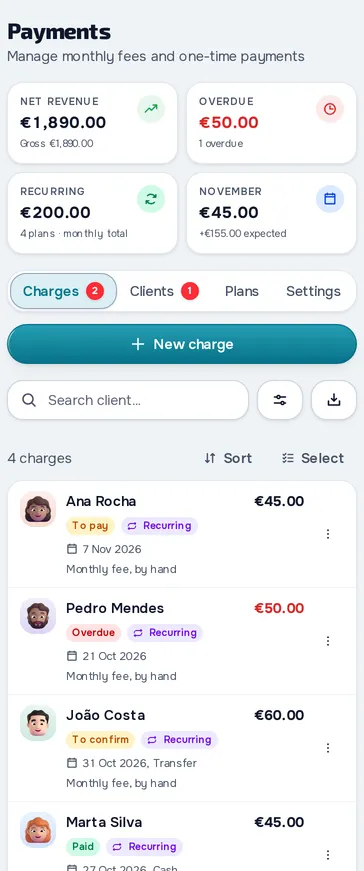
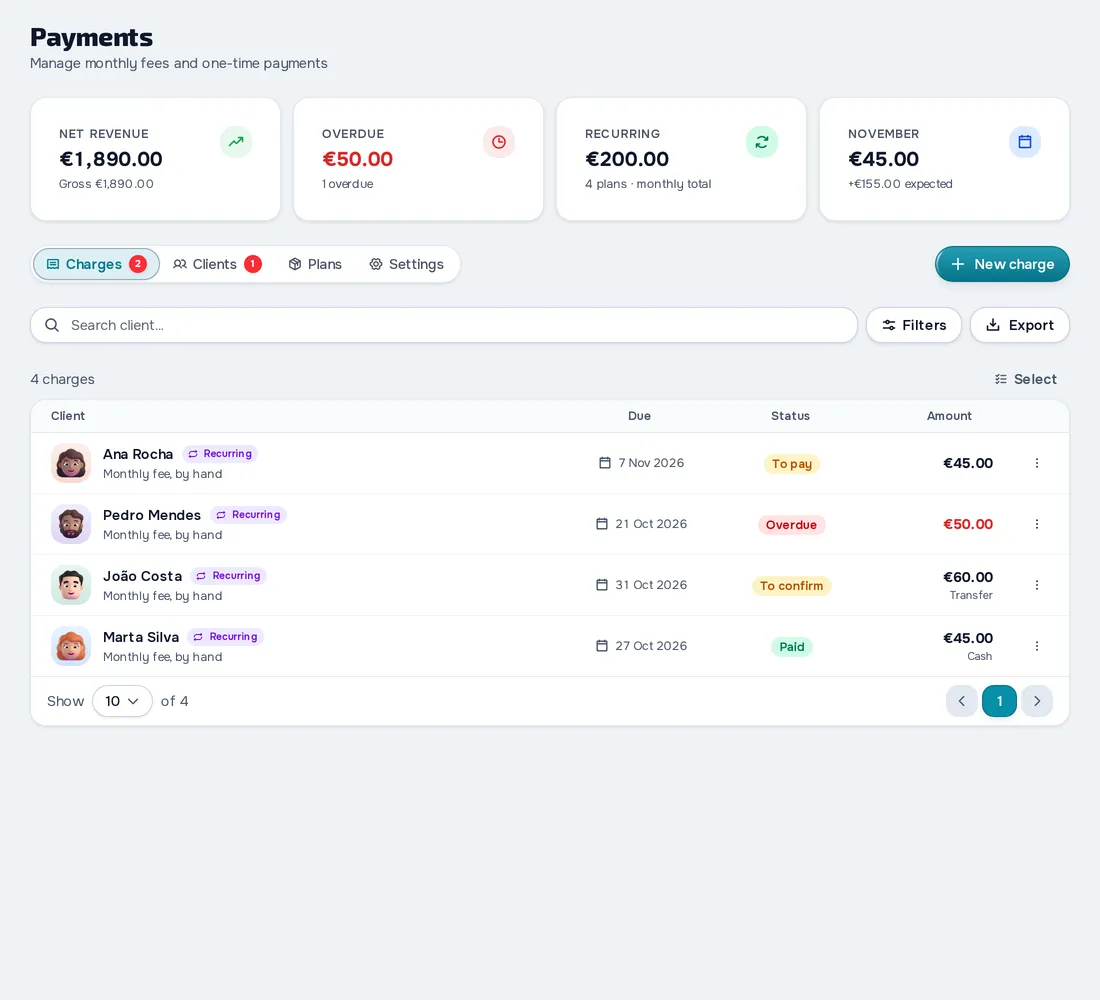
On your computer and on your phone.
Fig. 01 - Payments on the computer
Fig. 02 - Payments on the phone
Charges that repeat on their own
With Give plan you choose a monthly fee from your catalogue or a custom plan. Each cycle's charge is created on its own and your client gets a notice. If it stays unpaid, it turns Overdue.
Your client marks it, you confirm
In the app, your client taps Mark as paid and says how and when they paid. You get a notification, open Review request and confirm or reject it with a reason. If they still haven't paid, use Send reminder.
Online payments with Stripe
On Basic and Pro, use Activate online payments to create your Stripe account. Your client taps Pay now and the payment turns Paid on its own. On monthly or yearly charges, your client can subscribe and is then charged automatically.
Everything you can do in Payments
32 features to charge by hand or online: you manage everything in the web dashboard and your client sees and pays in their app.
Charges
New charge
Create a charge with the amount, due date, description, type and notes only you see.
Charges list
See one-off charges, monthly fees, packs and course sales in a single list, with what needs you first.
Actions on each charge
On a charge logged by hand, mark it as paid, send a reminder, edit, cancel or delete it.
Mark as paid
When you get paid, mark the charge as paid with the date, the method and a note.
Edit a charge
Edit a one-off charge, or just one of a plan's charges without touching the next ones.
Your client says they paid
In the app, your client uses Mark as paid and says how they paid, when and with what note.
Payment reminders
On an unpaid charge, send a reminder by notification and email, and you can repeat it after 24 hours.
Totals at the top
At the top of Payments you see revenue, what's overdue, the monthly total and what's still to come in this month.
Hide amounts
In Settings, turn on Hide money values and amounts show blurred.
Plans and packs
Plan and pack catalogue
Create monthly fees, charged every 1 to 12 months or yearly, and packs paid once with a number of days of access.
What each plan includes
In each plan you choose the sections your client gets, from workouts and nutrition to chat and calls.
Change the price
Decide whether a monthly fee's new price applies only to new clients or also to current ones.
Who picks the plan
You pick the plan, your client picks from the catalogue or, on Basic or Pro with Stripe connected, a new client must pick and pay to come in.
Each client's plan
Give plan
Give your client a catalogue plan or a Custom one, with a price, cadence and rules just for them.
Invitation with a plan
When you invite a client, you choose up to 10 catalogue plans in Package to join.
Monthly charges created on their own
On a repeating plan paid by hand, each cycle's charge is created on its date and your client is notified.
Each client's plan status
In the Clients tab you see each client's plan, status and next charge.
Payments in the client profile
In the client's profile you see the plan, the total received, the overdue amount and the payment history.
Change, cancel or swap the plan
On a Custom plan you change the price, what it includes, the rule and the grace period, and on a pack you give a new plan.
Extra recurring charges
Charges that repeat outside the plan show in Extras, where you edit, pause and resume them.
If your client doesn't pay
After a grace period you choose, your client's access stays the same, becomes read-only or closes until they pay.
Online payments with Stripe
Create your Stripe accountPlan: Basic and Pro
Create your Stripe account, in one of 43 countries, and see its status, balance and payouts to your bank.
Online payment methodsPlan: Basic and Pro
Card is always on and includes Apple Pay, Google Pay and Link.
Pay nowPlan: Basic and Pro
Your client pays a charge in the Stripe checkout and it turns Paid on its own, with the receipt in the app.
Automatic paymentPlan: Basic and Pro
On a monthly fee outside a plan, your client taps Automate, saves in Stripe their card, Link or, if you've turned them on, Revolut Pay or Klarna, and is charged automatically from then on.
Subscriptions and 14-day withdrawalPlan: Basic and Pro
In Plans, your client sees their subscriptions, cancels them (keeping access until the end of the paid period) or resumes them.
Refunds, disputes and noticesPlan: Basic and Pro
A payment refunded in Stripe turns Refunded.
Course salesPlan: Pro
Course purchases and subscriptions show in Charges with the Course type and the Stripe receipt.
What your client sees
Your client's payments
Your client sees their plan, how long their access lasts and their pending and paid charges, with each one's details.
Pick, pay for and renew a plan
In the browser, clients who can pick see your plans with the price, choose one and pay online if you're on Basic or Pro with Stripe connected.
Settings and team
Country and currency
Choose where you work and the currency you charge in.
What your team can doPlan: Basic and Pro
A member with access to payments sees and exports charges, and with more permissions marks them paid and gives plans.
Frequently asked questions
The comparison of prices and features with other platforms is in Personal trainer software: 11 platforms compared.
Does MyFitnessClient take a commission on my clients' payments?
No. Online payments go straight to your Stripe account and you only pay Stripe's fees.
Can I log payments on the Free plan?
Yes. Manual charges, plans and packs, monthly charges created on their own, the non-payment rule and CSV export are on every plan. Getting paid online through Stripe is on Basic and Pro.
Do you issue invoices to my clients?
No. For an online payment, your client gets the Stripe receipt. MyFitnessClient invoices are only for your own subscription.
Can my client pay in the phone app?
Yes, with Pay now, in the Stripe checkout, also with Apple Pay and Google Pay, if you're on Basic or Pro with Stripe connected. Picking or renewing a catalogue plan and paying an invitation's plan happen in the browser.
What happens if a client doesn't pay?
You decide, after a grace period of up to 90 days: things stay the same, they go read-only (no check-ins, questionnaires or course catalogue) or they lose access to the content until they pay. The chat always stays open.
Which payment methods can my clients use?
Online, card with Apple Pay, Google Pay and Link and, if you turn them on, Klarna, Revolut Pay and, on Portuguese accounts, MB Way and Multibanco (these two with Pay now, not in subscriptions that charge on their own). Klarna may already be on, is turned on or off in MyFitnessClient and only shows in the countries where Stripe offers it, and Multibanco can take a few days to confirm after your client pays the reference. Revolut Pay and the other methods of your country are turned on in your Stripe dashboard, in the MyFitnessClient configuration. By hand, you log Cash, Transfer, Card or Other, and MB Way or Multibanco if you work in Portugal.