
Every client in a single profile. Everything you need in one place.
Invite by email, link or QR, import a list or create a client without an account. The profile holds each client's workouts, nutrition, assessments, payments and files, and you decide what each client can see and do.
- Email, link and QR invitations, plus CSV list import
- Intake form with PAR-Q and your own sections, filled in the client app, on iPhone, Android or in the browser
- Tags, filters and bulk actions to manage many clients
Cancel any time
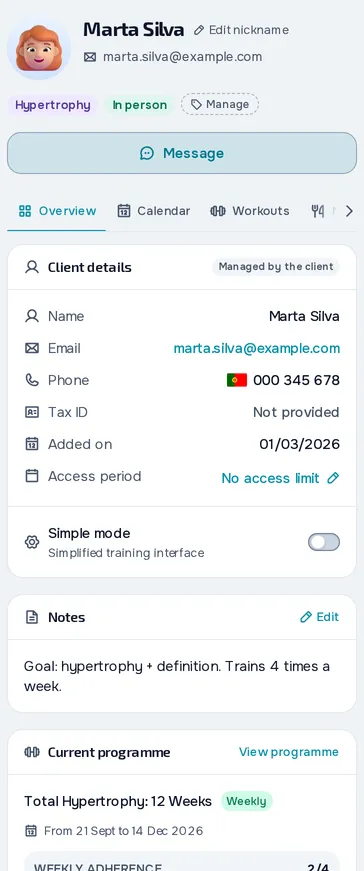
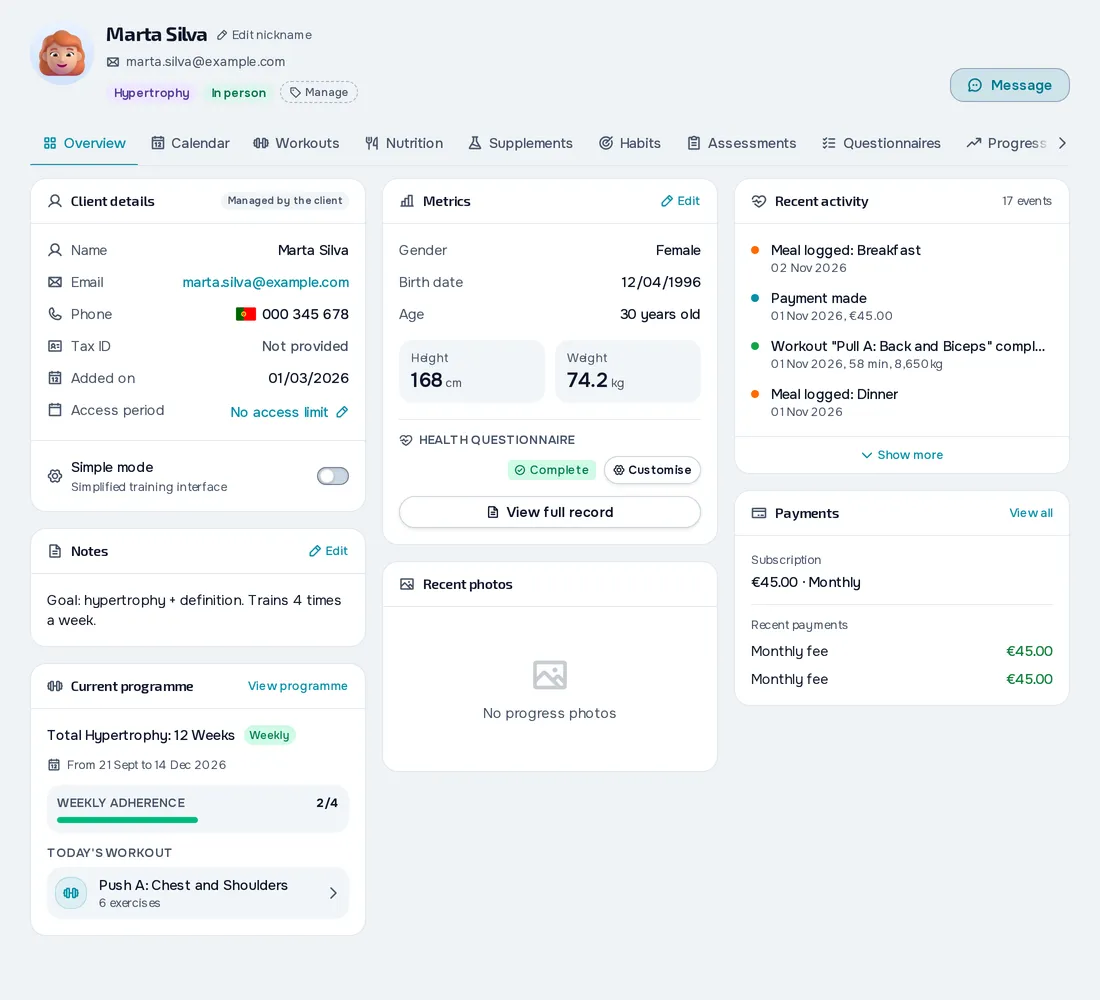
On your computer and on your phone.
Fig. 01 - Clients on the computer
Fig. 02 - Clients on the phone
Bring clients in your way
Invite by email, share a link or a QR code, or create a company link with a join limit and, if you restrict it to the company's email domain, entry without your approval. You can also create a client without an account and give them the app later, with all their data.
Rules for each client
Set the access period, whether they see or fill in assessments, how many messages they can send per day and the check-in reminders. When the period ends, access closes on its own, manual monthly charges stop and the online subscription stops renewing. You and your client are notified 7 days before.
Your client's day to day in view
The Overview tab shows the current programme, today's workout, recent activity and payments, with your note always at hand. The other tabs hold nutrition, habits, assessments, progress and materials.
Everything you can do in Clients
39 features to bring in, organise and follow your clients, in the web dashboard and in the client app.
Bringing clients in
Client without an account
Create a client with just a name and start giving them plans and logging their progress right away, even if they never use the app.
Give them the app later
In the profile of a client without an account, Invite to the app sends the invitation by email, link or QR.
Email invitation
The email invitation lasts from 24 hours to 14 days, or never expires, and only works for that client's email.
Link or QR invitation
A link to share lasts from 1 hour to 7 days, and a QR code to show in person, full screen, lasts from 5 minutes to 1 hour.
Permanent invitation with approval
A link or QR with the expiry set to Never and the uses set to Unlimited works for every client you want.
Access period in the invitation
Set the access period with start and end dates, or with a number of days counted from when each person joins.
Invitation with a plan to join
In an invitation you pick up to 10 plans from your catalogue, and the client chooses one and pays before being connected to you.
Company links
Create one link per company with a tag, the accepted email domain and a join limit.
Import clients from a file
Drop a CSV or paste the rows, say which column is which and see errors and duplicates before importing.
Migration from another platformPlan: Basic and Pro
If you're coming from another platform, such as UpCoach or Everfit, the MyFitnessClient team does the migration for you.
Invitations and requests
Follow the invitation live
For a link or QR you see the countdown to expiry and how often it was used, and for a single invitation whether it was accepted.
Invitations tab
See every invitation sent with its status (pending, used, declined or expired) and your company links.
Client requests
In Requests you get the people who want to train with you, with where each request came from.
Accept with a period and a plan
When you accept, you choose the access period (left blank, it starts today and has no end) and right after you can give a payment plan.
Request reminder and deadline
An unanswered request reminds you after 3 days, in the dashboard, by push and by email, and expires after 14 days.
Returning former client
When a former client asks again, their archived profile is reused with the notes, nickname, contacts and settings.
Your client accepts the invitation
Your client opens the invitation, signs up or logs in, lets you see their health data and accepts or declines.
Your client list
List with status and presence
See your clients in a list with their photo, tags, who's online and each one's status.
Each client's activity
Without opening the profile, see when each client last trained, their unread messages and whether they missed the check-in.
Filters
Filter your clients by status, by access and by one or more tags.
Bulk actions
Select several clients, or everyone the filter shows, and change tags, archive or reactivate them in one go.
Right-click on a client
On a computer, right-clicking a row in the list opens View profile, Tags and Archive, or Reactivate for inactive clients.
Tags
Create tags with a name and a colour and apply them to one or many clients.
Nickname
Give a client a nickname, which shows in parentheses next to their name throughout the dashboard.
Client picker
Whenever you pick clients, you get search, a tag filter and Select all.
The client profile and intake form
Profile with tabs
The profile brings everything about the client together in tabs, from workouts to payments, and opens your conversation.
Overview tab
In Overview you see the contacts, the days of access left, the paid plan, your notes and the current programme.
Private notes
Write notes about the client, up to 5,000 characters, that they never see.
Personal details and metrics
In the Metrics card you correct the client's sex, date of birth, height and weight.
Test Client and See the client app
You start with a Test Client with example data, who doesn't count towards your client limit.
Intake form (Anamnesis) with a PAR-Q, your way
Choose the intake form sections, the PAR-Q included, and create up to 20 of your own with 7 question types.
Request, fill in and correct the intake form
Fill in the intake form yourself or ask your client to fill it in in the app.
Rules, limits and ending coaching
Access period and scheduled client
A client with a future start date is Scheduled: you prepare their plans now and they get into the app on that day.
Settings for each client
In one place you decide what the client can do with assessments and whether they message freely, with a limit or only read.
Birthdays
Your client's birthday goes into your calendar and dashboard, where you congratulate one client or all of them at once.
Client limit
The Free plan has 1 client and Basic and Pro have no limit; the Test Client doesn't count and scheduled clients do.
Archive and reactivate
Archiving removes app access, pauses monthly charges, stops the Stripe subscription and frees the slot, without losing the history.
Dissociate a client
Dissociating removes the client from your list for good and cancels open charges, and the courses they bought stay theirs.
Your client ends coaching
Your client ends coaching in the browser or the Android app, booked sessions are cancelled and the subscription ends with the paid period.
Frequently asked questions
How many clients can I have?
On the Free plan, 1 client. On Basic and Pro there's no limit. The Test Client, with example data, doesn't count.
Can I have clients who don't use the app?
Yes. Create the client without an account, give them plans and log their progress in the profile. Whenever you want, invite them to the app and they keep everything you had already logged.
How does a client get into the app?
Through your invitation, by email, link or QR, or through a request made on your public profile or a company link, which you accept in Requests. In the phone app they paste the invitation link, and in the Android app they can also scan the QR with the camera.
Can I bring over the clients I have on another platform?
Yes. Import a list as CSV, TSV or TXT with the name, email and phone. Workouts, plans and history don't come in by file: on the Basic and Pro plans, also during the trial, the MyFitnessClient team does the migration for you, at no cost, from another platform such as UpCoach or Everfit, from PDFs or from screenshots.
What happens when a client's access ends?
App access closes on its own, manual monthly charges stop and the online subscription stops renewing. You and the client are notified 7 days before, and the history is kept.
Is there a mode for in-person clients?
There's no separate mode. For clients who train with you in person, create the client without an account, log their workouts for them in the profile and set assessments to No access.