
Your clients' app, on whatever phone they have.
Your clients download the free app from the App Store or Google Play, or open it in the browser. They see their day, train, log and talk to you. You work in the web dashboard.
- On the App Store, Google Play and in the browser, free for your client
- Today on Home: workouts, intakes and habits to tick off
- Workouts, meals, habits and supplements offline, in the apps
Cancel anytime
Where the app is
Your client downloads the free app from the App Store or Google Play and logs in with their account. They can also use it in the browser on a phone or computer, and add it to their home screen. On iPad, the app has a sidebar.
No signal, still training
In the iPhone and Android apps, workouts, meals, habits and supplements for the saved days open with no internet. What your client logs offline sends itself when the connection is back.
You work in the dashboard
The store apps are for clients. You work in the web dashboard, in the browser on your computer or phone, and you can install it as an app. Calls and course purchases happen in the client app in the browser.
Everything you can do in the client app
13 features of the app your clients use on iPhone, Android and in the browser, free for them.
Where the app is
5 features
App for iPhone and iPad
Your client downloads the free app from the App Store and logs in with their account. It has workouts, nutrition, supplements, habits, progress, chat, calendar, questionnaires, the courses they already have, materials and payments, and on iPad it uses a sidebar and works in any orientation.
For: ClientWhere: Client app
App Store, with iOS 15.1 or later. The sections that show depend on your plan and your client's plan.
App for Android
The same app is on Google Play, and your client logs in with the same account.
For: ClientWhere: Client app
Google Play.
App in the browser
Your client can also use the app in the browser on their phone or computer, without installing anything, and add it to their home screen. Installed from your space, it carries your name, your icon and your color.
For: ClientWhere: Client app
In the browser on a phone or computer.
What's only in the browser
Only in the browser can your client make voice and video calls (on iPhone, through Safari), look for professionals in the directory, buy courses, pick or renew catalog plans, export payments to CSV and link Google to an existing account. The store apps don't sell courses, because of Apple's and Google's rules, but paying you works in all of them.
For: ClientWhere: Client app
In the client app in the browser. Calls and courses depend on your plan.
Your dashboard, on computer and phone
You work in the web dashboard, in any browser and on your phone too, and you can install it as an app in Settings, Install the App. The store apps are for clients only.
For: ProfessionalWhere: Dashboard
Day to day in the app
5 features
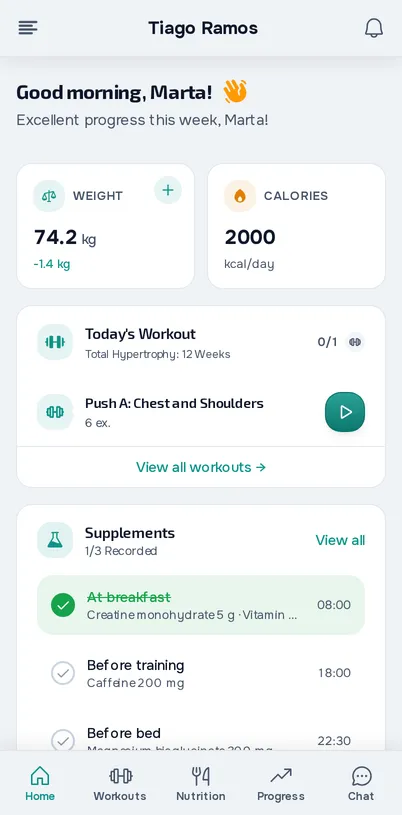
Home screen
When they open the app, your client sees what they have to fill in, their weight, the plan's calories, their check-in streak and pending payments. They also see today's workouts, intakes and habits, which they tick off with one tap, invitations waiting for an answer and the status of their access.
For: ClientWhere: Client app
Each card only shows if the section is in your plan and your client's plan.
First login
On the first login, a welcome page in your name asks only for what's missing from the profile (date of birth, gender, height, weight and photo) and then for permissions. Anything left unfilled comes back later in the Complete your profile card.
For: ClientWhere: Client app
In the store apps.
Guided tours
On each page, your client can follow a guided tour that shows them the real screen.
For: ClientWhere: Client app
Text size
Your client chooses the text size. Automatic follows the phone's font size, up to 2 times for reading text and 1.35 times for buttons, or they can pick Small, Normal, Large or Extra large.
For: ClientWhere: Client app
In the Android app.
New version notice
When a new version comes out in the store, the app suggests updating on Home, with Update now or Not now, and never in the middle of a workout.
For: ClientWhere: Client app
In the store apps.
Offline
3 features
Use the app offline
Workouts, meals, habits and supplements for the saved days (14 back and 14 ahead, by default) open with no internet, and your client trains and logs food, habits, intakes and the check-in offline. Photos need internet, and the data is encrypted on the phone.
For: ClientWhere: Client app
In the store apps. The browser needs a connection.
Offline use
In Offline use, your client chooses how many days to keep, whether to take the full food and exercise libraries or only what they use, images, the maximum storage and whether downloads wait for Wi-Fi.
For: ClientWhere: Client app
In the store apps.
Sync
What your client logs offline sends itself when the connection is back, with an indicator of what's still to send, and when they log out with entries not yet sent the app warns them before deleting them. If a nutrition, habit or supplement entry changed somewhere else in the meantime, your client sees both versions and chooses which one stays.
For: ClientWhere: Client app
In the store apps.
Frequently asked questions
Do my clients have an app?
Yes. It's on the App Store, for iPhone and iPad, and on Google Play, for Android, it's free for your client and they log in with the same account. It also works in the browser and can sit on the home screen.
Is there a store app for me, as the professional?
No. The store apps are for clients. You work in the web dashboard, which runs in the browser on your computer and phone and installs as an app.
Does the app work offline?
In the store apps, yes: workouts, nutrition, habits and supplements for the saved days open with no connection, and what your client logs sends when the connection is back. The browser needs a connection.
Does the app show my brand?
Yes, inside the app your client sees your name, your logo and your colors. In the store apps, the icon and the name on the phone's home screen are MyFitnessClient's. When the app is installed from your space through the browser, it carries your name and your icon.
Can my client answer calls in the app?
Not in the store apps: your client gets a missed call notice. Voice and video calls happen in the client app in the browser.
Which languages is the app in?
European Portuguese, Brazilian Portuguese, English, Spanish, French and German.