
The food library holds the foods you choose for meal plans and for the meals in the meal library. Each food comes with calories, protein, carbs and fat and, when they are declared, sugar, salt, fiber, saturated fat and potassium. It is in Nutrition > Food Library; on narrow screens, the tab is called Foods.
The foods are split into three tabs, and the page opens on the first. When you add foods to a meal plan or to a library meal, the selection window has the same three. See Add, edit and remove foods in a meal.
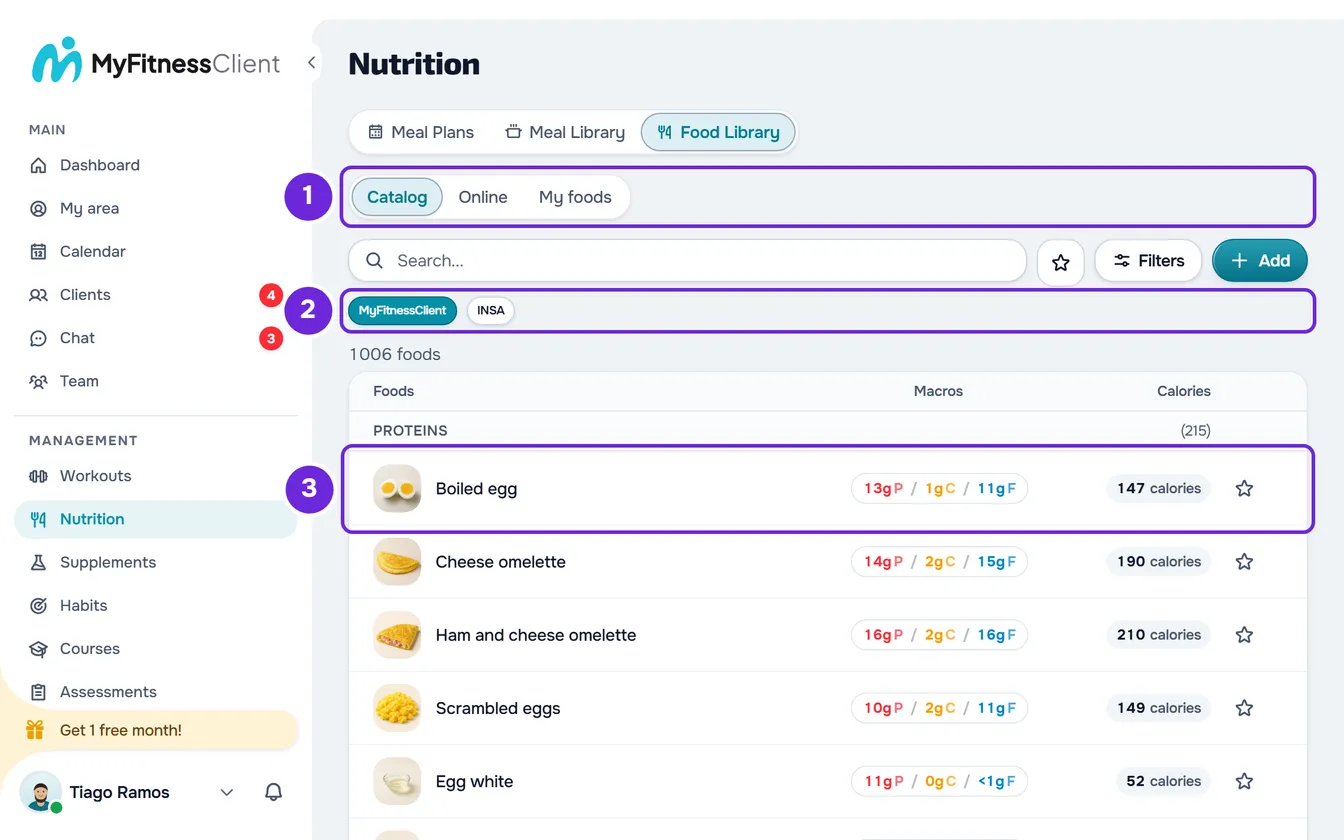
The three lists
- Catalog: the ready-made MyFitnessClient foods, the same for all professionals. They cannot be edited or deleted; to change one, copy it to your foods with Copy to My Library, in its detail view. A food that MyFitnessClient removes from the catalog no longer appears in the list.
- Online: searches supermarket products in Open Food Facts, an open database, by name or by barcode. The products found are not saved: Add, in a product's detail view, opens the form already filled in so you can save it to your foods. See Add a product by name or barcode.
- My foods (on narrow screens, My): the foods you create, copy from the Catalog or save from an online product. They are the only ones you can edit and delete. See Create or edit a custom food.
In the Catalog, under the search, the MyFitnessClient and INSA buttons choose what the list shows: the MyFitnessClient catalog, which is the one that opens, or the INSA table.
The INSA table
The INSA table is the Portuguese food composition table of the Instituto Nacional de Saúde Doutor Ricardo Jorge (INSA), version 7.1, from 2026. It has 1376 foods, such as “Abóbora crua” or “Abrótea cozida”, with values per 100 g of edible portion; for the 36 alcoholic drinks, the values are per 100 ml. From the table, MyFitnessClient uses calories, protein, carbs, fat, saturated fat, sugar, fiber, salt and potassium; vitamins and the other minerals are left out.
INSA does not publish portions, so MyFitnessClient gave almost every food a household portion, such as “1 fillet (120g)” or “1 teaspoon (3g)”. The nutritional values always come from INSA.
INSA foods have no photo: the list shows the first letter of the name. Like the foods in the MyFitnessClient catalog, they cannot be edited or deleted, but you can copy them to your foods or report them if you find an error. Each food's detail view shows the source at the end, “Source: INSA, Portuguese food composition table, version 7.1 (2026).”. A copy of an INSA food in your foods shows the same source in its detail view, even after you edit it.
How to read the list
Each row is a food, with:
- the photo or, without a photo, the first letter of the name;
- the name, with the brand underneath when it has one;
- the macros in grams, with P for protein, C for carbs and F for fat;
- the calories, for example “147 calories”;
- the star, to mark the food as a favorite.
The values are always per 100 g or per 100 ml, even if the list does not say so; the food's detail view says which of the two. A “-” means the value is not declared; a 0 really is zero. On wide screens, the columns are called Foods, Macros and Calories; on narrow screens, the calories and macros appear under the name.
At the top of the list is the total, for example “1376 foods” in the INSA table. With no search and no subcategory chosen, the list is split into sections by category, each with that category's total. When you search, your favorites and the foods closest to what you typed come first, with the term highlighted in the name. The column headings do not sort the list. To search, filter and mark favorites, see Search foods, filter by category and mark favorites.
Selecting a row opens the food's detail view. Only in My foods do the rows have the ⋮ menu, which also opens with a right-click, with Edit and Delete.
Names in your language
Foods in the MyFitnessClient catalog appear with their name in the language you use the site in: Portuguese from Portugal or Brazil, English, Spanish, French or German. INSA foods always keep their Portuguese name. In both cases, the reference portion, such as “1 tablespoon (15g)”, appears in your language. Your foods appear as you wrote them.
In another language, the search finds a catalog food by its translated name and also by its Portuguese name. In meal plans, library meals and the client's food log, the name stays as it was when the food was added and does not change language. See Library foods and meals: what changes in plans.
What you can do in each list
In your own account or as the team owner, each list allows the following:
| List | View the details | Bring into My foods | Edit and delete | Report an error |
|---|---|---|---|---|
| Catalog, MyFitnessClient | Yes | Yes, with Copy to My Library | No | Yes |
| Catalog, INSA | Yes | Yes, with Copy to My Library | No | Yes |
| Online | Yes | Yes, with Add | No | No |
| My foods | Yes | Already there | Yes | No |
To copy or report, see Copy a catalog food to your foods; to delete, Delete one or more foods from the library.
In a team, the library belongs to the workspace and only those with the Nutrition > View permission can open it. Without it, Nutrition does not appear in the side menu and the page shows “No permission to access”. See “No permission to access” and menu items missing for a member.
The other Nutrition permissions decide the buttons. With Create, the member sees Add (Create Food when the list is empty), Add on an online product's detail view and Copy to My Library on the detail view of a Catalog food. With Edit, they see Edit and Delete in the workspace's My foods, and the selection to delete several. With View only, they see none of these buttons and only open each food's detail view.
Questions
Can I share one of my foods with other professionals?
No. The foods you create or copy stay in your workspace, and only the MyFitnessClient team adds foods to the Catalog. If a Catalog food has wrong values, report it with the warning icon in its detail view.
Who sees my foods?
You and, in a team, the members with the Nutrition > View permission, who see the same list in My foods. The client only sees the ones you put in a meal plan assigned to them.
Why don't I see the MyFitnessClient and INSA buttons?
The buttons only appear in the Catalog tab, and only when the INSA table is available; without it, the Catalog shows only the MyFitnessClient foods. If you are in the Catalog and don't see them, reload the page. If it continues, see Contact Support and create a request.
How many foods can I create?
MyFitnessClient does not limit the foods you create or copy. The other limits, such as the 200 favorites, are in Food and meal library limits.
Does the client see this library?
No. This page only exists in the professional's dashboard. When the client adds a food to what they ate, they search the same MyFitnessClient catalog and the INSA table (in the app, only in the latest version) and, from your foods, they only find the ones in their meal plans.