
Before you start
- Only the workspace owner decides who picks the plan. In a team workspace, a member sees neither the Settings tab in Payments nor the Can choose a plan switch in the client's profile.
- The client chooses from the plans in your catalog that are for sale. Archived plans, plans not in the catalog and custom plans never appear to them. To create plans, see Create recurring plans and packs for clients; to take a plan out of the client's choice, see Archive a plan or remove it from the client catalog.
- The They must pick to come in option needs online payments turned on: see Connect Stripe to receive online payments from clients.
Steps
To choose what applies to all your clients:
- In the side menu, under Management, select Payments.
- Select the Settings tab.
- On the Who picks the plan row, open the list. On a narrow screen, select the row and open the list in the window that appears.
- Choose You pick, They can pick or They must pick to come in.
The option is saved as soon as you choose it, with no save button, and the sentence under the list changes to explain the chosen option. If saving fails, the list goes back to the previous option and a notice with the error appears.
What each option does
The sentence under the list sums up each option:
| Option | Sentence on screen | What happens |
|---|---|---|
| You pick | “You assign the plan. They never see the catalog.” | This is the default option. You give each client their plan with Give plan. There are three exceptions, described in “When the catalog always opens” in this article. |
| They can pick | “They see the catalog and subscribe on their own. They still get in without a plan.” | A client with no plan gets into the app and can choose and pay for a plan on the website whenever they want. |
| They must pick to come in | “They pick and pay before opening the app. With no plan they see only the catalog and the chat.” | Applies to new clients only. Until they have a plan, a new client is held at the door, with only the catalog and the chat. |
Who is held at the door with “They must pick to come in”
- Only clients whose coaching starts after you choose this option, including those who come back through an invitation, a link or a request after leaving. Anyone who was already your client keeps coming in, as does an archived client you reactivate, and the sentence under the list says “New clients only: whoever is already in keeps coming in.”
- If you switch to another option and come back to this one, the last time you chose it is what counts.
- The client is no longer held at the door and gets what the plan includes when they pay for the plan they chose or when you give them a plan with Give plan. See Give a client a recurring plan or a pack.
- If you have no plan for sale, the new client only has the chat until you give them a plan.
- If you choose another option, the clients who were held at the door get into the app.
Let just one client choose
Each client can be an exception to the option in Settings, with the Can choose a plan switch:
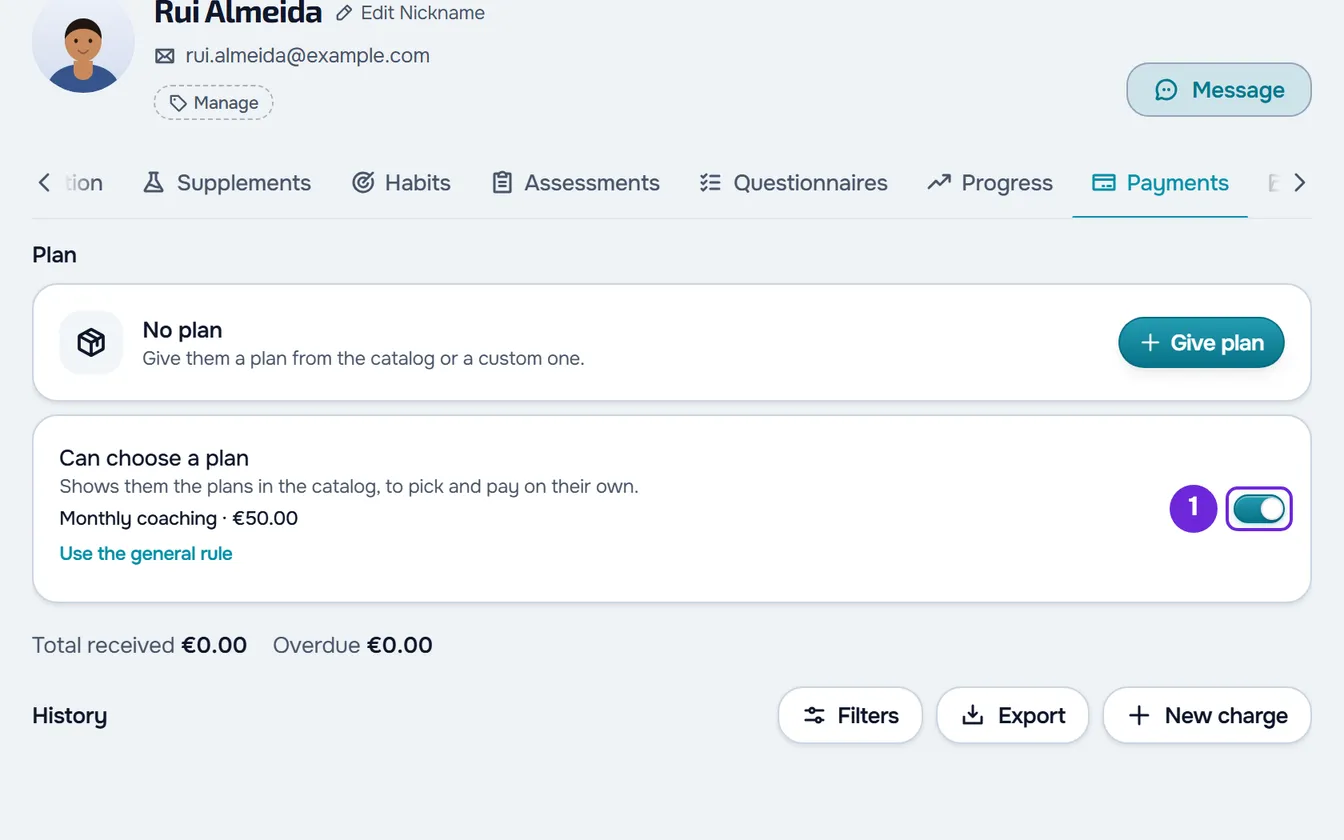
- The switch is in the client's profile, on the Payments tab, and in the payments sheet that opens when you select the client's row in Payments > Clients.
- It appears under the plan card, only when the client has neither a catalog plan nor a custom one, with the sentence “Shows them the plans in the catalog, to pick and pay on their own.”
- It is saved as soon as you change it. If saving fails, it goes back to its previous position and a notice with the error appears.
- With the switch on, the card shows the name and price of the cheapest plan the client can choose. If you have just turned it on, the plan only appears the next time you open the profile. If the switch is already on when you open the profile and shows no plan, you have no plans for sale.
- It overrides the option in Settings both ways: on, the client can choose even with You pick; off, they cannot even with They can pick.
- When you open the profile, the switch shows what applies to the client today. Once you change it, the client keeps the value you chose, even if you later change the option in Settings. With no choice of their own, the line under the switch says “Follows the rule in Settings.”; once you change it, Use the general rule appears, which puts the client back on the option in Settings.
When the catalog always opens
In three cases the client sees the catalog with any option, because it is the way to get in or to get access back:
- A new client held at the door with They must pick to come in.
- A client whose access ended on the end date, as long as they have not disconnected from you and you have not archived them. They only see plans with No access under If they don't pay, because only those give them access back.
- A client with the Read-only rule whose pack ended more days ago than the grace period and who is therefore view-only.
In the first two cases, the client's switch shows as on and turning it off does not close the catalog.
What the client sees
- On the website, the client sees your plans for sale under Settings > Payments, in the Your plan section, and pays there for the plan they choose. The list only appears to those who do not yet have a plan, a monthly fee paid manually or an active automatic payment with you. The client's path is in Choose and pay for a plan from your professional.
- A new client held at the door sees on Home the card “Pick your plan to start”, with the sentence “Your professional asks you to pick a plan before opening the app. Until then you can talk to them.”, the list of your plans and a button that opens the chat with you. On the website, if they open another section from a link, they see the same card. In the latest version of the app, the card also appears on the app's Home.
Common problems
“They must pick to come in” is disabled
Online payments are not active yet (the Stripe account must be in the Active state), and the sentence under the list ends with “To require a plan, turn on online payments first.” Turn them on (see Connect Stripe to receive online payments from clients) and reload the page. If online payments stop being available while the page is open, choosing this option shows “Online payments are not accepted yet.” and the list goes back to the previous option.
“You have more active clients than your plan allows. Choose which to keep or upgrade your plan.”
With more active clients than your plan allows, MyFitnessClient saves neither the option nor the switch, and both go back to their previous value. See You have more active clients than your plan allows.
The client sees no plan to choose
There are four possible causes: their switch is off, because the option is You pick or because you turned it off in the profile; they already have a plan, a monthly fee paid manually or an active automatic payment with you; you have no plan for sale; or they are looking in the phone app, and the list is on the website. In the client's profile, the Can choose a plan switch shows what applies to them and, when on, the cheapest plan they see.
The “Can choose a plan” switch does not appear
The switch only appears to the workspace owner, and only when the client has neither a catalog plan nor a custom one. To swap a client's plan, see Change a client's plan.
Questions
Can I make the clients I already have choose a plan?
No. They must pick to come in only holds at the door those who start coaching after you choose it. For the others, give them the plan with Give plan or let them choose with They can pick.
Do I need online payments for clients to choose?
Only for They must pick to come in. With They can pick and no online payments, the client sends you a request instead of paying online, and the plan only starts when you mark the payment as paid. See Mark a charge as paid.
Does the client see custom plans or plans not in the catalog?
No. They only see catalog plans that are neither archived nor removed from the catalog. You can still give them a plan that is not in the catalog or a custom one with Give plan.