
Before you start
- The Invoices tab shows what you pay MyFitnessClient for your plan and, if you have it, for the My app in the stores add-on: the 10 most recent invoices on your account. Charges to your clients are not here. See Receipts and invoices for client payments.
- You see the invoices of your own account. If you work in another professional's team, the invoices for that team's plan belong to the owner.
- The buttons that open the Stripe billing portal only appear when your account already has billing details in Stripe, for example after you open the payment for a plan for the first time.
Steps
To see your invoices and open one:
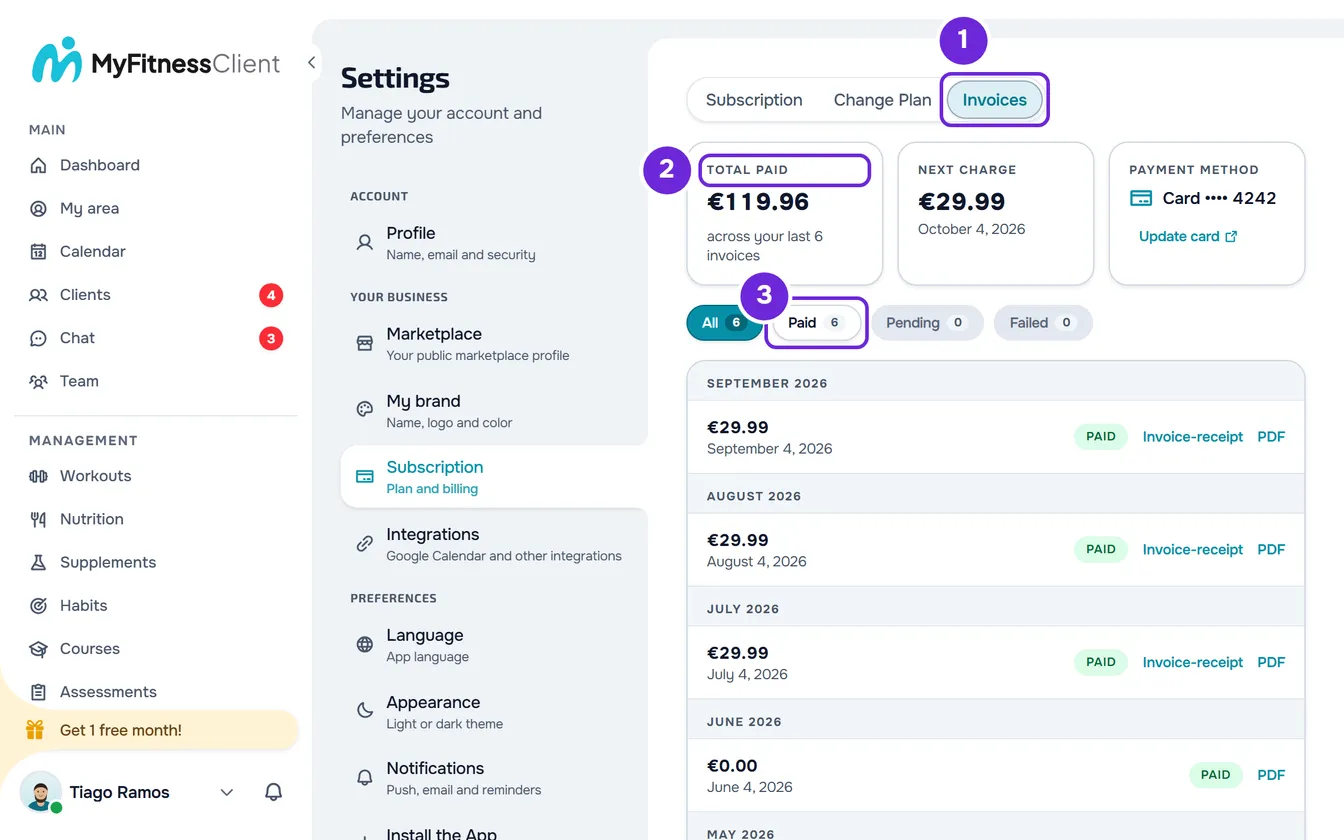
- On a computer, select your photo and your name at the bottom of the side menu, then Settings. On a phone, open the menu and select Settings at the bottom of the menu.
- Select Subscription.
- Select the Invoices 1 tab.
- In the summary, check Total paid 2, Next charge (on a paid plan) and Payment method.
- Optional: to see only the invoices with one status, select Paid 3, Pending or Failed. All shows the full list.
- On the invoice's row, select Invoice-receipt 1 or PDF.
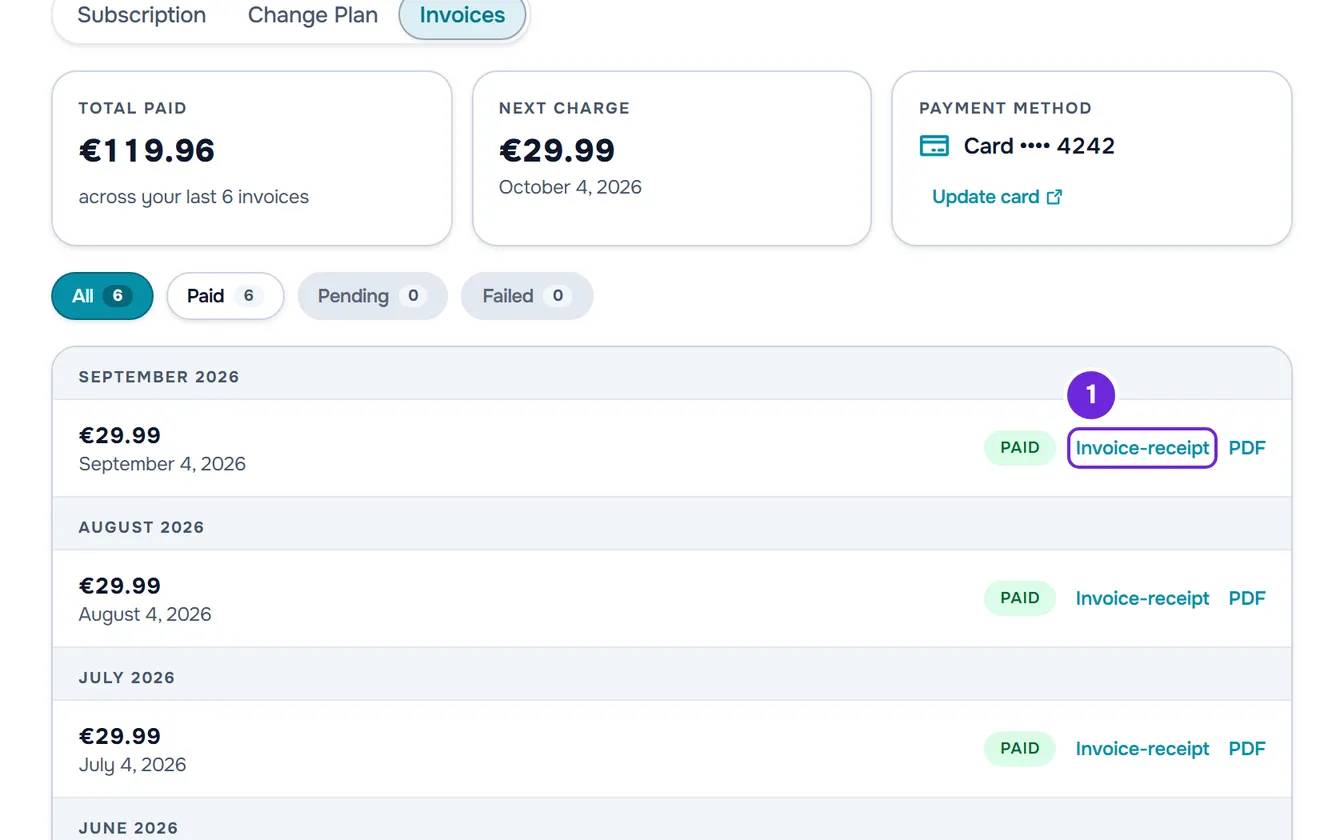
The document opens in a new tab or downloads, depending on your browser.
The summary
At the top of the tab, up to three tiles give the key facts:
- Total paid: the sum of the paid invoices among the 10 most recent. The note next to it says how many there are, for example “across your last 4 invoices”. It is not the all-time total for your account.
- Next charge: on a paid plan, the amount and the day of the next renewal. Your credit is already deducted from the amount and, if you have credit, for example from a free month, a line says how much is included. On a granted plan with an end date, the amount is €0.00, because there is no charge. Once you have asked to cancel, the tile is called “Ends” and only shows the day your plan ends.
- Payment method: the payment method Stripe will use, for example “Card” followed by the last 4 digits. With no saved method, it shows “None” on the free plan or “Not synced yet” on a paid plan. Under it is Update card.
Statuses and filters
Each invoice has a status label. The filters group the statuses like this:
| Status | Filter | What it means |
|---|---|---|
| Paid | Paid | The invoice was paid. A partial refund keeps this status. |
| Open | Pending | The invoice was issued and is not paid yet. A renewal whose payment failed keeps this status while Stripe tries again. |
| Draft | Pending | The invoice has not been issued yet. |
| Failed | Failed | Stripe stopped trying to collect the invoice and marked it as uncollectible, or could not issue it. |
| Uncollectible | Failed | The invoice was marked as impossible to collect. |
| Void | Failed | The invoice was voided, for example after a full refund. |
The filters only appear when there is at least one invoice. Each one shows how many invoices it has and, with none, is disabled, except All. The filter is not saved: when you come back to the page, the list opens on All. To fix a failed charge, see Failed payment, 3D Secure or dispute on your subscription.
Invoice-receipt and PDF
The list groups the invoices by month, from the most recent to the oldest. Each row shows the amount, the payment date (or the creation date, if the invoice is not paid yet), the status and up to two links. Invoices for the My app in the stores add-on have the note “Add-on My app in the stores” after the date.
- PDF opens the PDF of the invoice that Stripe generates for the charge.
- Invoice-receipt opens the certified invoice-receipt that MyFitnessClient issues after each payment. Until it is issued, the paid invoice's row says “Certified invoice being prepared”. An invoice of €0.00, like the one at the start of a free trial, has no invoice-receipt.
When the invoice-receipt is issued, you also get the email “Your invoice-receipt is ready”, with the “Download PDF” button. If that button no longer opens the document, select Invoice-receipt in the list: the link is requested again every time you open it.
The invoice-receipt carries the billing details you have in Stripe at the moment it is issued, such as your tax number (NIF), name and address. For them to come out right, update them in the Stripe billing portal before the charge. Changing the details does not change invoice-receipts already issued.
Update your card and billing details
In the Payment method tile, select Update card. In the Subscription tab, the Manage Billing button on the plan card does the same. The Stripe billing portal opens, on a Stripe page, in your account's language.
In the portal you add or replace your payment method, see your invoice history, edit your billing details (email, address, phone, tax number and name) and can cancel your subscription. You don't change plans in the portal: you do that in the Change Plan tab.
When you come back from the portal, you land on the Subscription tab. In the Invoices tab, the Payment method tile then shows the method Stripe will use for the next charge. If the message “The billing portal could not be opened.” appears, select the button again. To cancel, see Cancel your subscription and understand what happens next.
Invoices in the Subscription tab
At the end of the Subscription tab, the Invoices card shows the 3 most recent invoices, with the same links. With more than 3, View all invoices opens the Invoices tab. See View your plan, what it includes and how much you use.
Email before a renewal
Before a renewal with an amount to pay, when Stripe notifies MyFitnessClient, you get an email with the amount and the day of the charge and a button that opens Subscription. A €0 renewal has no email. The My app in the stores add-on has its own renewal email.
Common problems
I don't see Update card or Manage Billing
Both buttons only appear when your account already has billing details in Stripe, and they don't appear while the page is loading. If you have never opened the payment for a plan, there is no card to update yet: the card is requested when you subscribe. See Upgrade your plan and pay for your subscription.
I don't see the Invoice-receipt on an invoice
The link only appears once the document has been issued. If the row says “Certified invoice being prepared”, open the tab again later. An invoice of €0.00 and an unpaid invoice have no invoice-receipt. If the row stays in preparation, contact support with the date and amount of the invoice.
“Not synced yet” in the Payment method tile
On a paid plan, it means MyFitnessClient could not read the subscription's payment method from Stripe: there is no saved method or the read failed. Reload the page. If it persists, select Update card and confirm your card in the Stripe portal, so the next charge does not fail. On a granted plan, which has no charges, it also appears when you have no saved card, and then there is nothing to do.
“Unable to open the invoice-receipt. Try again.”
MyFitnessClient could not get the document and the new tab closes. Select Invoice-receipt again in a minute. If that didn't fix it, contact support with the date and amount of the invoice and the time you tried.
Questions
Why do I only see 10 invoices?
The tab shows the 10 most recent invoices, and Total paid only adds up the paid ones among them. Older ones are in the invoice history of the Stripe billing portal, which you open with Update card.
Are my clients' invoices here?
No. The Invoices tab only has what you pay MyFitnessClient. For what your clients pay you, see Receipts and invoices for client payments.
I paid and the invoice doesn't appear. What do I do?
Open the page again in a little while. Every time you open Subscription, MyFitnessClient fetches the missing invoices from Stripe, and an invoice recovered this way appears the next time you open it. If you have no charges, the tab says “No invoices yet”.