
Before you start
- You cancel the plan on your own account. If you work in another professional's team, that team's plan is the owner's, and only the owner can cancel it.
- Your plan continues until the end of the period you already paid for, or until the end of the free trial, and there are no more charges. If you cancel during the free trial, you pay nothing.
- A plan with the Granted status on the plan card can't be cancelled in Subscription. If it has an end date, it ends on its own on that date, which the card shows under “Ends on”.
- Cancelling doesn't delete anything. What changes on the day your plan ends is in “What happens when your plan ends”.
Steps
To cancel your subscription:
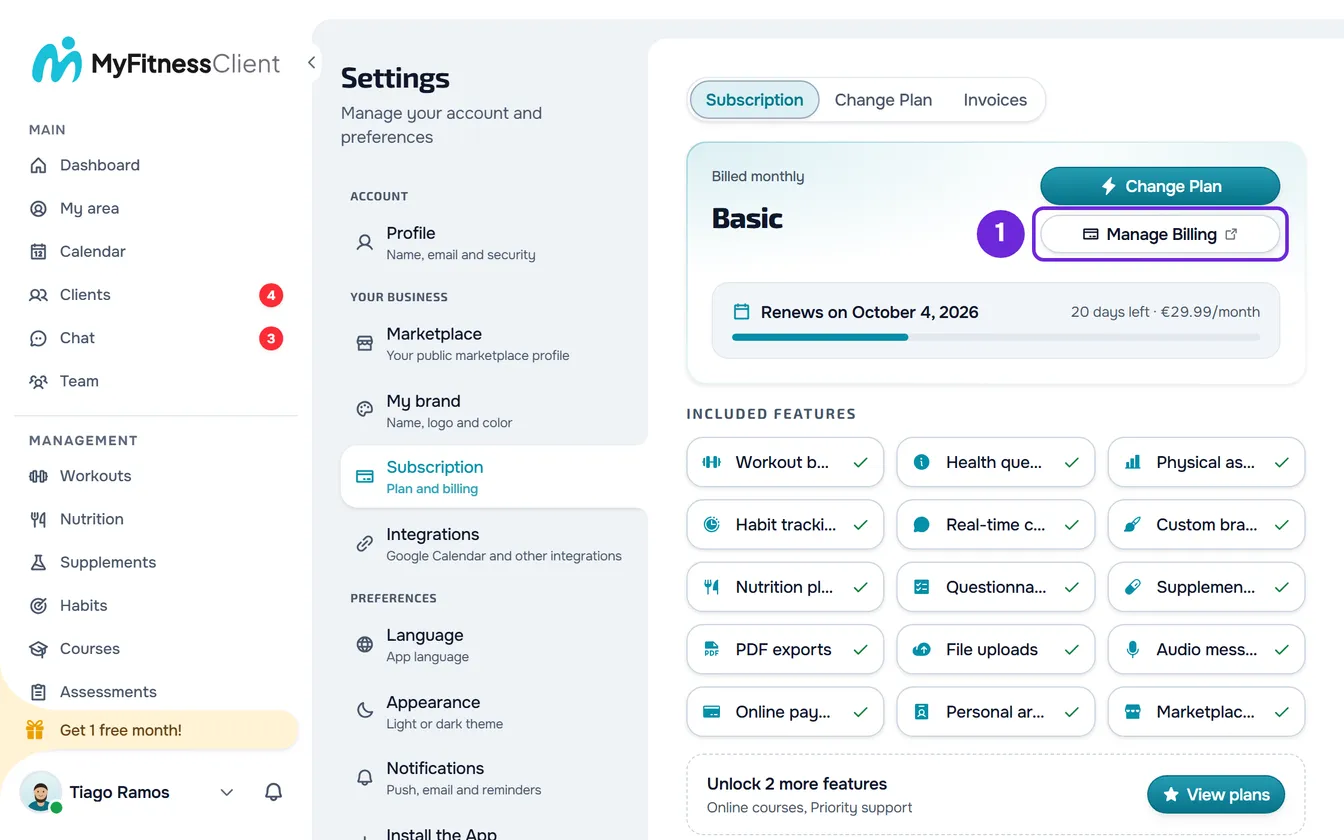
- On a computer, select your photo and your name at the bottom of the side menu, then Settings. On a phone, open the menu and select Settings at the bottom of the menu.
- Select Subscription.
- On your plan's card, select Manage Billing 1. Stripe's billing portal opens.
- In the portal, choose to cancel the plan.
- Confirm the cancellation. If Stripe asks for the reason, answer.
- Go back to Subscription in MyFitnessClient.
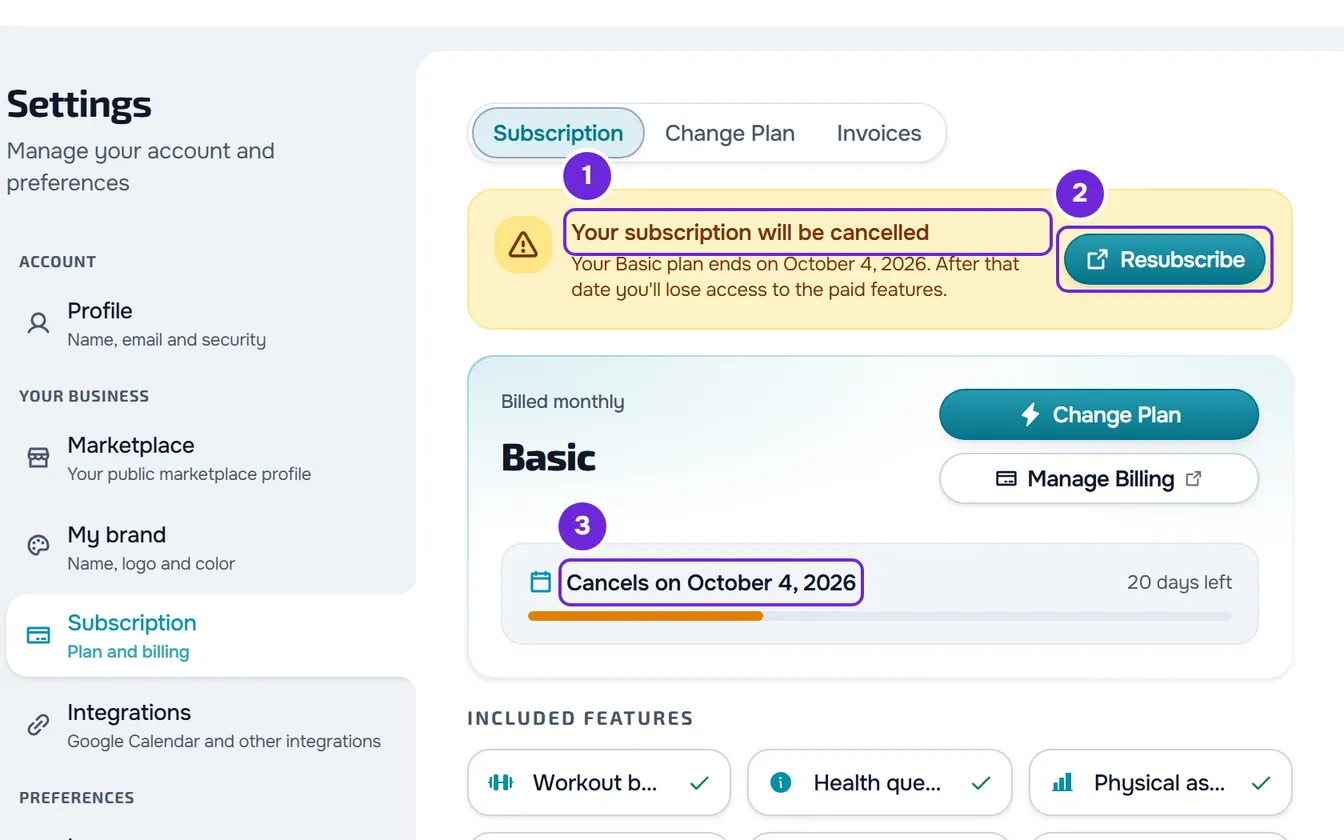
The “Your subscription will be cancelled” banner appears just before the plan card, with the date your plan ends, and the plan card shows “Cancels on” and that date. From now on, there are no more charges.
Cancel through the Free plan
You can also cancel your subscription by choosing the Free plan. In the Change Plan tab, select Change Plan on the Free plan's card. If your plan has the Granted status, that button is disabled: see “Unavailable on a granted plan” under Common problems. Otherwise, the “Switch to the Free plan?” window always opens: it says your plan changes to Free at the end of the current period and that, until then, you keep everything you have today. If you have files in Materials, the window is called “Your Materials become read-only” and also shows the Materials warning. Select Confirm downgrade. Stripe's cancellation page opens, where you confirm the cancellation. The result is the same as with the steps.
If you have a downgrade scheduled, cancel this way, because the Stripe portal doesn't cancel a subscription with a scheduled change. In that case Stripe doesn't open and the window is the only confirmation: after Confirm downgrade, the subscription is set right away to end at the end of the paid period, the scheduled change is removed, and you go back to Subscription, with the cancellation banner already showing. See Downgrade your plan and confirm the scheduled change.
Until your plan ends
- You keep your plan and everything it includes until the date in the banner.
- The plan card no longer shows the amount of the next charge, and the period bar turns amber. In the Invoices tab, the “Next charge” box becomes “Ends”, with the same date.
- You get an email that confirms the cancellation and tells you until which day you have full access.
- If you have the My app add-on, it's also set to end. When it ends, your app stops opening for your clients.
Undo the cancellation
Until your plan ends, you can undo the cancellation. In the “Your subscription will be cancelled” banner, select Resubscribe. The Stripe portal opens, where you renew the plan. MyFitnessClient deliberately doesn't resume the plan inside the app: confirming in Stripe keeps you from being charged again by accident.
After you renew, the banner disappears and the plan card shows “Renews on” and the date of the next renewal again. If the My app add-on was set to end because of the cancellation, it renews again too. The cancellation email has the “Reactivate plan” button, which opens Subscription, where Resubscribe is.
Once your plan has ended, there's no cancellation left to undo: to go back to a paid plan, see Upgrade your plan and pay for your subscription.
What happens when your plan ends
At the end of the paid period, the account moves to the Free plan and you get the “Subscription cancelled” notification in the bell. Nothing is deleted on that day, but:
- The pages of features the Free plan doesn't include now show what the feature does and the plan that includes it. Some, like the courses page, still show what you've already created. See Feature locked by your plan: what it means.
- If you have more active clients than the Free plan allows, the account is frozen until you choose who stays active. No client is deleted. See You have more active clients than your plan allows.
- You lose file uploads. The Materials page becomes read-only: you can view, download and delete the files you already have, but not upload new ones or change folders. The files are kept for 1 year and can then be deleted. Before that, you get warning emails 30, 10 and 3 days before the deadline. If you go back to a paid plan, they're no longer marked for deletion.
- The courses you already have become read-only while your plan doesn't include Courses: you can open, unpublish and delete them, but not edit, duplicate or publish them. What happens to the subscriptions of the courses you sell is in Course subscriptions when the professional moves to the Free plan.
- If you have a team, it becomes inactive: the members lose access to your workspace and are notified, and the team's data is kept. See what to do when the team is inactive.
Common problems
I cancelled and I still have access
That's expected. Your plan continues until the end of the paid period, or of the free trial, and the date is in the “Your subscription will be cancelled” banner and on the plan card, under “Cancels on”.
I can't find where to cancel
The subscription is managed on the MyFitnessClient website, in Settings > Subscription. The MyFitnessClient app in the stores is for clients only: see “This app is exclusively for clients”: what to do as a professional. If the Manage Billing button doesn't appear, the account has no billing in Stripe: you're on the Free plan, with nothing to cancel, or your plan has the Granted status (see the next problem). If it's none of these cases, see Subscription problems: payment, plan and billing.
“Unavailable on a granted plan”
It appears on the button of the Free plan's card, which is disabled, when your plan has the Granted status, which can't be cancelled in Subscription. If the plan has an end date, the card shows it under “Ends on”: the plan ends on its own on that day and, the day before, you get the “Your plan ends tomorrow” notification. To end it sooner, contact support.
I came back from Stripe and the banner doesn't appear
If you left the portal without confirming, nothing changed: repeat the steps. If you confirmed, the banner appears when MyFitnessClient receives Stripe's confirmation: open Subscription again in a little while. If that didn't fix it, contact support with your account email and the time you cancelled.
Questions
Do I lose my clients?
No. Cancelling doesn't delete clients, plans or history. If, on the Free plan, you have more active clients than the plan allows, the account is frozen until you choose who stays active or go back to a paid plan.
What if I cancel during the free trial?
You pay nothing. Your plan continues until the end of the trial and, on that day, the account moves to the Free plan.
Can I pause my subscription or cancel right away?
No. The subscription has no pause, and the cancellation always takes effect at the end of the period you already paid for.
Can I go back to the same plan?
Yes. Before your plan ends, select Resubscribe. After it ends, choose the plan in Change Plan and pay as for a new subscription. The free trial only exists on the account's first paid subscription, so you pay for the first period straight away.