
Before you start
- You can only cancel a scheduled closure. When you close your account and still have clients with paid days, it does not close right away: it stays in a closing state until the last paid day, at most 3 months after the request. See Close your professional account.
- You can cancel until the end of the set day. After that day, you can no longer cancel and the account closes at the next daily check.
- Cancelling the closure does not ask for your password.
Steps
To cancel the closure:
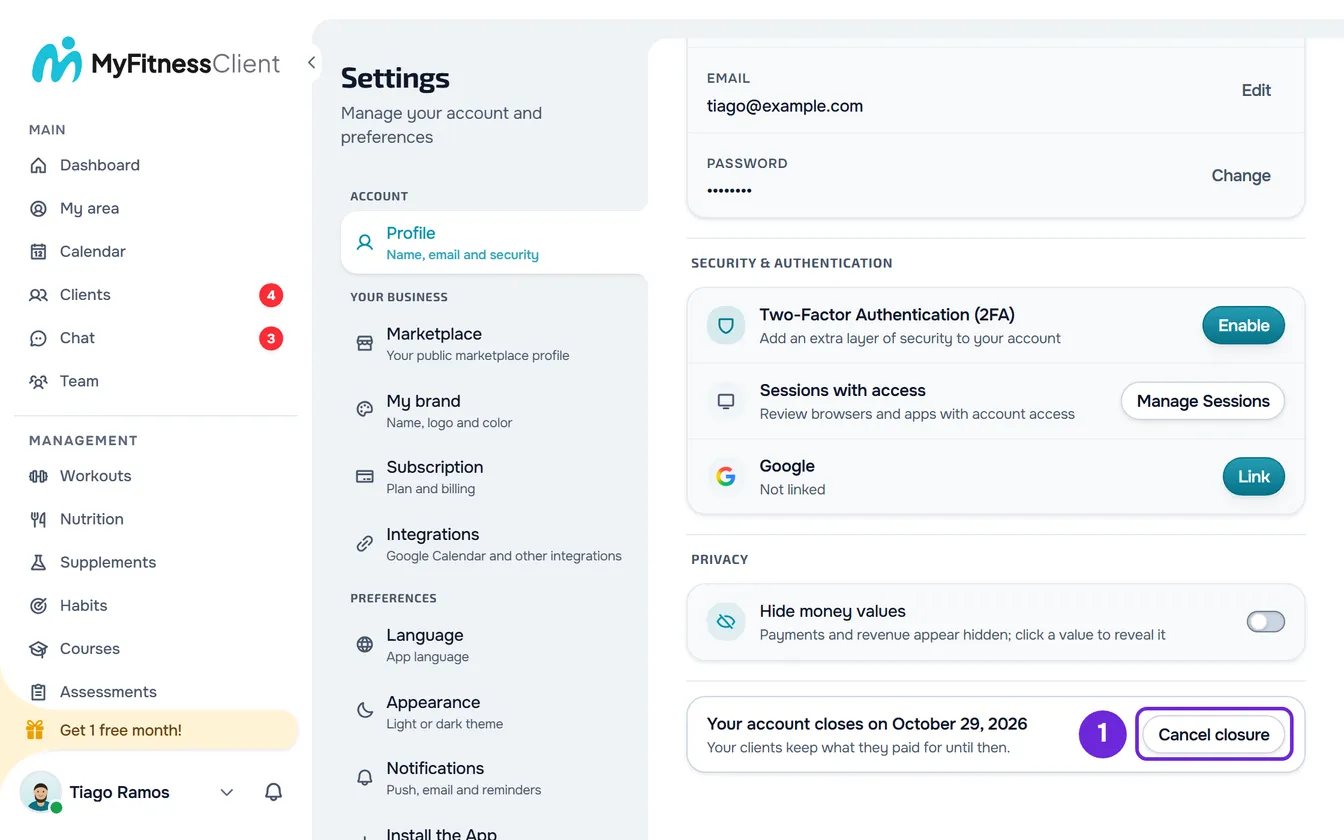
- On a computer, select your photo and your name at the bottom of the side menu, then Settings. On a phone, open the menu and select Settings at the bottom of the menu.
- If Settings did not open on Profile, select Profile.
- In the last section of Profile, on the row with the date your account closes, select Cancel closure 1.
- In the “Cancel the closure?” window, select Cancel closure.
The message “Your account is no longer closing.” appears. The row shows Close account again, with “Deletes your account and your data.”, and the account takes clients and sales again.
What works again
All the closure restrictions end the moment you cancel:
- You can add, accept, reactivate and renew clients again.
- You can sell courses, plans and packages, create charges and give plans again.
- Your public profile goes back to how it was before you scheduled the closure: if it was published, it shows in the marketplace again.
- Manually paid monthly fees create charges again, including the one that fell due while the account was closing.
What your clients receive
Each client you coach, active or with a scheduled start, gets a notification titled “Your professional is no longer closing their account” and the same message by email. The message says that the coaching carries on and that a subscription that was ending can be resumed. Clients without their own account do not get the email.
When you scheduled the closure, your clients' subscriptions, for plans and for courses, were set to end at the end of the paid period. Cancelling the closure does not make them renew on their own again:
- While the paid period has not ended, the client resumes the plan subscription in their own Settings, without paying anything at that moment: the subscription renews again at the end of the period. See Cancel or resume your plan subscription.
- After the period ends, the client has to subscribe again.
- The online payment pages for plans and courses that were open when you scheduled the closure have expired. The client starts a new purchase.
To see each client's plan and next charge, see View each client's plan and payment status.
Common problems
“The account's last day has passed. The closure can no longer be cancelled.”
This happens when the set day has already ended and the daily check has not closed the account yet. From then on, there is no way to cancel in MyFitnessClient, and the account closes at the next check. If you have questions, contact support with the account's email.
“Your account is closing: you can no longer add, accept, reactivate or renew clients.”
It appears, like “Your account is closing: you can no longer create charges or give plans.”, when you try one of these actions with the closure scheduled. To do them again, cancel the closure with the steps in this article and try again.
The row shows “Close account” and not the date
If you scheduled the closure and the row shows neither the date nor the Cancel closure button, the page may not have been able to read the account's status. Reload the page. If you never scheduled the closure, or if you already cancelled it, the row always shows Close account and there is nothing to cancel.
“You have join requests paid outside the app. Refund the money and decline them in Requests before the account closes.”
It appears under the row while the account is closing and there are join requests that the client paid outside the app. The app does not refund that money. If you cancel the closure, the warning leaves the row and the closure no longer stops you from accepting these clients. If you keep the closure, refund the money and decline the requests in Requests before the account closes.
Questions
Can I close my account again after cancelling the closure?
Yes, with the steps in Close your professional account. What happens is worked out again on that day: if you still have clients with paid days, the account stays in a closing state until the last paid day, at most 3 months after the new request; if you do not, it closes right away.
When does the account close if I do not cancel?
The account stays open until the end of the set day, in your account's time zone. Then the next daily check closes it, with the same effect as a closure with nothing pending. What is deleted and what is kept is in Data deleted and data kept on account deletion.