
Example data is the set of templates and records that MyFitnessClient adds to a new professional account, so that no area starts empty. It lets you see how each screen looks with data, try things out without touching real clients, and gives the interactive tutorials something to show. At its center is the Test Student, a fictional client with everything filled in.
What a new account includes
The table shows the names as they appear in an account set to English.
| What | How many | Names | Where to find them |
|---|---|---|---|
| Workouts | 5 | Full Body A; Full Body B; Upper Body; Lower Body; Cardio & Mobility | Workouts > Workouts |
| Programs | 4, one per mode | Beginner: Full Body (Sequential); Upper/Lower: Weekly; Flexible: Pick your workout; 2-Week Plan (Calendar) | Workouts > Programs |
| Meal plans | 4, one per mode | Balance: Flexible; Weekly: By day; Sequential: By day; 2-Week Plan: Calendar | Nutrition > Meal Plans |
| Meals | 2 | High-protein breakfast; Balanced lunch | Nutrition > Meal Library |
| Habits | 3 | Drink water (2000 ml, every day); Sleep 8h (Monday to Friday); Walk (8000 steps, 5 times a week) | Habits > My Habits |
| Event types | 3 | Workout; Assessment; Consultation | Calendar, on the button with the tag icon, which opens Event types |
| Client tags | 4 | In-person; Online; Beginner; Advanced | Clients > Tags |
| Health questionnaire form | 1 | The default section setup | In your clients' health questionnaire |
| Test Student | 1 | Test Student | Clients |
The workouts have sections, supersets, warm-up sets, drop sets and sets to failure, with exercises from the library. The meal plans and meals use foods from the library, in grams. The Sequential mode can no longer be chosen when you create a new meal plan; the example plan in that mode keeps working.
Once created, the example templates work like your own: you can open, edit and duplicate them.
The Test Student
The Test Student is a fictional, active client. It only appears in your account's dashboard, where your team can also see it. In an account set to another language, its name is in that language. It comes with:
- a filled-in profile, with photo, date of birth, height and weight
- the program “Beginner: Full Body (Sequential)” and the diet plan “Balance: Flexible” assigned, plus the extra workout “Extra: Core & Mobility”
- a history of completed workouts, with the logged sets
- meal logs for the last few days, following the diet plan
- the three example habits assigned, with completed, partial and missed days
- a full physical assessment and three check-ins with front, side and back photos
- a completed health questionnaire
- a conversation in Chat, with a welcome message, a workout you shared and the completed session the Test Student shared
- events in the Calendar, some already completed and others scheduled for the next few days
- in Materials, under Clients > Test Student, the Welcome pack folder with the Welcome guide Page, shared with the Test Student
- the In-person and Online tags
If you are the account owner, the Test Student's profile has the See the client app button, which opens the client app the way the Test Student sees it. See Preview the client app with the Test Student.
What does not count or happen
- The Test Student does not take a spot in your plan's client limit and is not included in the Active clients number on the Dashboard.
- It comes with no payments or charges, and the automatic billing of monthly fees skips it.
- It receives no emails or push notifications: its email is an internal address with no mailbox, and the automatic reminders for meals, habits, check-ins and events skip it.
- It has no access period: you cannot give it a start or end date.
- It uses almost no storage: the example photos are shared files that do not count, and only the Welcome guide Page counts, at about 3 KB.
How to recognize them
In the Clients list, the Test Student has the Example badge in the Status column, which appears on wide screens. To show only the Test Student, open Filters and, under Access, choose Example. This filter only appears while the Test Student exists.
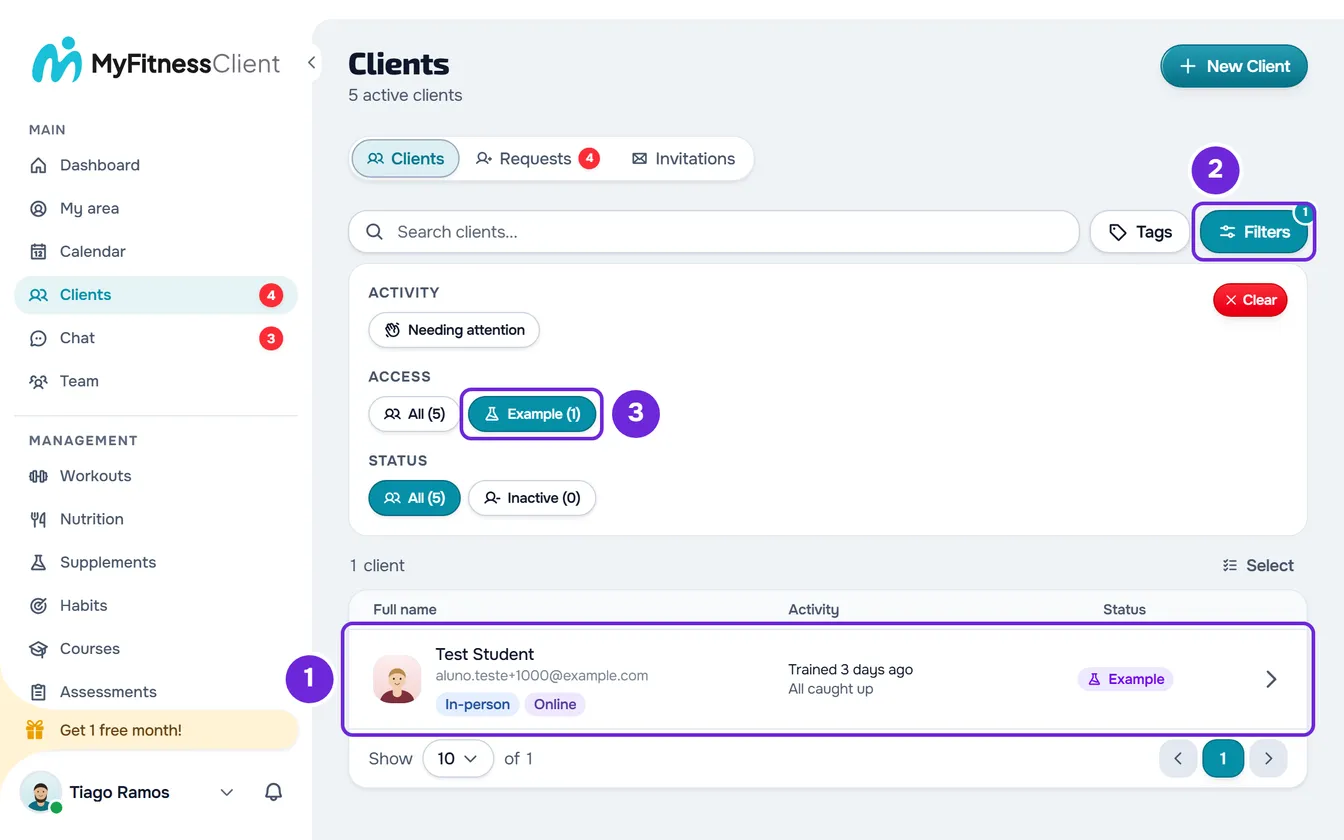
The example templates have no badge: you recognize them by the names in the table.
When they are created
MyFitnessClient creates the example data on its own when you verify the email of your professional account, or when you create the account with Google or Apple. It does not depend on your plan and is created only once: while it exists, it is not duplicated. Creation runs in the background and can take a few seconds. If the Test Student is not in the Clients list yet, open the list again in a moment.
The names stay in the language the account is in when the data is created, and do not change if you switch languages later.
At the same time, the account receives a check-in questionnaire, in Questionnaires. That questionnaire is not part of the example data and stays when you remove the example data.
If you remove the example data, you get it back when you start a tutorial that uses the Test Student: the tutorial asks “Create example data?” and creates it again. See Remove the example data and the Test Student.
Questions
Do my clients see the Test Student?
No. The Test Student and its data only appear in your account's dashboard, where your team can also see them, and no client receives anything from it. Your clients only see it if you add it to a group chat with them.
Does the Test Student count as a client on my plan?
No. It does not take a spot in the plan's client limit, so it does not stop you from adding real clients. See Client limit and occupied slots on your plan.