
Before you start
- The code field only appears while you do not have a paid plan. A free trial and a plan granted by MyFitnessClient also count as a paid plan: once you subscribe, you can no longer apply or change codes.
- The same field accepts three kinds of code: another professional's referral code, a MyFitnessClient partner's code and a discount coupon. MyFitnessClient recognizes the kind on its own.
- If you entered a code when you created the account, it is already applied: do not enter it again.
- You cannot use your own referral code.
- Paying on Stripe is explained in Upgrade your plan and pay for your subscription.
Steps
To apply a code before you pay for the plan:
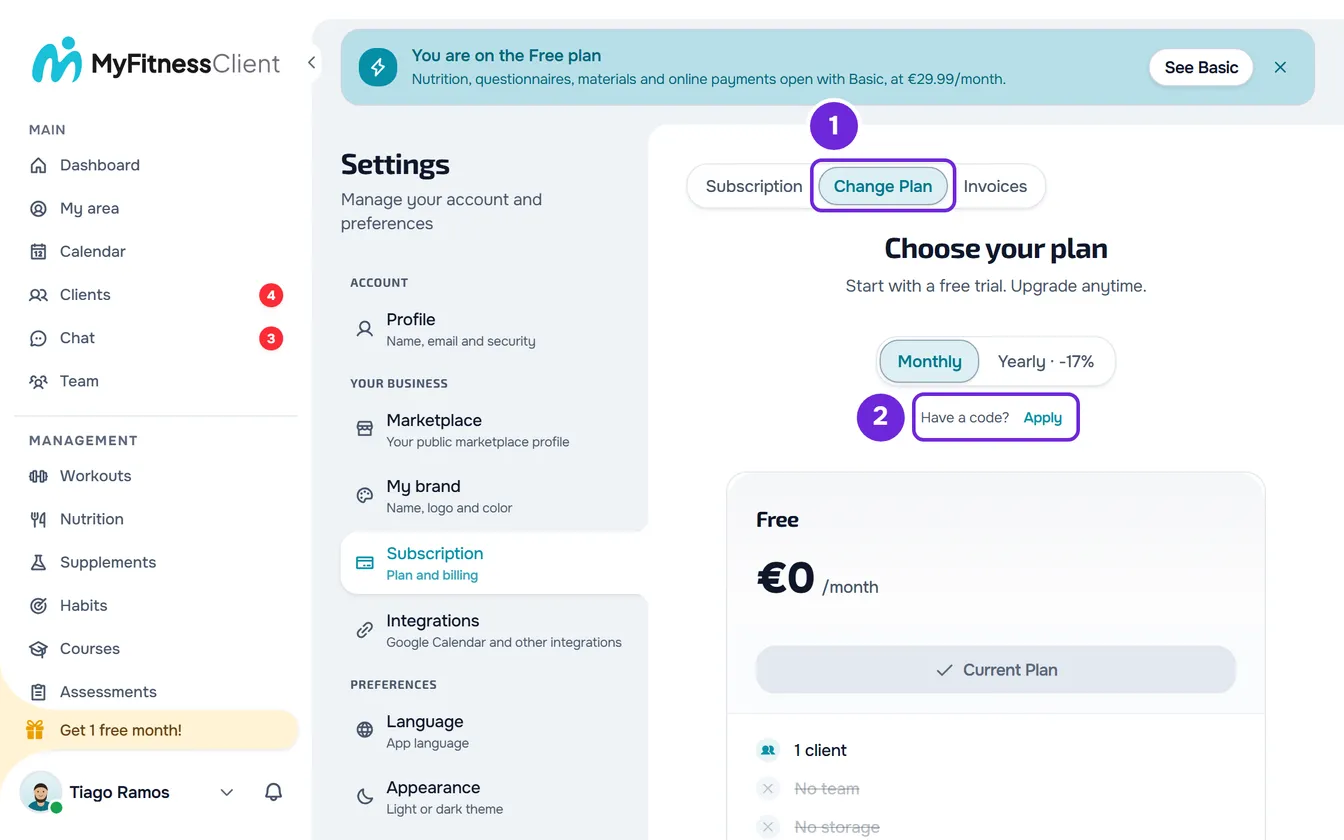
- Open Settings: on a computer, from the menu under your name in the sidebar; on a phone, from the side menu.
- Under YOUR BUSINESS (on a phone, BUSINESS), select Subscription.
- Select the Change Plan 1 tab.
- Under the Monthly and Yearly toggle, next to “Have a code?”, select Apply 2.
- Enter the code and select Apply code. The field accepts letters, numbers and hyphens, from 3 to 20 characters, and converts everything to uppercase.
- Check the message and the green line 1 that appears under the toggle, showing what was applied.
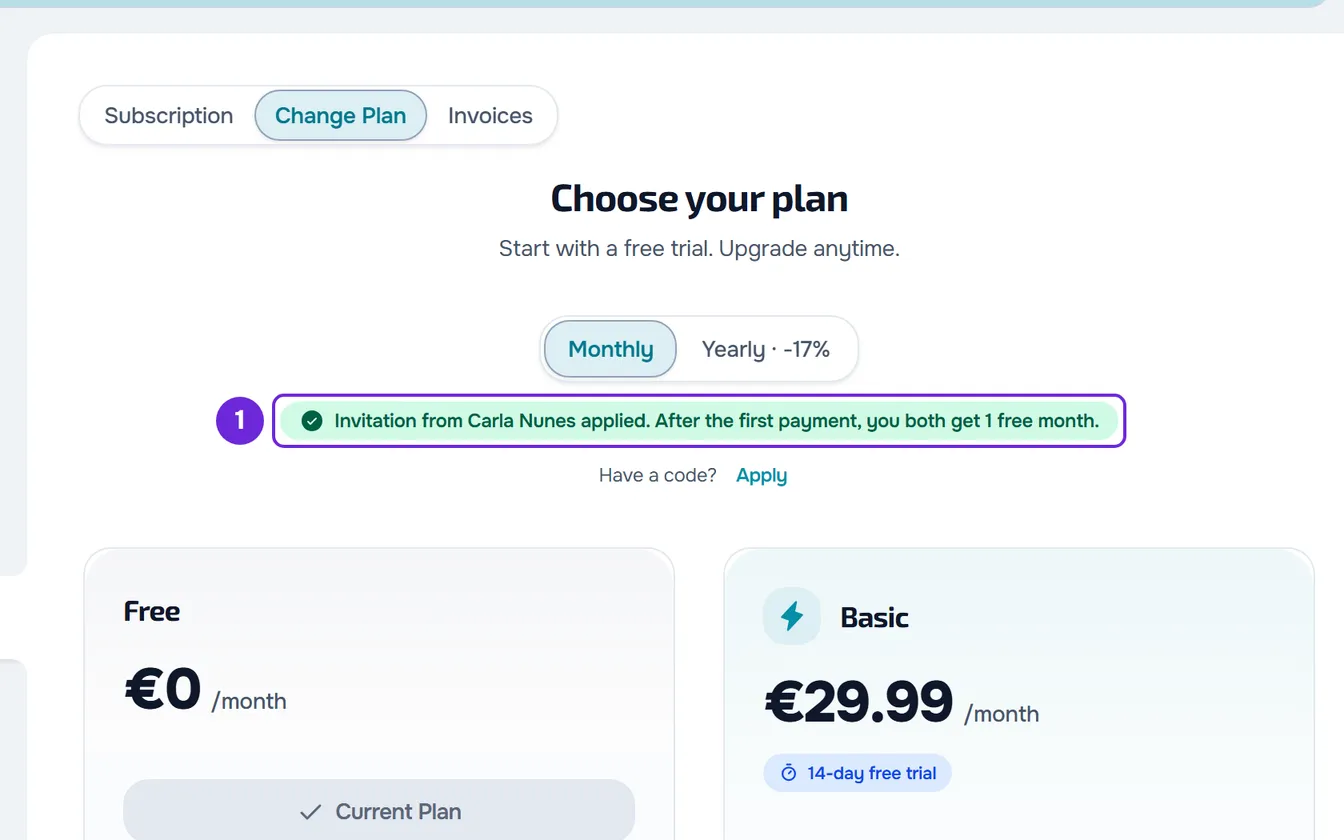
- On the card of the plan you want, select Upgrade. A Stripe page opens; an applied coupon already shows on it.
- On the Stripe page, confirm the payment.
The code is saved to your account and goes with the plan payment. The same field appears under the price on the page of a feature locked by your plan, in the window that opens when an action needs another plan, on the questionnaires page when your plan does not include them, and in the window for clients over your limit: applying it there works the same. Once you subscribe, even on a free trial, the field no longer appears.
What each code gives you
The message and the green line tell you which kind of code you applied:
| Code | What it gives you | Green line in Change Plan |
|---|---|---|
| Referral from another professional | When you pay the first subscription invoice with an amount greater than 0, you and the person who referred you each receive a credit equal to the monthly price of the paid plan each of you has at that moment. The credit is deducted automatically from the following invoices. The free trial does not count as a payment. | “Invitation from”, the name of the person who referred you and “applied”. |
| MyFitnessClient partner | From 0 to 3 free months, depending on the partner. The months are added to the plan's free trial days, 30 days per month, up to 180 trial days in total. They only count if the account has never subscribed to a paid plan, not even on a free trial. | “Code”, the code, “applied” and the free months. A code with no free months shows “Code applied” and the code. |
| Coupon | A percentage or fixed-amount discount, depending on the coupon: on the first payment, for the first months or on every payment. | “Coupon”, the code, “applied” and the discount, for example “10% off on your first payment”, with an X to remove it. |
The screen mentions “1 free month” for the referral code. The credit conditions, including for the person who refers, are in Earn free months with the affiliate program.
Combine, change and remove codes
- A coupon can be combined with a referral or partner code. Apply the coupon last: with a coupon applied, the field disappears until you remove it.
- To remove a coupon, select the X on the green line.
- While you do not have a paid plan, you can swap the referral code for another one: enter the new one in the same field and it replaces the previous one.
- Each account only has one partner code. The partner code cannot be changed or removed.
- An applied coupon is saved to your account until you pay, in any browser or on any device. It goes away by itself after the payment or, if it is no longer active, when you try to pay.
- The Stripe payment page has no code field: apply the code in MyFitnessClient before you pay.
Where you see the applied code
Until you subscribe, the green line stays in Change Plan. In the Subscription tab, the first one on the page, you also see at the top:
- with a partner code, the “Code applied” box, with the code and, while you have not used them, the free months; this box also stays after you subscribe;
- with a referral code, the line “Invited by” and the name of the person who referred you, until you subscribe.
Apply the code when you create your account
When you create a professional account, you can also enter a referral code, a partner code or a coupon. The other sign-up steps are in Create a professional or client account.
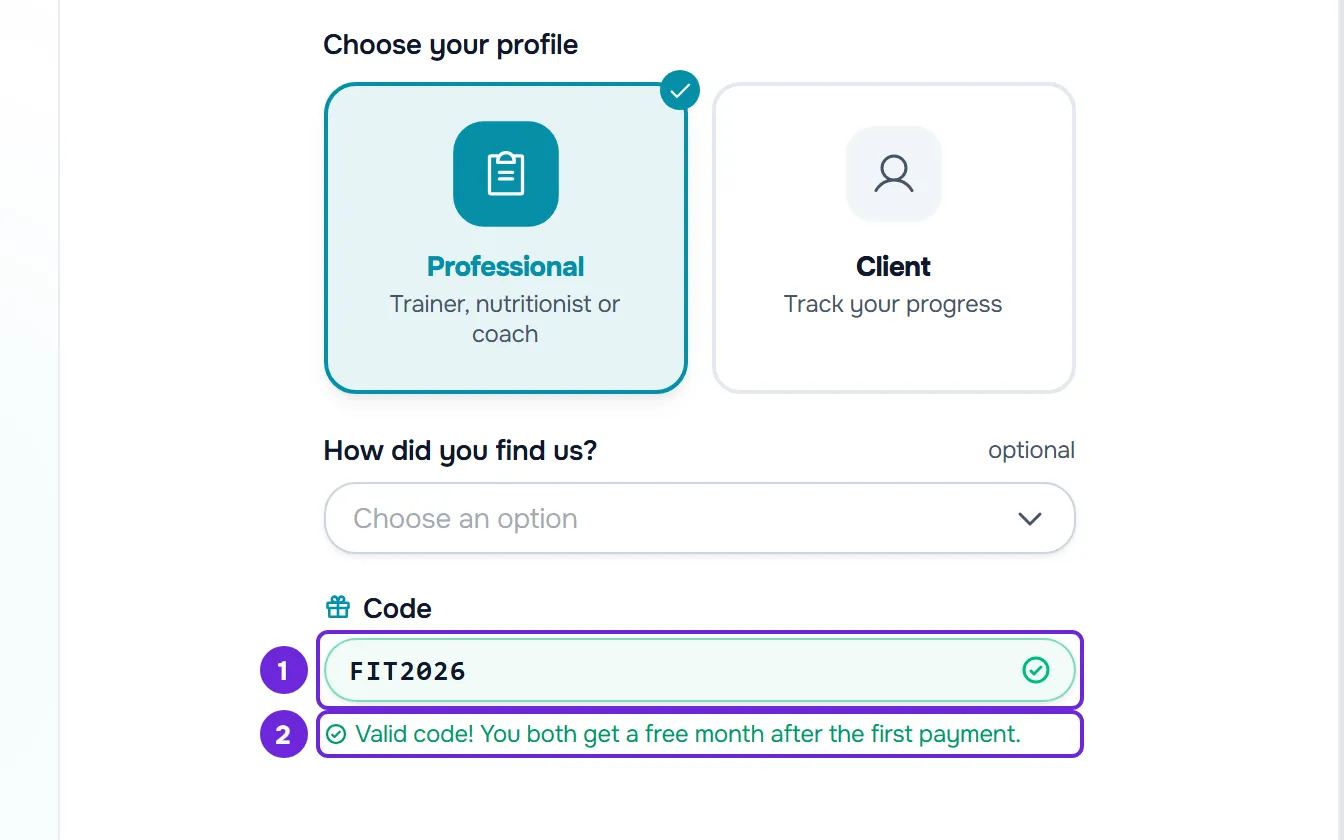
- At the step where you choose your profile, with Professional chosen, select I have a code and enter the code in the Code field.
- Half a second after you stop typing, MyFitnessClient checks the code. A valid referral code shows a green check mark and “Valid code! You both get a free month after the first payment.”; a partner code shows the free months, for example “Valid code: 1 free month!”; a coupon shows the discount, for example “Valid code: 10% off on your first payment.”. A code that does not exist shows a red X and “Invalid or unknown code.”.
- With an invalid code in the field, the account is not created and “Invalid code. Remove it or enter a valid one” appears. Delete the code or correct it. If MyFitnessClient has not been able to check the code yet, “We are still checking the code. Try again in a moment.” appears: wait a few seconds and try again.
- A coupon entered at sign-up is kept on the account, and the discount applies when you pay for the plan. In Change Plan, you see “Coupon”, the code, “applied” and the discount.
- If you opened a referral or partner link, the code is already in the field and, when it is valid, the Professional profile is chosen. If the code came in the link's address, the field stays locked while the code is valid. The code from a referral link, or from a partner link that gives free months, is kept in the browser for 30 days, even if you create the account with Google or Apple.
Error messages
When the code is not accepted in Change Plan, one of these messages appears:
| Message | Why | What to do |
|---|---|---|
| “Invalid code. Try again.” | The code does not exist, is no longer active or is a coupon that does not apply to your account. | Check the code letter by letter or ask whoever gave it to you for another one. |
| “You cannot use your own referral code.” | It is your affiliate program code. | Use another professional's code. Yours is for inviting others. |
| “You have already applied a referral code.” | Your account already has a partner code. | Keep the code you already have. |
| “This referral has already received its reward.” | The credit for your referral has already been given or is being processed. | Keep the referral you have: you can no longer apply another referral or partner code. A coupon can still be applied. |
| “You can no longer change this code.” | You already have a referral code and an active subscription. | Reload the page: with an active subscription, the field no longer appears. |
| “Too many requests. Wait a moment.” | You tried to apply a code more than 5 times in the same minute. | Wait a minute and try again. |
| “We could not check the code right now. Please try again in a moment.” | The code check failed at that moment. | Try again in a little while. |
| “Could not apply the code. Please try again.” | Two requests to apply a code arrived at the same time. | Try again. |
When you select Upgrade with a coupon applied, MyFitnessClient checks the coupon again:
| Message | Why | What to do |
|---|---|---|
| “This code doesn't exist or is no longer active.” | The coupon expired or ran out since you applied it. | The green line goes away on its own. Pay without a coupon or ask for another one. |
| “This coupon can't be used on this purchase.” | The coupon has conditions this purchase does not meet, for example it is only for another plan. | Choose the plan the coupon applies to, or remove the coupon and pay without it. |
| “This discount would end before your first payment.” | The discount lasts a number of months from today and ends before your free trial ends. | Remove the coupon and pay without it. |
If, when you open the field, “We could not confirm whether a code is already applied.” appears, reading your codes failed. Select Try again on the tab's error card before you apply a code.
Other problems are in Subscription problems: payment, plan and billing. If that did not solve it, contact support with the account email, the code you used and the message you saw.