
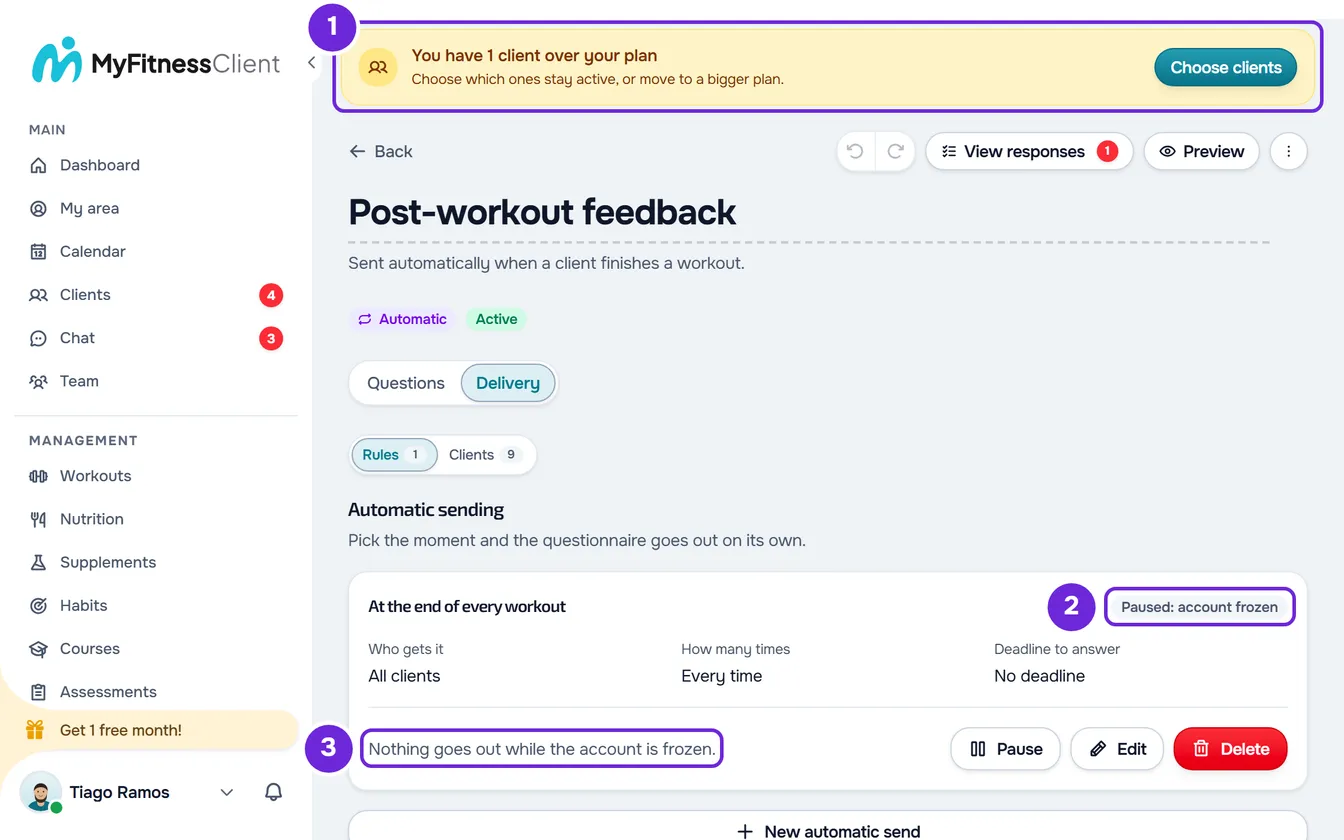
It happens when the account's plan no longer includes Questionnaires or when the account is frozen because you have more active clients than the plan allows. From that moment on, automatic delivery rules stop sending questionnaires and reminders for unanswered questionnaires stop going out. With the account frozen, each active rule shows the Paused: account frozen tag and the sentence “Nothing goes out while the account is frozen.”; without Questionnaires in the plan, the rules are not even visible.
Why it happens
Before each delivery, MyFitnessClient checks that the plan includes Questionnaires and that the account is not frozen. If either check fails, it sends nothing and saves nothing to send later, with one exception: with the account frozen, a send that does not repeat is held and goes out after you fix it. The rules are not deleted or paused, and the questionnaire stays active. The effect is immediate both ways: once you fix it, the next event already sends.
In a team, what counts is the team owner's plan and account, never the member's. If you are a member, ask the owner to follow the steps in this article.
Causes
| Cause | What you see | What to do |
|---|---|---|
| The plan no longer includes Questionnaires: you moved to a plan without them, the subscription ended, or the subscription payment failed more than 7 days ago. During the first 7 days after the payment fails, deliveries continue. | In Questionnaires, instead of the list, you see your check-in with the “View only” tag, and the Create questionnaire button has a padlock. The rules do not appear. | Move to a plan that includes Questionnaires. |
| The account is frozen: you have more active clients than your plan allows. | At the top of the dashboard, an amber banner says how many clients you have over your plan. Questionnaires open, the rules show the Paused: account frozen tag and every save in questionnaires is refused with the notice “You have more active clients than your plan allows. Choose which to keep or upgrade your plan.” | Choose which clients stay active or upgrade your plan. |
Both causes can happen together, for example after you move to a plan with fewer clients and without Questionnaires. In that case you see the amber banner and, in Questionnaires, only your check-in. Deliveries only come back once both are fixed. If it was the subscription payment that failed, also see Failed payment, 3D Secure or dispute on your subscription.
What stops and what keeps working
| What | While stopped | After you fix it |
|---|---|---|
| At the end of every workout, After a check-in, After completing the day's meals, When a new client joins and After an assessment rules | Do not send. | Send from the next event on. What happened while stopped is not sent. |
| Before starting a workout rules | The questionnaire does not appear and the workout opens without the questions. | The questionnaire appears in the next workout. |
| On a date and time rules | In a repeating schedule, each scheduled date that passes is lost and the schedule moves on to the next one. With the account frozen, a Once send, or the last date of a schedule with an end, is held. | A repeating schedule sends on the next date. With the account frozen, the held send goes out within minutes of the fix, because the server checks it every 10 minutes. Without Questionnaires in the plan, a Once schedule whose time has passed shows Finished and does not send. |
| Reminders for unanswered questionnaires, from rules and from manual sends | Postponed one day at a time. The reminder count does not go up. | Go out at most one day after you fix it. |
| Check-in reminder | Keeps going out. | Keeps going out. |
| Your clients | Keep answering the questionnaires they already had and doing their check-in. | No change. |
| Send to clients and creating, editing, pausing, resuming or deleting rules | Without Questionnaires in the plan, you only see the check-in and there are no rules or deliveries to change. With the account frozen, the amber notice appears and nothing is saved. | Works again. |
Once per client and With a minimum gap only count what was actually sent: a client who missed the questionnaire gets it at the next event. A client who became active while deliveries were stopped does not get the When a new client joins questionnaire later: you have to send it to them manually.
How to fix it
To get automatic deliveries back:
- Open Settings > Subscription and look for Questionnaires under Included features.
- If Questionnaires is not listed, move to a plan that includes them. The steps are in Upgrade your plan and pay for your subscription.
- If the amber banner 1 saying how many clients you have over your plan appears at the top of the dashboard, choose which clients stay active or upgrade your plan. The steps are in You have more active clients than your plan allows.
- In Questionnaires, open the automatic questionnaire and, on the Delivery tab, select Clients.
- To find out who missed the questionnaire, check each client's Last sent or Sent date. Anyone who has received nothing since the day the plan changed or the account was frozen may have missed it.
- Select Send to clients, tick those clients and confirm the send.
- If an On a date and time rule shows Finished without having sent, on the Delivery tab, open Rules and select Edit on that rule.
- Choose another Date and select Save delivery.
Rules start sending on their own again from the next event: you do not need to resume or edit them. Manually, each client only receives this questionnaire once; deliveries from rules do not count toward that.
Questions
Did I lose my rules?
No. Nothing is deleted or paused: the rules, the responses and what had already been sent stay as they were.
Does the check-in stop too?
No. Your clients' check-in button and the check-in reminder do not depend on the plan or on the account being frozen. The exception is a check-in that is not the button one and goes to all clients: that one arrives through a scheduled rule and stops like the other rules.
Are reminders lost?
No. While the cause remains, they are postponed one day at a time, without using up any of the rule's or the send's reminders. They go out once you fix it, at most one day later and at around the same time.
Why does the rule say Finished if it sent nothing?
An On a date and time rule set to Once shows Finished as soon as the scheduled time passes, whether it sent or not. If the time passed while deliveries were stopped because the plan has no Questionnaires, edit the rule and choose another date. With the account frozen, the send is held and goes out after you fix it.
If this did not solve it
If deliveries do not come back after you fix it, see the other causes in Common problems with questionnaires, rules and responses and in The client doesn't receive the questionnaire or can't answer it. If it continues, contact support and send:
- the questionnaire's name and the rule's timing, for example At the end of every workout;
- the day your clients stopped receiving it;
- the plan you see in Settings > Subscription and whether the amber banner appears at the top of the dashboard.