
Before you start
- In a team workspace, you need the Nutrition > Create permission: without it, Duplicate does not appear in the row menu. The team owner always has it.
- While the account has more active clients than the subscription allows (in a team workspace, the owner's subscription counts), MyFitnessClient refuses the copy. See You have more active clients than your plan allows.
Interactive tutorial
Opens in the app and needs you to be signed in.
Steps
To duplicate a meal plan:
- In the side menu, select Nutrition.
- On the Meal Plans tab, which on a small screen is called Plans, find the plan. In a long list, type part of the name in the search. See Search, filter and tag meal plans.
- On the plan's row, open the ⋮ menu 1. On a computer, a right-click anywhere on the row opens the same menu.
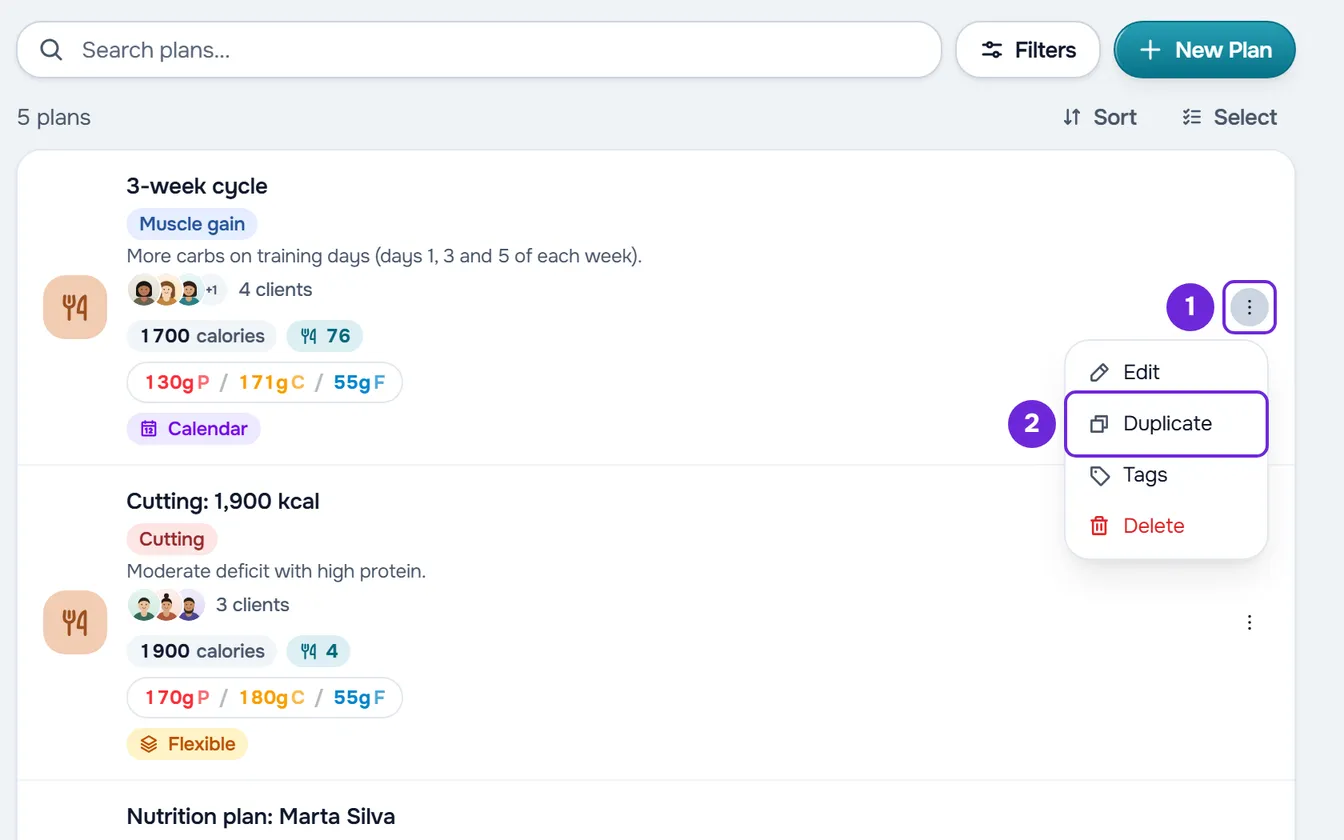
- Select Duplicate 2.
“Meal plan duplicated” appears and the list reloads. The copy has the original's name followed by “(Copy)” and shows “No clients”. Unless you chose another sort order, the newest plans come first, so the copy is at the top of the first page. To give it to a client, see Assign a meal plan to one or more clients.
The copy's name
- If you duplicate a copy, the number goes up instead of another suffix being added: “Cutting (Copy)” becomes “Cutting (Copy 2)”, and that one becomes “Cutting (Copy 3)”.
- The number comes from the name of the plan you duplicate, not from the copies that already exist: duplicating the same original twice gives two plans named “Cutting (Copy)”. To change the name, see Change a meal plan's name, cover and duration.
- A plan's name has at most 100 characters. If the original has more than 93, the “(Copy)” is cut off at the end.
What the copy includes
The copy is a new, independent plan, created in a single step. This table shows what passes from the original to the copy.
| Part of the plan | In the copy |
|---|---|
| Description, color, icon and cover | Same as the original. |
| Tags and private note | Same as the original. |
| Mode | The same as the original. |
| Duration | The same. If there are meals in weeks beyond the duration, the copy is made longer to cover the last of those weeks. |
| Daily goals | The same, including the ones you adjusted for a single day or week only. |
| Meals | All of them, with each one's name, time, day, period and note. |
| Foods | All of them, with each one's quantity, note and substitutions. |
| Meal options | All of them, with their foods. |
| Calendar mode periods | The copy does not keep the switch: it turns the periods on if any copied meal is in the morning, afternoon or evening. A plan with no meals opens with the periods off. |
| Assigned clients | None. The access dates and what you set for each client stay in the original only. |
| Clients' logs | None. |
Common problems
I don't see Duplicate in the row menu
In a team workspace, Duplicate only appears with the Nutrition > Create permission. Ask the team owner for it. See Team members and permissions. If the owner removes the permission while the page is open, the server refuses the copy with “You don't have permission to do this in this team.”: refresh the page.
“You have more active clients than your plan allows. Choose which to keep or upgrade your plan.”
While the account has more active clients than the subscription allows, MyFitnessClient does not let you create or change meal plans, and the copy was not created. See You have more active clients than your plan allows.
“Not found.”
The plan was deleted after the list loaded, for example in another browser tab or by another team member. Refresh the page: the plan no longer appears on the list.
The copy does not appear on the list
The list reloads the page you are on, with the sort order and filters you had. On another page or with another sort order, look for the copy by name. With the Client filter set to “With client”, the copy does not appear, because it has no clients: clear the filters.
If this did not solve it, contact support with the plan's name, the exact message and the approximate time.
Questions
Is the copy linked to the original?
No. They are two independent plans: what you change in one does not change the other, nor what the other plan's clients receive.
In a team workspace, who does the copy belong to?
To the workspace you are in, like the original: whoever sees the meal plans there also sees the copy. For the other members, the copy's row shows “Created by” followed by your name.