
This happens when you look in Nutrition for where to log the water you drink, or where to give a client a water target, and can't find it. It isn't an error or a hidden option: the meal plan, the daily goals, the meal log and the shopping list have no water counter or water target, on the website or in the app.
Water is logged in Habits, with a habit that has a goal per day in liters, ml or glasses.
If you are a professional: create the habit and assign it
You create and assign the habit on the website. In a team, you need the Manage permission for Habits.
- In the side menu, select Habits.
- Select Create Habit. The New Habit window opens.
- In Habit name 1, type the name, for example “Drink water”.
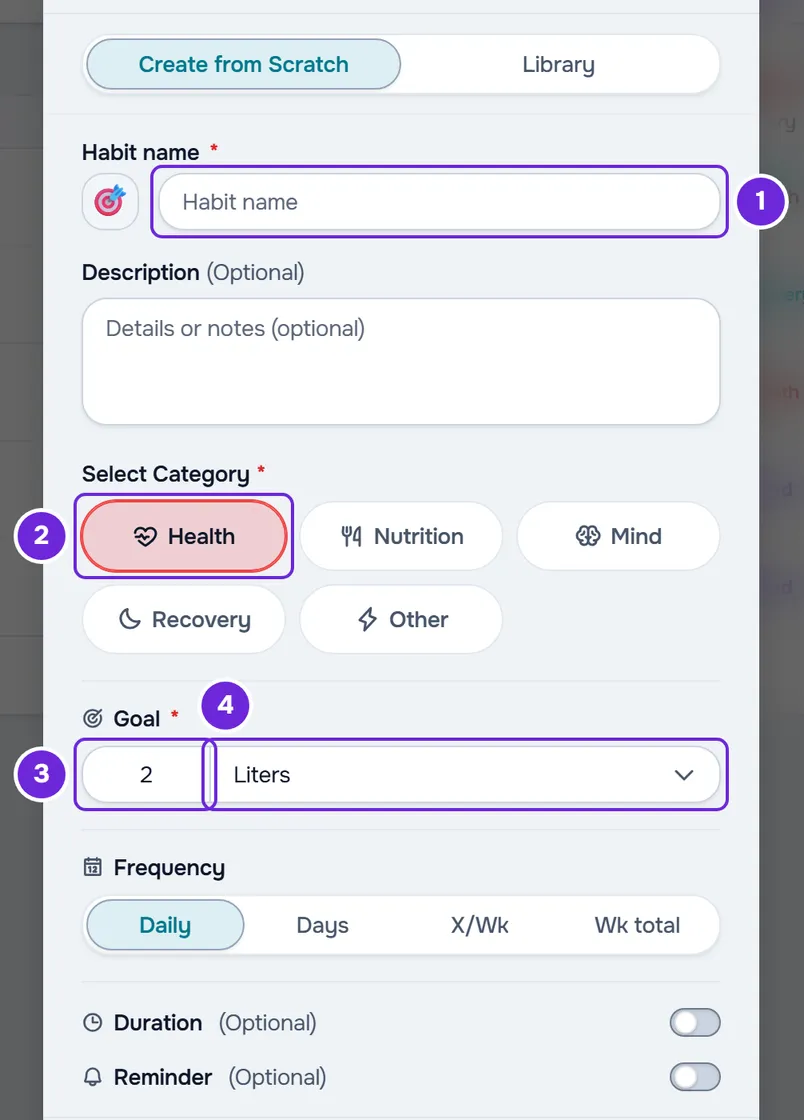
- In Select Category, choose a category, for example Health 2.
- In Goal 3, type the amount per day and, in Select unit 4, choose the unit: 2 with Liters, 2000 with ml or 8 with Glasses. Frequency is already set to Daily.
- Optional: turn on Reminder, choose the time and, in Reminder Message, type the text the client receives in the reminder.
- Select Create Habit. The habit appears in My Habits, with the message “Habit created”.
- On the habit's row, open the ⋮ menu, or right-click the row, and select Assign to clients.
- Choose the clients who will receive the habit and select the continue button, which shows the number of clients chosen.
- Confirm the start date and select Confirm. With several clients, the button also shows how many there are.
A message appears with the number of clients who received the habit. Each client gets a copy of the habit and sees it in Habits from the start date on. An active client gets the “New habit” notification in the bell and, with push notifications and Habit reminders turned on, also on their phone or browser. It isn't sent to a scheduled client or to a client whose plan with you doesn't include Habits.
If one of the chosen clients already has an active habit with the same name, assigned earlier, the message “If you continue, they end up with two identical habits.” appears first. Select Remove from list so the habit isn't assigned to them again, or Continue to assign it anyway.
How the client logs water
On the website and in the app, the client opens Habits and finds the habit in the category you chose. On each day, they log it in one of two ways:
- they select the habit's circle, which checks it off as done with the full goal;
- they select the pencil, type how much they drank, or use the − and + buttons or the shortcuts for 50%, 75% and 100% of the goal, and select Save.
The − and + buttons change the value according to the habit's unit:
| Unit | Example goal per day | How much each − or + changes |
|---|---|---|
| Liters | 2 | 0.1 |
| ml | 2000 | 100 |
| Glasses | 8 | 1 |
The saved value is the day's total and isn't added to the previous one: the pencil opens with the value already logged, and what the client saves replaces it. The habit is done on the day the value reaches the goal. Selecting the circle of a habit that is already done unchecks it and sets that day's value to zero.
Water stays in the habit history and doesn't go into the meal log or the day's calories and macros. To follow the logs, open the client's profile and select the Habits tab.
If you are a client and have no water habit
First check in Habits whether your professional has already assigned you one. If not, you can create a habit of your own: in Habits, select Create habit (the + button), fill in the name, the goal and the unit (on the website, the category too) and save. The units are the same: Liters, ml and Glasses (in the app, Litres, ml and Glasses), and you log water with the circle or the pencil. In the app, creating your own habits is available in the latest version of the app. You can have up to 50 habits created by you.
What has “water” in its name and isn't a log
- “Water (L/day)”, in the health questionnaire, under Lifestyle, is an answer about how much someone drinks per day. It isn't a daily log.
- Water (%) or Water, in progress check-ins and in the body composition of assessments, is the body's total water as a percentage of weight.
- Water, in foods, is a subcategory of Beverages. A water added to a meal counts as a food in that meal and doesn't add to a water total for the day.
Write the water target in the meal plan
The meal plan has no field for water. For the client to read the target next to the meals, write it in a meal's note: in the plan editor, on the meal card, select Add Note and type, for example, “Drink 2 L of water throughout the day”. The client reads the note on that meal's card, on the website and in the app. The note is text only: it has no log and no reminder.
If this did not solve it
If the client can't see the habit you assigned to them or the reminder doesn't arrive, see Common problems with habits and how to fix them. If you are a client, see Common problems with your habits and how to fix them.
For another problem with the website or the app, write to the MyFitnessClient team using the contact shown at the end of the Help Center home page (in the app, on the “Problems with the app” line). Include:
- the habit's name and, if you are a professional, the client's name;
- where it happened: on the professional's website, on the client's website or in the app;
- the exact message, if one appears, and a screenshot.