
The Habits page shows the habits your professional assigned to you and the ones you created. You only log the ones from your professional: they are the one who changes the dates, the days, the goal and the reminder time. Your own habits are in your habits list, where you edit, pause and resume them: on the web, the Manage my habits link at the end of the Habits page; in the app, the My habits row.
“No habits assigned” or a habit is missing from the list
On the web, the page shows “No habits assigned”; in the app, “No habits yet”. Under it you see “No habits for today yet. Create your first one or wait for your professional's.” and the Create habit button. A single habit can also be missing from the list.
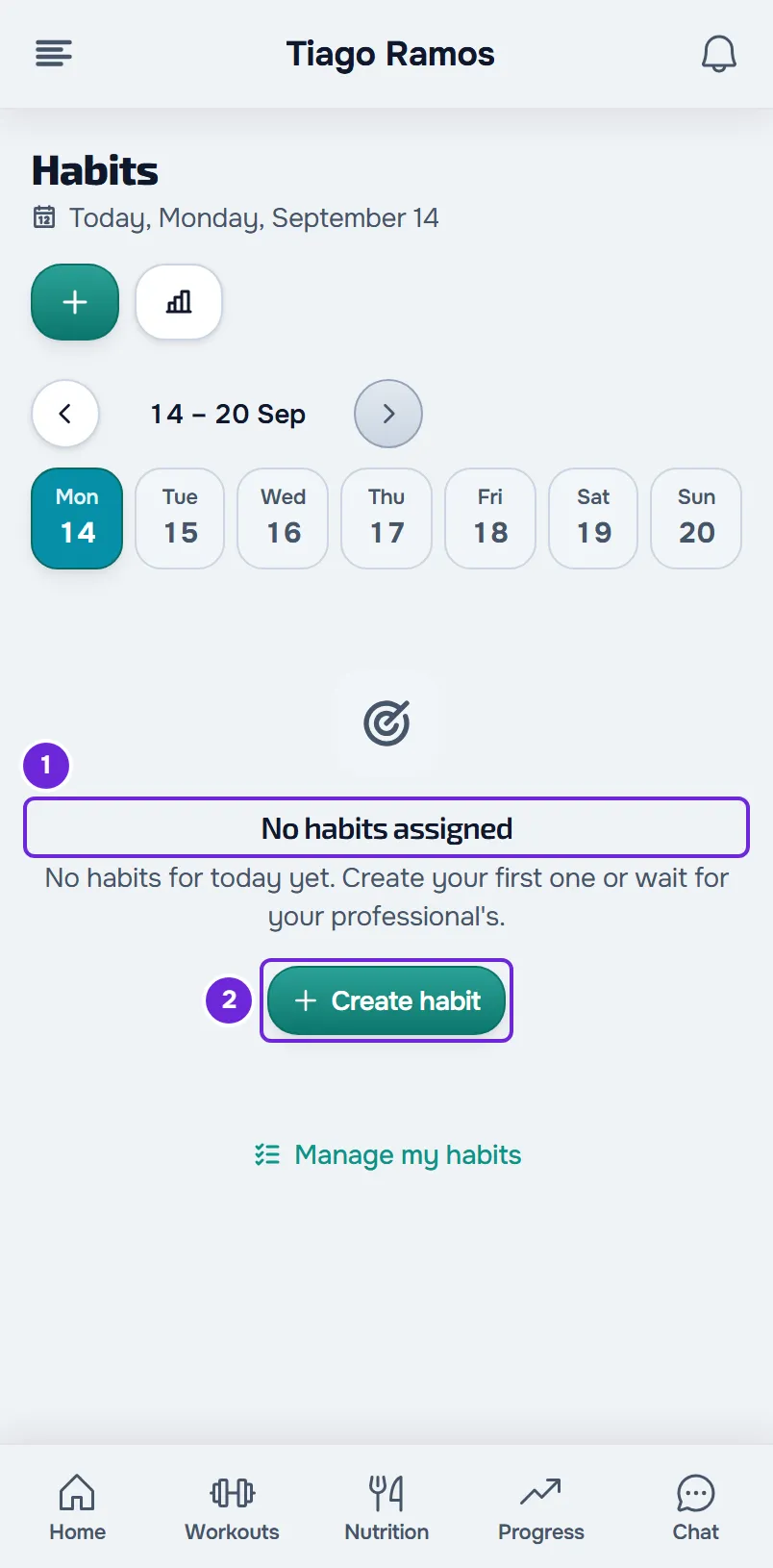
A habit appears in a day's list when it isn't paused, the day falls between the start date and the end date and, for a Specific days habit, it is one of the chosen days. Daily, X per week and Weekly total habits appear every day.
| Cause | What to do |
|---|---|
| Your professional hasn't assigned you any habits yet. | Wait for theirs or create one of your own with Create habit. |
| The habit hasn't started yet or has already ended. | If the habit is from your professional, ask them to change the dates. If it's yours, change them in your habits list. |
| Your professional deleted the habit. | Talk to your professional. |
| The habit is a Specific days habit and today isn't one of the chosen days. | Nothing: the habit comes back on the next chosen day. |
| The habit is yours and it's paused. | In your habits list, the habit has the Paused label. Resume it there. |
| The plan you have with your professional doesn't include Habits. In that case, only the habits you created appear. | Talk to your professional. |
Your habits list has every habit you created, with the Active or Paused label. A habit past its end date stays Active, but leaves the day's list. About a plan without Habits, see “Not in your plan”: a section of the app has disappeared. If your access to your professional is closed and the list is empty, the page shows the access notice instead of these messages: see Access statuses: scheduled, ended and inactive.
The circle opens a window instead of checking off
The habit is a Weekly total habit: the goal is the sum for the week, Monday to Sunday, and you spread the amount over the days as you like. That's why the circle opens the value window, where you log how much you did that day. The habit is done when the week's sum reaches the goal. This is the normal behavior.
The streak went back to zero
The streak is the number with the flame next to the habit's name. It counts the days in a row on which you did the habit or, for X per week and Weekly total habits, the weeks in a row in which you met the goal. Neither today, while the habit is still to do, nor the current week breaks it. The streak goes back to zero when:
- a day is missed: for a Daily habit, a day without the habit done; for a Specific days habit, one of the chosen days (the other days don't count);
- for a Daily or Specific days habit, you used the pencil to log a value lower than the goal: the day keeps that progress, but doesn't count as done;
- in a week that has already ended, the days done fell short of the times per week of an X per week habit, or the sum fell short of the goal of a Weekly total habit.
If the missed day was 7 days ago or less and you did the habit, log it as in the next section: the streak is calculated from your logs and starts counting it. For a habit from your professional, only they can correct an older day; for a habit of your own, an older day can no longer be corrected.
I can't log a day that has passed
You can log today and the previous 7 days. In the app, this is available in the latest version of the app. The day strip, under the title, shows a week from Monday to Sunday. To log an earlier day:
- In the menu, select Habits.
- If the day is in the previous week, select the arrow before the week's dates, over the day strip.
- In the day strip, select the day.
- Check off the habit's circle, or select the pencil to log the value.
The date under the title changes to that day. To go back to today, select Today, over the strip, or today in the strip.
Days before those 7 and days after today are inactive in the strip. On an earlier day, only the habits that had already started on that day appear, and a paused habit doesn't appear on any day. For an older day: for a habit from your professional, talk to them, as they can correct it on their side; for a habit of your own, it can no longer be corrected.
“You already have the maximum of 50 habits of your own.”
This appears when you try to create a habit and you have already created 50. Every habit you created counts, paused ones included; your professional's habits don't count.
To create another one, delete one of your habits in your habits list. Pausing doesn't free up a spot. Deleting also erases all the logs of that habit, and there is no way to recover them.
I didn't get a habit reminder
A habit with a reminder time notifies you at that time, once a day, if you haven't checked it off yet. Habits without a time go into a morning notification that tells you how many habits you still have to check off. That notification is only sent if you have active coaching with a professional, with your access open on that day.
| Cause | What to do |
|---|---|
| The Habit reminders switch is off. When it's off, no habit reminder is sent, and neither is the morning notification. | In Settings > Notifications, turn on Habit reminders. |
| The habit has no reminder time. | If the habit is yours, edit it in your habits list and turn on Reminder. If it's from your professional, they set the time. |
| You had already checked off the habit that day, or, for an X per week or Weekly total habit, the week's goal was already met. | Nothing: the reminder only tells you about what's left. |
| The habit is paused or outside its dates, or, for a Specific days habit, the day isn't one of the chosen ones. | See the first section of this article. |
| The habit is from your professional and the plan you have with them doesn't include Habits, or your coaching with them is no longer active. | The habits you created keep notifying you. About your professional's habits, talk to them. |
| You turned on the reminder, or changed the time, more than 15 minutes after the chosen time. | The reminder is only sent up to 15 minutes after the time. On that day it is no longer sent; the first one arrives the next day. |
| No device received the push notification: the phone or the browser is blocking notifications, or Push is off. | The reminder stays in the MyFitnessClient bell. To get push notifications again, follow the article linked next. |
For blocked notifications or Push turned off, see Not receiving notifications on your phone or in the browser.
A reminder can arrive up to 15 minutes after the chosen time. If it arrives hours early or late, the account has a different time zone. Reminders follow the time zone saved in your account, which the web and the app update with your device's time zone when you open them. After changing time zones, open MyFitnessClient.
The log isn't saved
On the web, when a log fails, the circle stays as it was and an error message appears, for example “Connection error.” when there is no connection. In the value window, the message is “Try again” and the window stays open with what you typed. Check your connection and try again.
In the app, each log is first saved on your phone and sent when there is a connection, so you can check off habits without internet. “Couldn't save” appears when the app doesn't have that day on your phone yet, for example a day you never opened with internet. Open Habits with internet and try again. If the app can't load your habits offline, see The app says “Offline” or takes a long time to load. If a log sent this way isn't accepted, the app leaves it to review: see Record “to review” or “The server did not accept this record”.
Values appear with a comma
MyFitnessClient shows numbers in the format of the language you use it in: in English, with a decimal point, as in “1.5 / 2 L”; in Portuguese, with a comma, as in “1,5 / 2 L”. The saved value is the same. In the value window in the app, you can type a comma or a point.
If this did not solve it
When the problem is a habit from your professional (the dates, the days, the goal or the reminder time), talk to them: they are the one who changes these. For a problem with the web or the app, write to the MyFitnessClient team using the contact shown at the end of the Help Center home page (in the app, on the “Problems with the app” line). Include:
- your professional's name and the habit's name;
- the day it happened;
- whether you use the web or the app;
- a screenshot.