
Before you start
- You need a supplement plan from your professional on the Supplements page. If the page does not appear or is empty, see The Supplements page is empty or missing.
- What the details show comes from your supplement plan and from the supplement library, and is read-only. To change the amount of a dose on one day, see Change a supplement amount for one day only.
Steps
To view a supplement's details:
- In the menu, select Supplements. The page opens on today's date.
- In the dose row, select the supplement name, the one with the small “i”. The details open, with the photo, the name, the form and the brand at the top. The dose is not marked.
- In the About 1 tab (in the app, “About this supplement”), which opens first, read Max per dose, Type, Usage note and Anti-doping note. Each one only appears when the supplement has it.
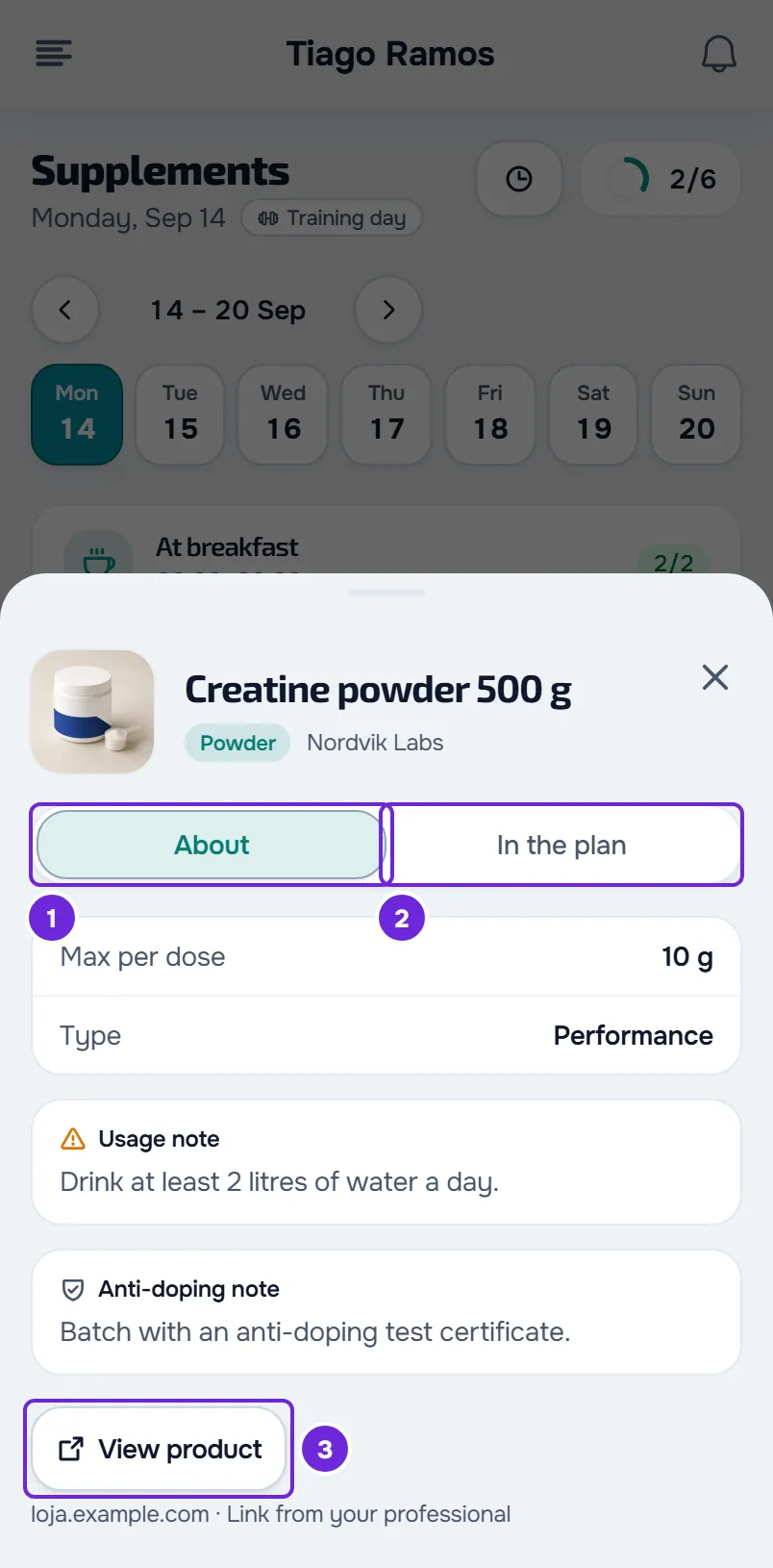
- Select the In the plan 1 tab to see what your professional asked you to do: Amount, Period, When and, when they apply, Days, Food, Never after and Frequency.
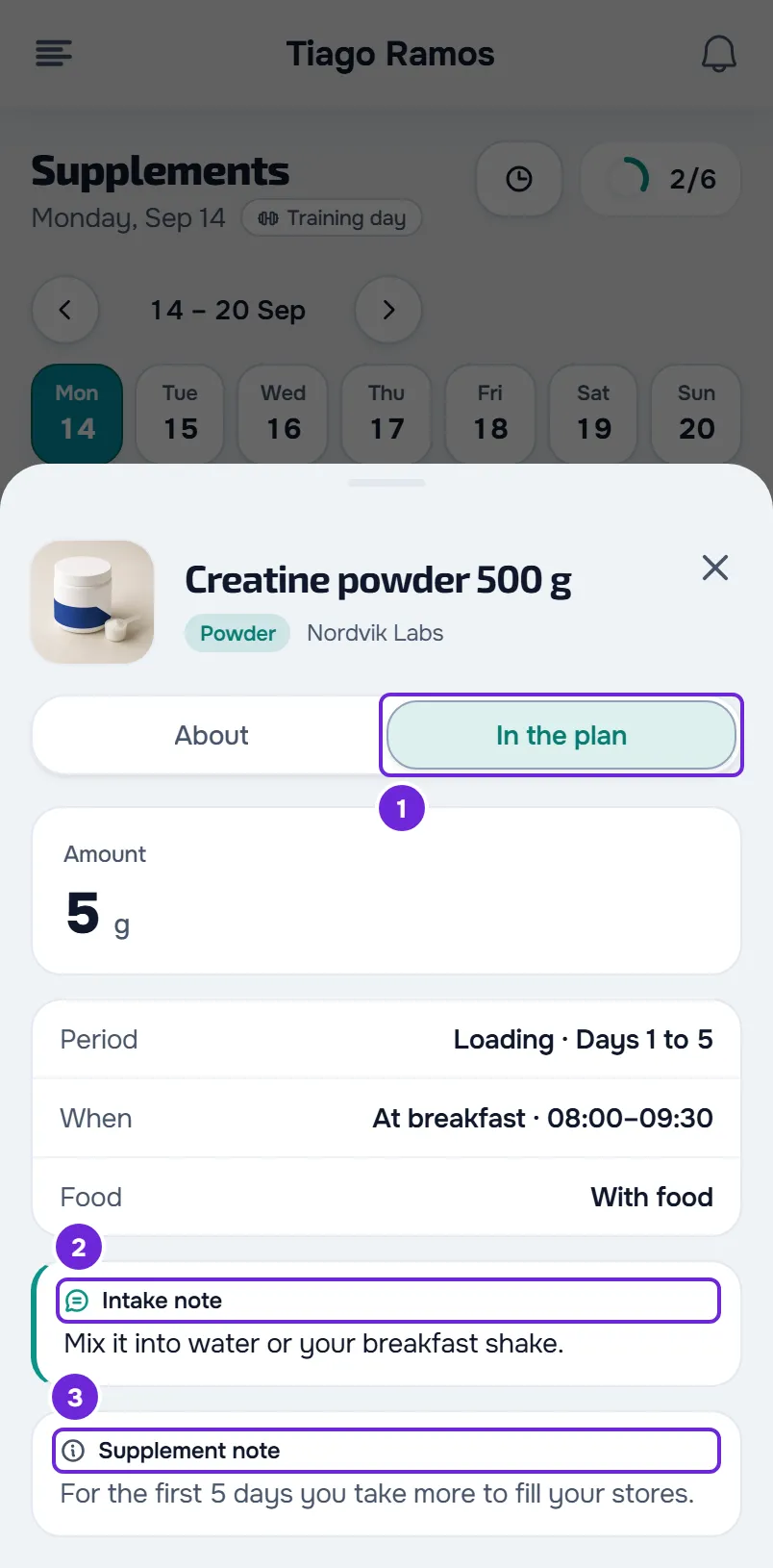
- In the same tab, read the Intake note 2 and the Supplement note 3, when your professional wrote them.
- Optional: to open the product page, go back to the About tab and select View product 3. Next to the button, you see the site address and “Link from your professional”.
You see what is known about the supplement and what your professional asked you to do. Closing the details does not change the plan or the doses you marked. The details open on any day, including a day that has not come yet.
On the web
- The details open in a window. If the supplement has a photo, select it to see it full size.
- View product opens the product page in another browser tab.
In the app
- The details open in a sheet, with the supplement name as the title. To see the photo full size, select it in the dose row.
- View product opens the link outside the app. If your phone cannot open it, “Could not open the link.” appears.
What each field shows
The details bring two sides together: in About, what the library says about the supplement, either the MyFitnessClient library or the supplements your professional created, and the product link they added to the plan; in In the plan, what your professional set up for you.
| Field | Tab | What it shows |
|---|---|---|
| Max per dose | About | The maximum amount per dose that the library gives for the supplement. |
| Type | About | Health, Performance or Sports food. |
| Usage note | About | A general indication of how to use the supplement, the same for everyone. |
| Anti-doping note | About | A text your professional wrote on a supplement they created. |
| Amount | In the plan | The amount of the dose on that day: the plan amount, or the one you changed for that day only. For a per-kilo dose, it is calculated with your most recent logged weight. |
| Period | In the plan | The plan period the dose is in on that day, for example “Loading · Days 1 to 5” or “Maintenance · From day 6”. |
| When | In the plan | The time of day and its time range, for example “At breakfast · 08:00–09:30”. Some times of day have no time range. |
| Days | In the plan | “Training days only” or “Rest days only”, when the dose is only for those days. |
| Food | In the plan | What the dose requires, for example “With food” or “On an empty stomach”. |
| Never after | In the plan | The latest time for the dose, for example 18:00. |
| Frequency | In the plan | How often it is taken, when it is not every day, for example “3 days per week” or “As needed”. |
| Intake note | In the plan | What your professional wrote for this dose. |
| Supplement note | In the plan | What your professional wrote about the supplement. It is the same in all of its doses. |
If a dose is per kilo and you have no weight logged, Amount shows the per-kilo dose, for example “3 mg/kg”, and “Your weight is needed to calculate the amount. Check with your professional before taking it.” (in the app, “An up-to-date weight is needed to calculate the amount. Check with your professional before taking it.”) appears. See “An up-to-date weight is needed to calculate the amount”.
Other places with the notes and the link
- In the dose row, under the name, you read the same notes: the dose note in a box with a speech bubble and the supplement note in a gray box with an “i”. When there is a link, the View product button also appears there. See Mark your supplement doses for the day.
- At the end of the page, the Plan products collapsible section gathers the links from your supplement plans running on that day, even on a day with no doses, and shows how many there are. Select it to open it: each product has its photo, its name and View product.
Common problems
The details have no tabs
When the library has nothing about the supplement and there is no product link, the details go straight to what is in the plan, without the About and In the plan tabs. This happens, for example, with a supplement your professional created without that information. There is nothing to fix.
The View product button does not appear
Your professional did not add a link to this supplement in the plan, or the link is not valid: the button only appears for a full link that starts with https://, is up to 2048 characters long and has no spaces, user name or password. Ask your professional to add or fix it. The other limits are in Supplement limits and what is not available.
I don't see the Plan products section
It only appears when at least one supplement in your plans running on that day has a valid link. On the web, it also does not appear when the page cannot load the day and shows an error card: select Try again.
“Could not open the link.”
This happens in the app, when your phone cannot open the View product link. Select View product again. If it keeps happening, ask your professional for the link.
Questions
Are the notes from my professional?
Yes. The Intake note and the Supplement note are written by them in the plan; you only read them. The private notes they keep in the plan never reach you.
What does the Anti-doping note mean?
It is a text your professional wrote on a supplement they created themselves. MyFitnessClient does not check that text. If you have questions, talk to your professional.
Is the Usage note advice for me?
It is not calculated for you. For supplements in the MyFitnessClient library, it is a general sentence from the catalog; for supplements your professional created, they wrote it. What they asked you to do is in the In the plan tab. If you have questions, talk to your professional.