
Before you start
- You need active coaching with your professional in MyFitnessClient, and the plan you have with them must include Supplements.
- Your professional must assign you a supplement plan. If Supplements is not in the menu or the page opens empty, see The Supplements page is empty or missing.
Steps
To mark a dose as taken:
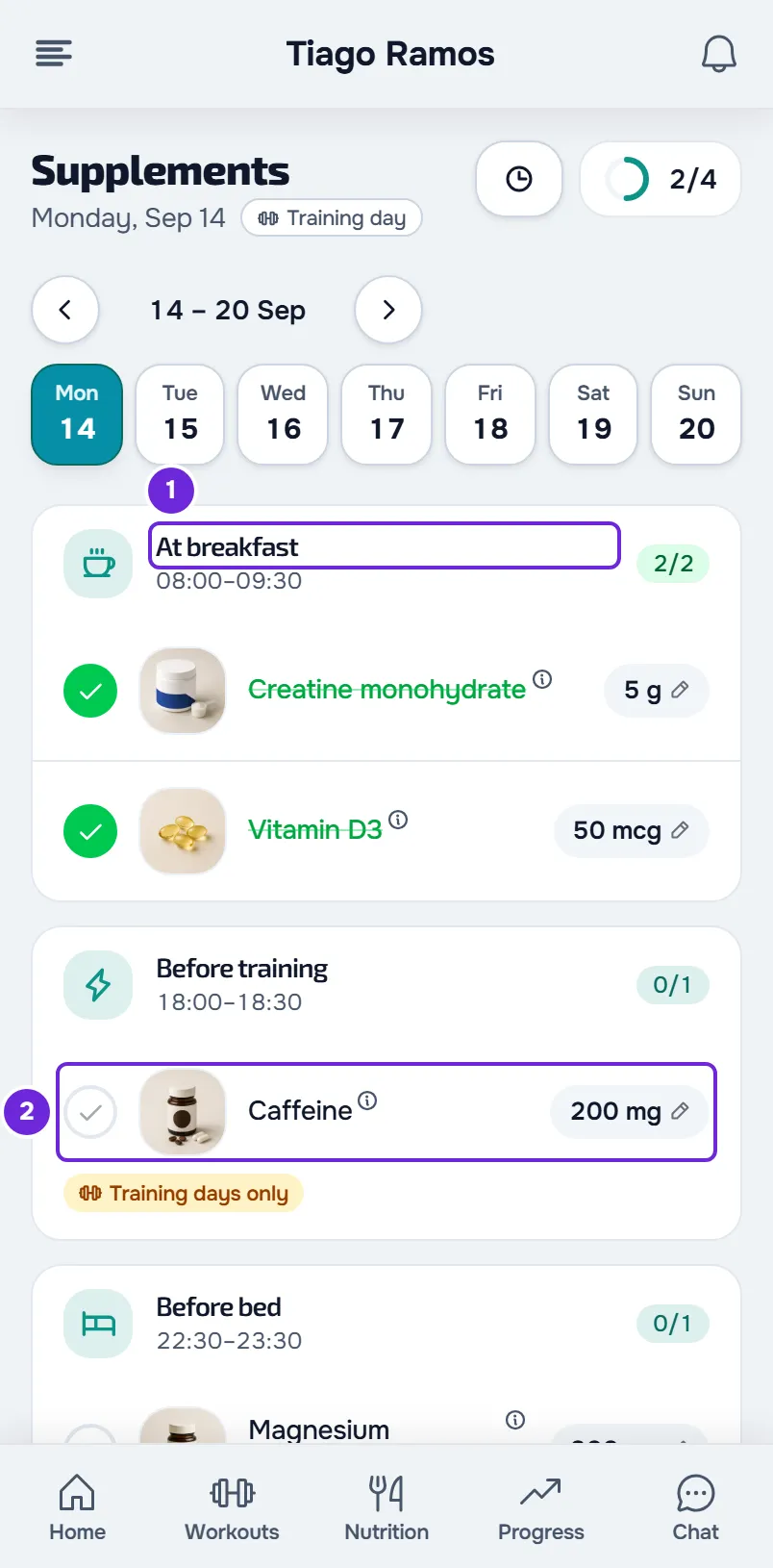
- If the menu is not showing, open it with the menu button in the header. The supplements entry is not in the bottom bar on your phone.
- In the menu, select Supplements. The page opens on today's date, with the doses grouped by time of day.
- Find the card for the time of day when you took the supplement, for example At breakfast 1. The card shows the time range for that time of day, when it has one, and how many doses you have already marked, for example 0/2.
- In the supplement row, select the circle or an empty space in the row 2. The circle turns green with a check mark and the name is crossed out.
- To undo, select the row again. The dose is unmarked again.
- Optional: on Home, in the Supplements card, select the circle for a time of day 1 to mark all the doses for that time of day at once. Select it again to unmark them.
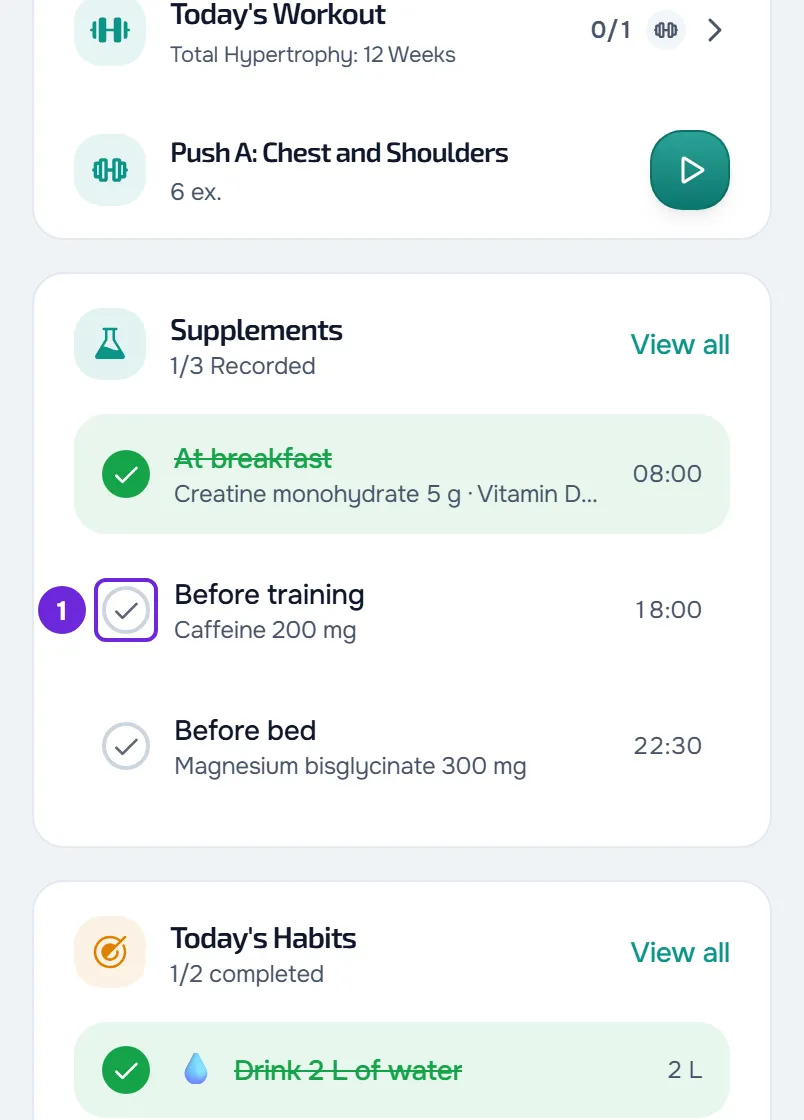
The count for that time of day goes up and the ring next to the title fills. When you mark all the daily doses for the day, the ring turns green and All taken appears at the end of the list.
You can also reach the page from the Supplements card on Home and by opening a supplement reminder or the “New supplement plan” notice. The Home card shows up to four of today's times of day; the others are on the page.
On the web
- The page reloads the day when you come back to it and every 60 seconds while it is on screen.
- Without a connection, the mark is not saved: an error notice appears and the page may show an error card with Try again.
- The Supplements card on Home shows, for example, “1/3 Recorded”, and View all opens the page.
In the app
- Marking a dose on the page gives a light vibration.
- Pull the list down to reload the day.
- In the latest version of the app, you can also mark doses without a connection: the mark is saved on your phone and is sent when the connection comes back. If the server does not accept it, see Record “to review” or “The server did not accept this record”.
- On the Supplements card on Home, the whole row for a time of day marks and unmarks it. The card shows, for example, “1/3 done”, View all opens the page and, with every time of day marked, the sentence “Today's supplements are complete.” appears.
What each part of the row does
Only the circle and the empty space in the row mark the dose. The rest of the row does other things:
- The photo enlarges the image. Without a photo, the square with the bottle marks the dose like the rest of the row.
- The name, with the small “i”, opens the supplement details. See View a supplement's details and open the product link.
- The amount, with the pencil, changes the amount for that day only. See Change a supplement amount for one day only.
- The tags and your professional's notes under the row do not mark the dose.
Common problems
The check mark went away on its own after I marked the dose
The mark was not saved and an error notice appears, for example when you have no internet connection. Check your connection and mark the dose again. In the latest version of the app, without a connection, the mark is saved on your phone and is sent when the connection comes back.
The dose has no circle or the circle is gray
On a day that has not come yet, the list is read-only: there is no circle and no pencil on the amount. Mark the dose on the day itself or later. See View or log supplements for another day.
If the circle is gray and you see “Your weight is needed to calculate the amount. Check with your professional before taking it.” (in the app, “An up-to-date weight is needed to calculate the amount. Check with your professional before taking it.”), the dose is per kilo of body weight and you have no weight logged yet. See “An up-to-date weight is needed to calculate the amount”.
I marked everything and “All taken” does not appear
The ring and All taken count the daily doses for every time of day. Go through the list and look for a time of day whose count is not complete, for example 1/2. Doses under As needed and Weekly goal do not count. A per-kilo dose with no weight logged cannot be marked: All taken only appears after you log your weight or enter today's amount for that dose.
The Supplements card does not appear on Home
The card only appears when you have daily doses today. It does not appear before the supplement plan starts or after it ends, on a day with only As needed or Weekly goal doses, or when the plan you have with your professional does not include Supplements. It can also stay hidden when it cannot load the day. Open the page from the menu to see the day; if it is empty, see The Supplements page is empty or missing.
Questions
Can my professional see what I mark?
Yes. Each dose you mark goes into your professional's records, on the day selected on the page, and unmarking it deletes that record. Your professional can also mark or unmark a dose for you.
I marked the wrong day. How do I fix it?
In the week strip, select the day you marked and select the dose row to unmark it. Then select the right day and mark the dose. You can mark today and days that have already passed.
What if I select the same dose several times in a row?
Your last choice is what gets saved. Changes are sent one at a time, so the check mark does not jump back halfway.
What do the ring and the Home card count?
The ring next to the title counts the daily doses marked out of the day's total, for example 2/4. The Supplements card on Home counts times of day, not doses: a time of day counts when all of its doses are marked.