
When it happens
Your professional can ask for a dose per kilo of body weight, for example 3 mg/kg. MyFitnessClient calculates the amount from your weight. As long as you have no weight logged, the dose looks like this:
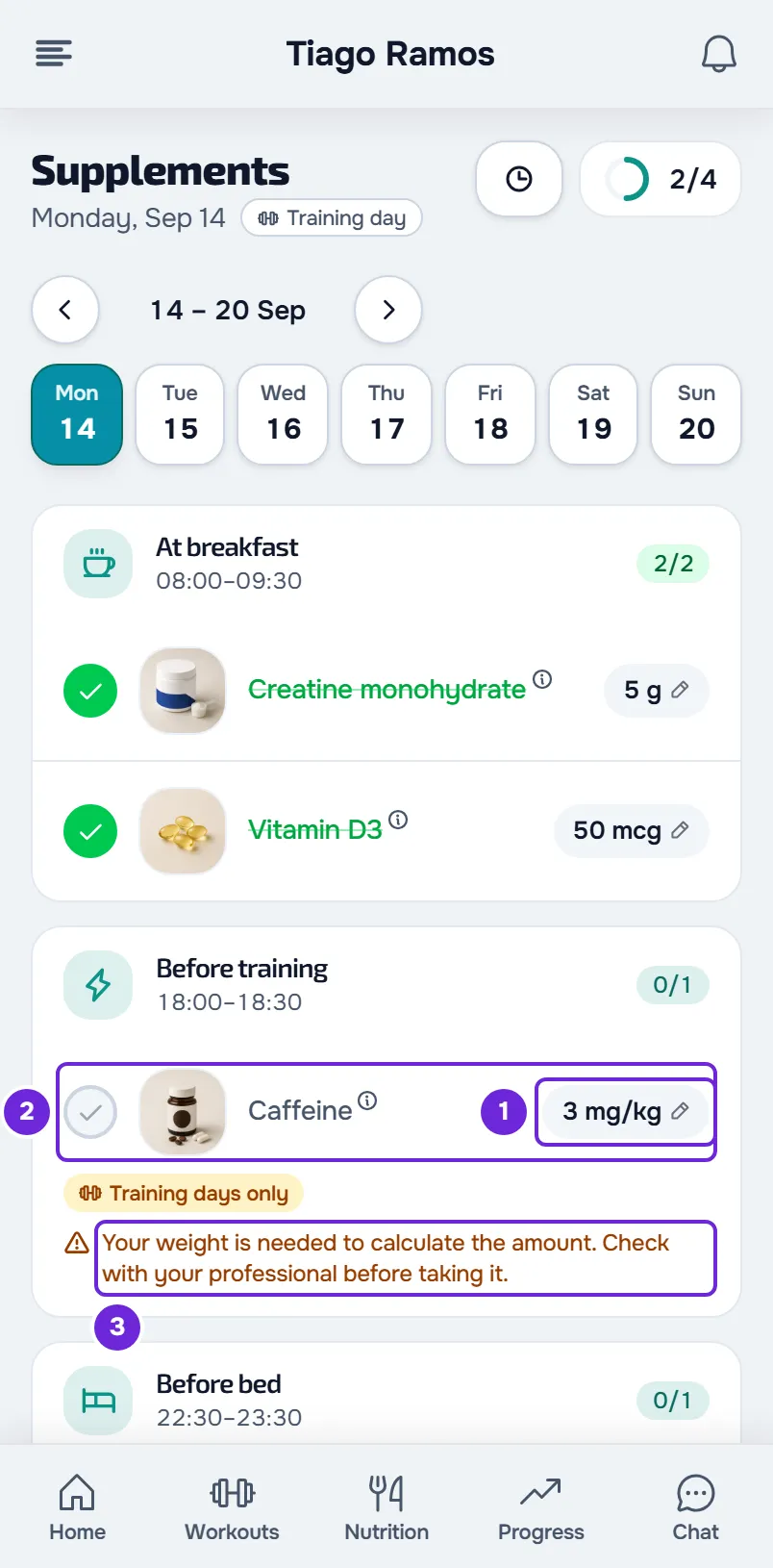
- On the Supplements page, the amount shows per kilo, for example “3 mg/kg”, instead of a value.
- The supplement name turns gray and the check-off circle is disabled: you can't mark the dose.
- Under the dose you see “Your weight is needed to calculate the amount. Check with your professional before taking it.” (in the app, “An up-to-date weight is needed to calculate the amount. Check with your professional before taking it.”) The same sentence appears in the supplement details.
- On the Supplements card on Home, the time of day that has this dose can't be marked and shows the same sentence. The other doses at that time are marked one by one on the Supplements page.
- If a check-off like this reaches the server, it is rejected and you may see “This dose depends on your weight. Log your weight to mark it as taken.”
Why it happens
The amount of a per-kilo dose is the plan's dose times your most recent weight. That weight comes from the Progress entry with a weight that has the most recent date: a check-in or a physical assessment that has not been deleted. What counts: the check-ins you do, the physical assessments you log yourself when your professional gives you access to that, and the entries they make for you. Any logged weight works, even an old one: the warning only appears when there is none. Without a weight, the amount can't be calculated and the dose can't be marked.
The calculated amount is rounded so it is easier to read: from 100 up, to the nearest ten; from 10 up, to the nearest whole number; under 10, to one decimal place. For example, 3 mg/kg at 82 kg gives 246 mg, which shows as 250 mg.
Log your weight
To have the amount calculated on its own:
- In the menu, select Progress.
- Select Check-in. In the app, while your Progress is empty, the button is called Do your first check-in.
- In the check-in that opens, enter your weight and send the check-in.
- Go back to the Supplements page. If the dose hasn't changed, reload the page on the website or pull the list down in the app.
The dose now shows the calculated amount, the warning goes away and the circle can be checked off. The weight applies to every day, including past days.
If you don't have Progress in the menu, don't have the Check-in button or your check-in doesn't ask for your weight, ask your professional to log your weight in a check-in or a physical assessment.
Enter today's amount
If you already know how much you took, you don't need your weight for that day. On the Supplements page, select the dose amount, the chip with the pencil, enter how much you took and select Done. The dose keeps that number on that day and can be marked.
- The first time, the field opens empty. While there is no weight, there are no one-tap amounts either, because the plan has no fixed amount to start from.
- It only applies to that day: the plan doesn't change and, the next day, the dose needs your weight again.
- While there is no weight, this dose has no Reset: to change the number, enter another one.
- You can only do this today or on a past day. Your professional sees the amount you entered and can also enter it for you.
See Change a supplement amount for one day only.
The warning stays after you log your weight
- You entered your weight in Settings, in your personal data. That weight doesn't count for supplements: log it in a check-in.
- The check-in you sent didn't include your weight. An entry without a weight doesn't count.
- You deleted the entry with the weight. A deleted entry no longer counts and the previous one with a weight applies, if there is one.
- The page still shows the day as it was before. Reload the page on the website or pull the list down in the app. On the website, the Supplements page also refreshes on its own every 60 seconds while it is on screen.
If this did not solve it
If you logged your weight in a check-in or a physical assessment and the warning stays after reloading, write to the MyFitnessClient team through the contact shown in the Help Center and send:
- the day and the name of the supplement;
- the date of the entry with your weight;
- whether it happens on the website, in the app or both;
- a screenshot of the warning.