
Before you start
- A monthly fee paid manually creates a payment each period, which you pay one by one. With Automate, the monthly fee becomes a Stripe subscription and you are charged automatically each period.
- The Automate button only appears when your professional receives online payments and the monthly fee can be charged on its own: a frequency between “Monthly” and “every 12 months”, or “Yearly”, and an amount within the limits for online payments (in euros, from €0.50 to €10,000). If it does not appear, see “Common problems”.
- If you marked this period's payment as paid and it is Awaiting confirmation, the first automatic charge is set for the start of the next period.
Steps
To switch a monthly fee paid manually to automatic payment:
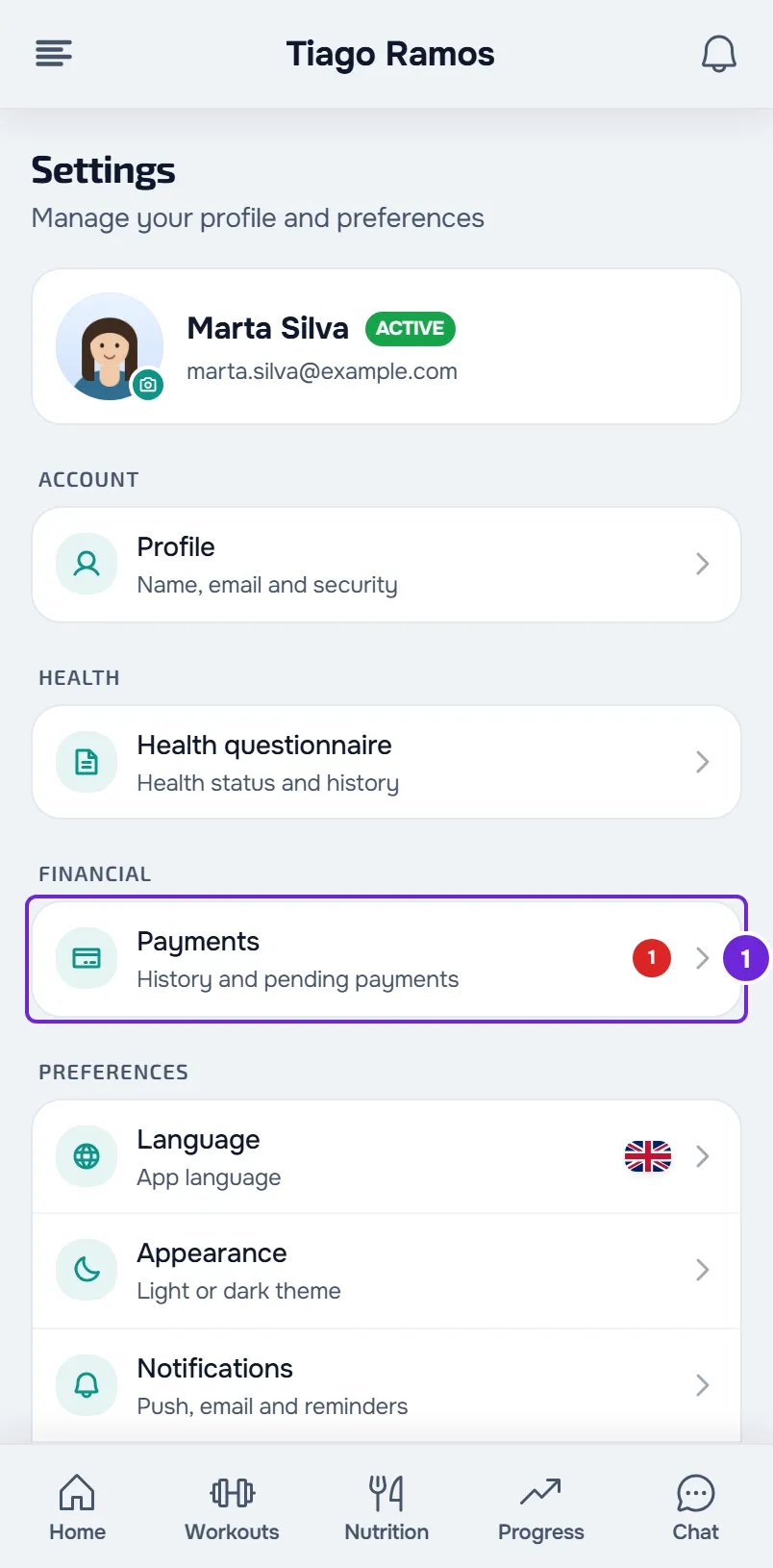
- In Settings, select Payments 1. If you don't know where Settings is, see Client settings: where to find each option.
- In the Your plan section, find the row with the Manual tag. It shows the amount, the frequency, for example “Monthly”, and, when they exist, the description and “Next” followed by a date.
- In that row, select Automate. MyFitnessClient creates a plan with the amount and frequency of the monthly fee and opens the Stripe payment page.
- On the Stripe page, check the amount, enter how you will pay and complete the subscription.
- When Stripe sends you back to MyFitnessClient, wait a few seconds: the page confirms the subscription up to 8 times, every 2 seconds, and shows Plan active.
- Select View payments or My plans. Both take you back to Payments.
In Your plan, the Manual row disappears and the plan appears with its name, amount and frequency. The monthly fee paid manually stops creating payments. If you leave the Stripe page without completing it, nothing is charged and the monthly fee stays manual.
In the app
- In the latest version of the app, the monthly fee is in Settings > Financial > Payments, on the Your plans card, with the Manual tag and the Automate button.
- Automate opens the Plans screen with the Confirm subscription window already open. Check the price, the First charge line, which says “today” or shows a date with “Nothing is charged today: the current period is already paid.”, and the Renews line. Select Subscribe and the Stripe page opens in your phone's browser.
- After you pay, go back to the app, which confirms the subscription on its own. If the plan still shows “Payment not finished” in My subscriptions, select Check.
- With the subscription active, the plan appears on the Your plans card with the Automatic tag.
When you are charged
The amount and frequency are those of the monthly fee your professional created: you don't choose or change them. The first charge is at the start of the first period you have not paid yet:
- If the current period's payment is Paid or Awaiting confirmation, the first charge is set for the start of the next period and you pay nothing today. If the next period starts in less than 49 hours, for example tomorrow, the first charge is made right away.
- If the current period's payment is Pending or Overdue, the first charge is made right away, unless you have already paid a later period: then it is set for the end of that one. If your professional has already asked you for the next period and that payment is Pending, the first charge is on the day that period starts, with the same 49-hour limit.
When the subscription becomes active, a Pending or Overdue payment of the monthly fee for the period the automatic payment now covers is cancelled. A payment for a period that has already ended and a payment that is Awaiting confirmation are not cancelled: they stay in Payments. After that, you are charged for each new period while the subscription is active.
Common problems
The Automate button does not appear
The Manual row appears without the button when the monthly fee cannot be charged on its own:
- The frequency is not between “Monthly” and “every 12 months” and is not “Yearly”, for example “Weekly”, “Daily”, “every 18 months” or “every 2 years”.
- Your professional does not receive online payments.
- The amount is outside the limits for online payments in the monthly fee's currency (in euros, less than €0.50 or more than €10,000), or that currency cannot be paid online.
In these cases, keep paying each payment as before. See Mark a payment made outside the platform as paid. If not even the Manual row appears, the monthly fee may belong to a plan or pack your professional gave you, which has its own card in the same section (see States and buttons of the Your plan card), or your coaching with that professional has ended.
“An online payment is in progress. Wait a few minutes and try again.”
On the website, Automate again reopens the Stripe page you left unfinished, for up to one hour. The message only appears if that page no longer opens: wait and try again. Until then, the plan appears in Your plan with “Payment not finished” and the Check button. If the earlier payment was completed, “Plan active” appears and you do not pay again.
“Online payments are not accepted yet.”
In the app, the message is “Payment setup isn't finished yet.” Your professional can no longer receive online payments. Keep paying manually and talk to them.
“This professional is closing their account and takes no new purchases or clients.”
Your professional asked to close their account and, until then, does not start any new subscription. Talk to them.
“Payment received” and the plan does not appear
If the confirmation takes longer than the 8 checks, the page shows “We're confirming with the bank. This usually takes a few seconds. You can close this page.” This is not an error: the plan appears in Your plan when the confirmation from Stripe arrives. Go back to Payments in a little while and, if it still does not appear, talk to your professional.
Questions
Can I change the amount or the frequency?
No. They come from the monthly fee your professional created. If they are not right, talk to them before you automate.
Does my professional know I switched to automatic payment?
Yes. When MyFitnessClient creates the plan from your monthly fee, they get a notification. They get another one when the first automatic charge is paid.
My professional invited me to automatic payment. What do I do?
You get the notification “Automatic payment available”. The plan they prepared appears under Available, with Subscribe (on the website, in the Your plan section; in the app, on the Plans screen), and the Manual row still has Automate: both lead to the same subscription. For the Subscribe steps, see Choose and pay for a plan from your professional.
Can I go back to paying manually?
Cancel the subscription, as explained in Cancel or resume your plan subscription, and talk to your professional: cancelling does not turn the monthly fee paid manually back on. When the subscription ends, your professional gets a notification that the monthly fee paid manually is still paused.