
This happens on a course page, on the website: the Buy course or Subscribe button is disabled, or, when you select it, a message appears instead of the Stripe payment page. If a message appears before the Stripe page, nothing is charged: you only pay on Stripe. Find the text you see in the tables.
The app does not sell courses. If the course page in the app says “This course is not available for purchase in this app.”, open MyFitnessClient in the browser and buy the course on the website.
The Buy course or Subscribe button is disabled
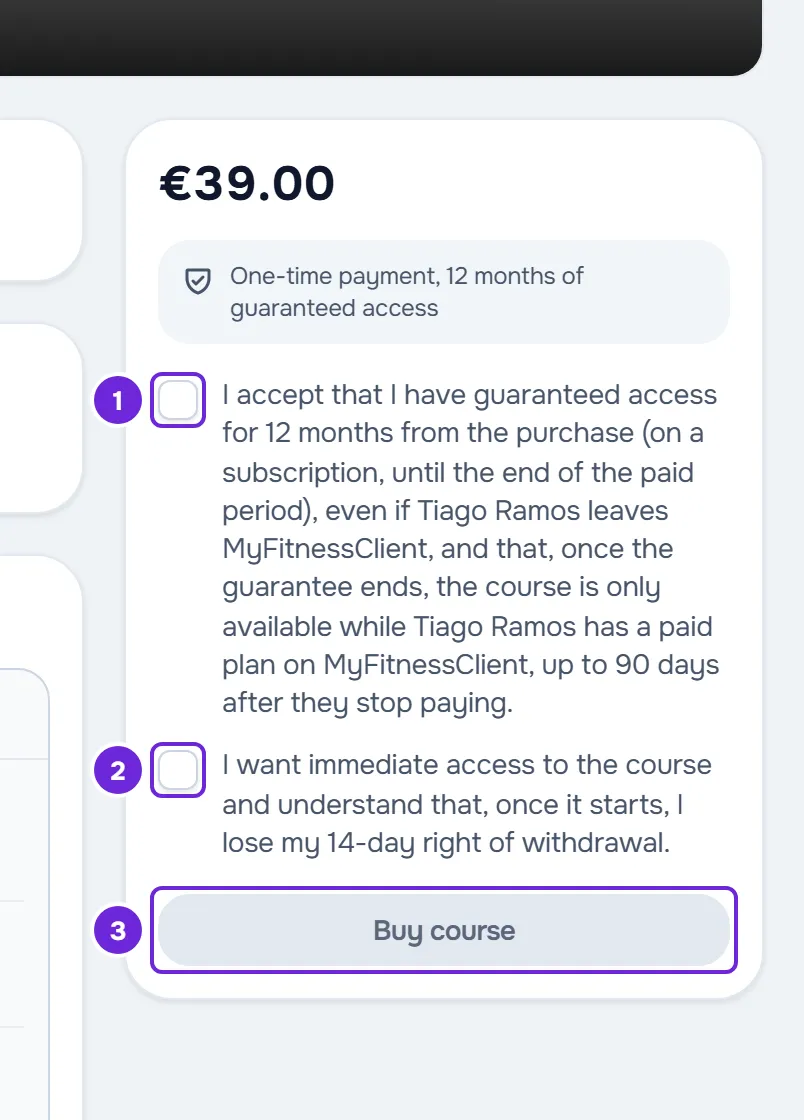
In the purchase panel, next to the button, the page shows a sentence about the status of the purchase.
| Sentence in the panel | Cause | What to do |
|---|---|---|
| “One-time payment, 12 months of guaranteed access” or “Access while the subscription remains active”, with two unticked boxes | The two confirmation boxes are not ticked yet. They start unticked on every course. | Tick both boxes. The button becomes active. |
| “Online purchase unavailable. Ask your professional for access.” | The professional does not sell this course online, for example a course that the card shows as “Free”, or cannot receive online payments right now. It also appears when you have already paid for this course and that payment was refunded or is in dispute. | Ask the professional for access: access they give you is not charged. If the payment was refunded or is in dispute, write to support. |
| “Your payment is being confirmed.” | A payment for this course is already under way: you paid and the confirmation has not arrived yet, or you opened the Stripe page and left without paying. | If you paid, wait for the confirmation. If you left without paying, the button becomes active again when that payment page expires, about 1 hour after you opened it. |
| “This subscription needs attention. Update payment or manage the subscription.” | Your subscription to this course has an overdue payment or is paused. | Select Manage subscription and update the payment on Stripe. |
To manage a subscription and see your receipts, see Manage a course subscription and view receipts.
Messages when you select Buy course or Subscribe
The message appears in a notice and the page stays as it was. Nothing is charged and you can try again.
| Message | Cause | What to do |
|---|---|---|
| “Tick both confirmations before buying.” | The request arrived without both boxes ticked. | Tick both boxes and try again. |
| “You already have access to this course.” | You already have access to the course, for example because the professional gave it to you, or because you bought it in another window, after you opened the page. | Reload the page. The button changes to Open course. |
| “You already have a subscription to this course.” | Your account already has a subscription to this course: active, awaiting confirmation, with an overdue payment or paused. | Reload the page. If the subscription has an overdue payment, use Manage subscription. |
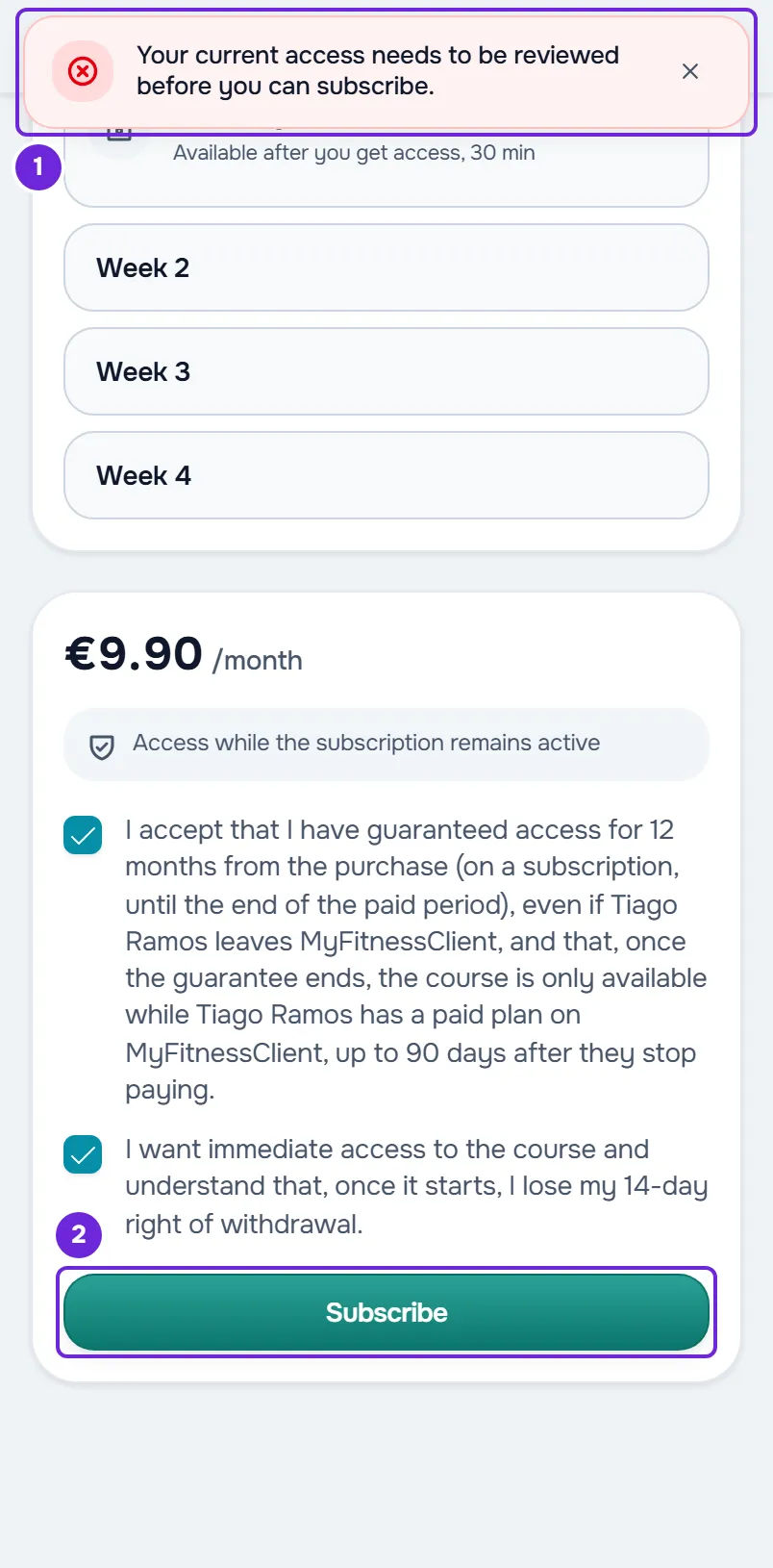
| “Your current access needs to be reviewed before you can subscribe.” | You already had access to this course another way and that access was paused or ended. | Talk to the professional. See the next section. |
| “Complete the required course first.” | The professional requires you to complete another course before this one. | Complete that course. If you do not know which one it is, ask the professional. |
| “This course has no places left.” | The course has reached the maximum number of clients the professional set. Clients with access and payments still in progress both count. | Talk to the professional. You can also try later: the place held by a payment that nobody completed becomes free again when that payment expires. |
| “The previous checkout is still closing. Try again shortly.” | An earlier attempt is still being prepared or closed. | Wait a few minutes and try again. |
| “The previous checkout expired. Try again.” | The payment page you opened earlier is no longer valid, for example because the price changed in the meantime. | Select the button again. A new payment page opens. |
| “The payment is still being processed.” | You already paid on the Stripe page and the confirmation has not arrived yet. | Do not pay again. See the section “I paid and the course does not open”. |
| “The course changed meanwhile. Refresh and try again.” | The professional changed the course, for example the price, the payment type or who can see it, or your coaching with them changed, at the moment you selected the button. | Reload the page and try again. |
| “We could not find this course. It may have been deleted or republished.” | The course is no longer available to you: it was deleted or unpublished, it is no longer visible to you, or your coaching ended. | Talk to the professional. |
| “This course is not for sale.” | The professional stopped selling this course online after you opened the page. | Ask the professional for access. |
| “Online payments are unavailable.” | The professional cannot receive online payments right now. | Talk to the professional. |
| “This purchase needs to be reviewed by support.” | You already paid for this course and that payment was refunded or is in dispute. | Write to support. |
| “This subscription needs to be reviewed by support.” | Your subscription to this course is in dispute. | Write to support. |
| “Buying this course is temporarily unavailable.” | A problem with the sale setup prevents the purchase. | Try again later. If it continues, write to support. |
| “The purchase could not be started.” | The Stripe payment page never opened. | Try again. If it continues, write to support. |
| “No connection to the server. Check your internet and try again.” | The request did not reach the server: you are offline or the connection failed. | Check your connection and try again. |
| “Online purchase unavailable”, with no other text | Another problem: more than 10 attempts in the same minute, the server took too long to respond, the professional is closing their account, or Courses is no longer in your plan. | Wait a minute and try again. If it continues, talk to the professional. |
For the full purchase flow, see Buy or subscribe to a course.
“Your current access needs to be reviewed before you can subscribe.”
This happens on a course sold by subscription when you already had access to that course another way and that access was paused or ended: the professional gave you access, for example when the course was not on sale yet, or you bought the course before. The page still shows the Subscribe button and the message only appears when you select it. Nothing is charged or saved, and no button lets you fix this yourself: only the professional can change that access.
The professional can resume your access: you get the course back without paying and do not need to subscribe. If the access did not come from a purchase, they can also remove you from the course. After that you can subscribe, but you start from scratch.
To get the course back:
- Send your professional the name of the course and the message you saw.
- If they resumed your access, open the course in Courses > My Courses. You pay nothing.
- If they removed you from the course, open Courses > Discover and select the course card.
- On the course page, tick both confirmation boxes.
- Select Subscribe.
The Stripe payment page opens. After you pay, the course appears in My Courses, without your previous progress.
With a one-time purchase this message does not appear: when you pay, your previous access becomes active again and your progress is kept. While the access is paused or ended, the course does not appear in My Courses; see Course does not open, shows as paused or a lesson cannot be completed.
I paid and the course does not open
After you pay, Stripe takes you back to the “Confirming payment” page, which checks the payment for about 1 minute. When the payment is confirmed, the page changes to “Purchase confirmed” and the course opens by itself.
- “Confirmation is taking longer”: the confirmation has not arrived yet. Do not pay again. Access activates by itself when the confirmation arrives, even if you close the page. Select View my courses and check again later.
- “Could not verify”: the payment was not completed or could not be confirmed. Check whether the course is in My Courses in a few moments.
Until the confirmation arrives, the course page says “Your payment is being confirmed.” and the button is disabled. If a long time passes and the course does not appear in My Courses, write to support with the name of the course and the time of the payment.
The Discover tab is empty or shows Payment overdue
- “No courses available”: your professional has no course you can see. A course appears in Discover when it is published, the professional shows it to all active clients or chose it for you, and your coaching with them is active. Ask them if they have courses for you.
- “Payment overdue”: you have an overdue payment to your professional. The Discover tab and the course pages are locked until the payment is settled. The courses you already have stay open in My Courses. The button on the screen takes you to your payments: Pay now, if the professional receives online payments, or View payments.
To settle the payment, see Payment overdue: what is paused and how to settle it.
If this did not solve it
Talk to your professional first: almost every cause depends on them. If it is an error, write to MyFitnessClient support at [email protected] with the name of the course, the exact message, the approximate time and, if you paid, the time of the payment.