
Before you start
- You need active coaching with your professional and a supplement plan assigned by them. If the plan you have with your professional does not include Supplements, you do not get reminders. If the Supplements page does not appear or is empty, see The Supplements page is empty or missing.
- Reminders arrive by push, the notification on your phone or computer screen. If you get no push notifications at all from MyFitnessClient, see Not receiving notifications on your phone or in the browser.
- The Supplement reminders switch is on by default.
Steps
To turn supplement reminders on or off:
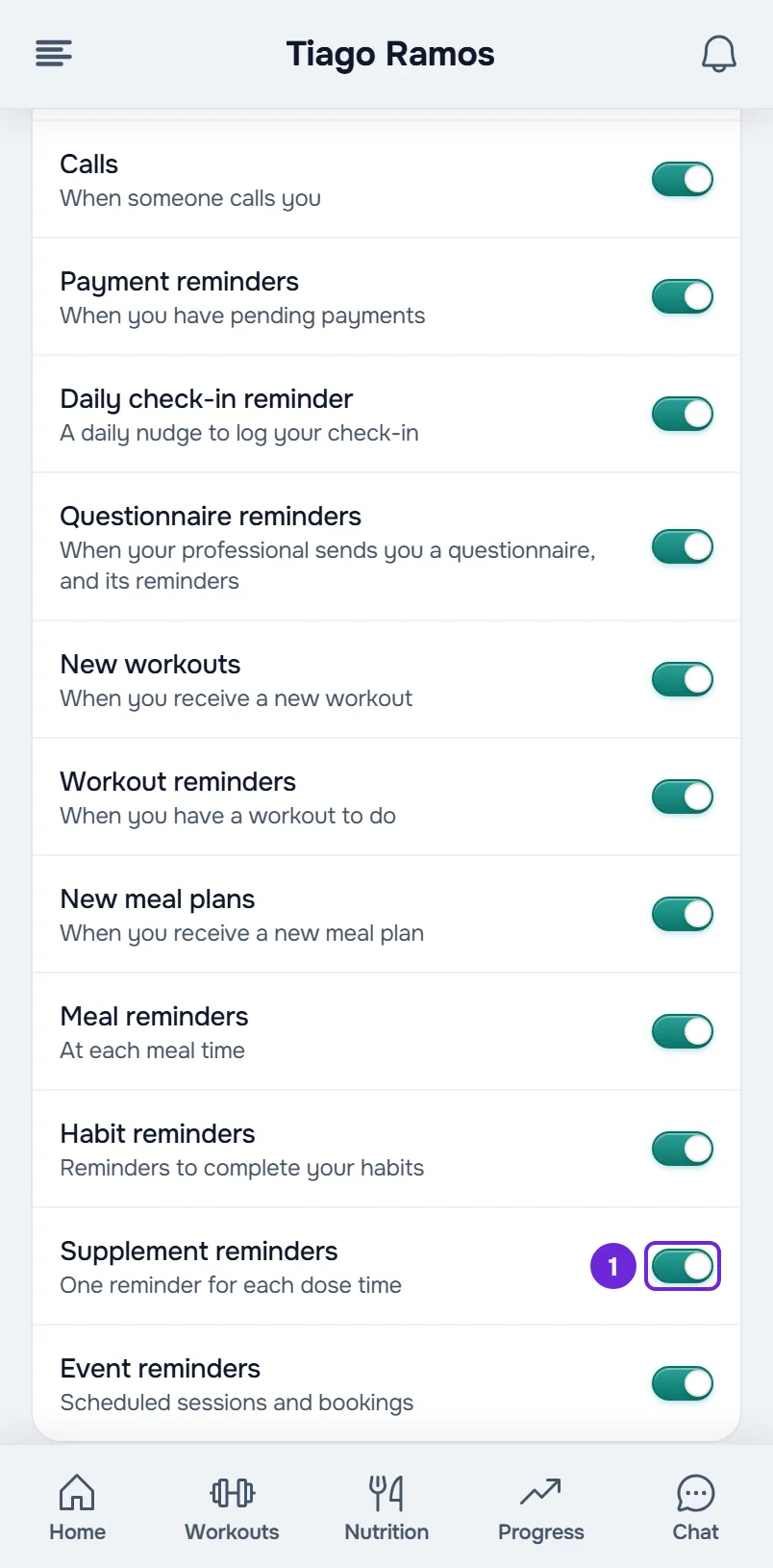
- Open Settings. If you don't know where they are, see Client settings: where to find each option.
- Select Notifications.
- In the list of notification types, turn Supplement reminders 1 on or off. The change saves right away and applies to your account, on all your devices.
- If you turned the reminders on, check at the top of the same screen that Push is on. Push is set per browser and per phone: turn it on for each device where you want to get the notifications.
With both on, you get “Supplements to take” at the times of day set for your doses, with the time of day and the number of doses still to mark. With Supplement reminders off, you stop getting these reminders and the push for the “New supplement plan” notification, on all your devices. If the change does not save, the switch goes back to where it was and an error message appears: try again with an internet connection.
When you get the notification
The notification goes out per time of day, never per supplement: three supplements at breakfast give a single notification.
| Time of day | When you get the notification |
|---|---|
| A time of day with a time range, such as At breakfast or Before bed, or a dose with a specific time | At the time when the range shown on that time of day's card starts and, if any dose is still unmarked, again at the time it ends. |
| With a meal, With the largest meal, Any time and Split throughout the day | At your lunch time and, if any dose is still unmarked, at your dinner time. |
| Before training | Like a time of day with a time range, in a range that sits before the time of today's workout. With no workout time, there is no notification. |
| During training | When you start a workout in MyFitnessClient. Only once a day, even if you do two workouts. |
| After training | When you finish a workout in MyFitnessClient and, if any dose is still unmarked, at the end of that time of day's range. A workout saved more than 3 hours after it ended does not send this notification. |
Times follow your account's time zone and come from your supplement times: see Set your supplement times. What each time of day means is in Times of day, tags and sections in your supplement day.
What the notification says
The title is always “Supplements to take”. The text only counts the doses you have not marked yet:
- “At breakfast: 2 doses”, in the first notification for a time of day.
- “At breakfast: 1 dose left” or “At breakfast: 2 doses left”, in the second notification for the same time of day.
- “Now: 3 doses”, when several times of day come due in the same minute. A single notification comes with the total.
- “At 10:00: 1 dose”, for a dose with a specific time.
Selecting the notification opens the Supplements page, where you mark your doses: see Mark your supplement doses for the day. Reminders only arrive by push and do not stay in the bell. If the device is offline for more than 1 hour after the notification time, that notification no longer appears.
What never sends a notification
- Doses under As needed and Weekly goal.
- A time of day with all its doses marked. Marking the last dose of a time of day silences the next notifications for that time of day.
- Doses for training days only or rest days only, on a day when the page does not say whether it is a training day or a rest day.
- Before training, on a day with no workout time.
- Any dose, while your coaching is not active or your plan with your professional does not include Supplements.
The new plan notification
When your professional assigns you a supplement plan you did not have yet, you get “New supplement plan”. The text gives your professional's name and the name of the plan. Selecting the notification opens the Supplements page.
- It always appears in the bell. The push only arrives with Supplement reminders and Push on: there is no switch for this notification alone.
- It does not arrive when the plan was already yours, for example when your professional only changes the dates, or when your plan with your professional does not include Supplements.
- It also does not arrive while your coaching is scheduled: on the day it starts, you get the “Access active” notification.
Common problems
I don't get supplement reminders
Check, in this order:
- Push is on for the device where you expect the notification, and the browser or phone lets MyFitnessClient show notifications. See Not receiving notifications on your phone or in the browser.
- Supplement reminders is on.
- The time of day still had unmarked doses and is not one of the cases in What never sends a notification.
- The Supplements page shows your doses. If it does not, see The Supplements page is empty or missing.
The “New supplement plan” notification is in the bell but did not reach my phone
Supplement reminders is off, or Push is off on that device. Turn both on, as in the steps. A notification that already reached the bell is not sent by push again.
I got a single notification for several doses
This is on purpose: there is one notification per time of day, with the number of doses still to mark, and times of day in the same minute are combined into a single notification.
I didn't get the Before training notification
MyFitnessClient does not know when you train today: there is no workout with a scheduled time in the program or the calendar, and no usual training time. Choose your usual training time in Set your supplement times. On a day the app knows is a rest day, the usual time does not count.
Questions
Is my professional notified when I don't mark a dose?
No. Supplement reminders only go to you. Your professional sees the marked and unmarked doses in your history when they open it.
Can I turn off only the new plan notification?
No. The push for that notification follows the Supplement reminders switch, and the entry in the bell always appears.
Does turning off supplement reminders turn off other notifications?
No. Each notification type has its own switch. To find out what each one is for, see Client notification types: what they tell you and where they lead.