
In the client's profile, on the Overview tab, the Client Details card has the Access period line, with the day the client's access to the app ends. That end date has two owners: you, when you enter it in the Access period window, and the client's paid plans, monthly fees and packs, whether you gave them or the client chose them. Whenever a plan changes (when you give it, or when it is paid, cancelled, refunded or renewed), MyFitnessClient recalculates the date from both. That is why the date can change without you touching it.
Each plan's rule decides what it does to the date
Each plan counts by its If they don't pay rule: the plan's own or, if the plan has none, your default rule. To choose it, see Choose what happens when a client does not pay.
| Plan rule | What it does to the end date |
|---|---|
| No access | Removes access: sets an end equal to the last paid day. On a monthly fee, the end is the due date of the next charge plus the grace period (After), the plan's or your default, which is 7 days until you change it: the first day without access is the same day Read-only would pause the client. On a pack, and on a monthly fee that is paused, cancelled or has a cancellation requested, there is no grace period. A client with no end date gets the plan's end. |
| Stays the same and Read-only | Keep access: they never create an end, and a client with no end date stays without one. If the client already has an end and the last paid day is after it, they push it to that day, with no grace period. |
A No access plan that you gave with Request payment to a client with no paid days running holds access during the grace period, so they have time to pay. For a scheduled client, the paid days and the deadline to pay count from the day access opens, not from the day they paid. To give a plan, see Give a client a recurring plan or a pack.
When the date is yours and when it belongs to the plans
- The end date you enter by hand is never shortened by a plan. Plans only extend it, when the end they give falls after it.
- When no plans count any more, for example because you cancelled a plan that was still unpaid or the payment was refunded, the date goes back to what it was before the plans, if you haven't changed it in the meantime. If you have, your date stays.
- When an up-to-date monthly fee is going to push the end by itself, the Access period line says “Renews on {date}” instead of “Access until {date}” and doesn't count the days left. In that case the notice 7 days before the end isn't sent either.
Cutting access before the last paid day
When the client has a paid plan and already has an end date, the Access period window shows “Follows the plan {name}, paid until {date}. It moves by itself when the plan is paid.”. An end before the last paid day would cut days the client paid for, so it isn't accepted, whatever the plan's rule, including on a monthly fee with automatic payment. The window shows in red “It can't end before {date}: the client has {name} paid until then. To cut access earlier, deactivate the client in Settings.” and the Save button is blocked.
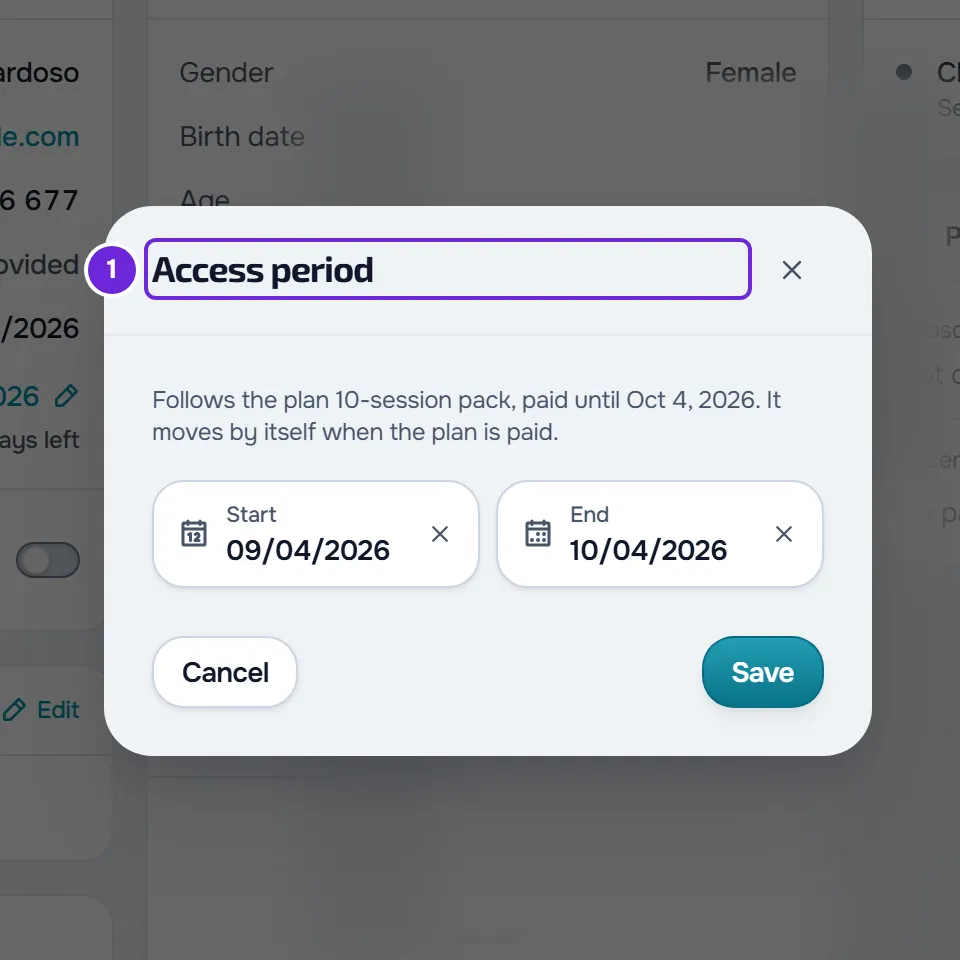
There are two ways to cut access before that day.
- Deactivate the client: in the profile, Settings > Client management > Deactivate. The client loses access straight away and no plan reopens it.
- Cancel or refund the plan's payment: the days of that payment stop counting. Cancelling an active monthly fee isn't enough, because the next charges stop but the client keeps the days already paid, now with no grace period. See Cancel a client's plan.
An end on the last paid day or later, or no end at all, has no such restriction. If the end falls after the day the plan ends, or if there is no end, the window warns in amber “After {date} the client keeps access without paying for the plan.” and lets you save.
A monthly fee that keeps access takes priority
While the client has a Stays the same or Read-only monthly fee running, No access plans, such as a pack, stop creating an end. Their paid days count like the monthly fee's: they only push an end that already exists. A client with no end date stays without one, and the monthly fee keeps charging every cycle.
The monthly fee stops running when it is paused or cancelled, or when the automatic payment subscription ends or has a cancellation requested. From then on the rules in the table apply again, except for No access packs whose paid days all ended before the first day of the monthly fee: those are left behind and don't close access again.
Automatic payment: the client keeps the period they paid for
A Stays the same or Read-only monthly fee with automatic payment (the client pays online, in a Stripe subscription that charges by itself every cycle) doesn't push the end at each renewal. Automatic payment only exists with online payments connected: see Connect Stripe to receive online payments from clients.
- With no end date, the subscription always renews.
- With an end date, it renews as long as the next period starts before that day.
- When the next period would start on the end day or later, the subscription stops renewing at the end of the paid period, and the end moves to the last paid day if it was before it. The client keeps the period they paid for and the subscription doesn't charge again.
- If you then remove the end, or move it to after the day the next period would start, the subscription renews again.
Ended access or deactivated client
- The paid days of Stays the same and Read-only plans, and the rules of the two previous sections, only count while access is active or scheduled.
- Access that ended by date only reopens through a No access plan whose end, with the grace period, covers today: a paid plan or, while the deadline to pay lasts, one you gave with Request payment. It reopens if you have a free slot on your plan and the client has no other active professional. If a payment can't reopen it for that reason, you get the notice “Payment received, access not opened”. See Client limit and occupied slots on your plan.
- The end date of access that has already ended never moves back.
- A client you deactivated is never reopened by a plan: they only come back when you reactivate them. Plans can extend their end date, but never shorten it.
What the client sees
- When you save the period by hand and the end changes, a client with active or scheduled access gets “Access end changed” in the app's notifications, with “Your access now ends on {date}.” or “Your access no longer has an end date.”. They get no push or email. If that save reactivates or schedules them, they get the notice for that change instead of this one.
- When a plan changes the end, the client gets no notice at that moment, unless the plan reopens their access: then they get “Access active”. The notice 7 days before the end then counts from the new date.
- When a subscription stops renewing because of the access end, nobody is notified at that moment. When access closes, the client gets “Subscription cancelled” and you get “Client subscription cancelled”.
Examples
- A 30-day No access pack, paid on 1 October, for an active client with no end date: the end becomes 30 October. If the payment is refunded before then and you haven't touched the date, the client is back to having no end.
- A monthly fee by hand with No access, paid until 31 March, with a 7-day grace period: the next charge is due on 1 April and the end is 8 April, so the client loses access on 9 April. If you cancel the monthly fee, the grace period stops counting and the end becomes 31 March.
- A monthly fee by hand with Stays the same, with cycles from the 1st to the end of each month, and an end you set for 15 July: when the client pays the July cycle, the end moves to 31 July and the August charge is no longer created. Without that end, the client would have stayed without an end. See Charge day of a manual monthly fee and end of access.
- A pack paid until 31 July and an end on 15 July: the window doesn't let you save.
- Automatic payment with Stays the same, paid until 31 July, with the end on 15 August: on 1 August the subscription renews. As the next period would start after the end, the end moves to 31 August and the subscription stops renewing.