
Before you start
- Only a plan with automatic payment, charged by Stripe at each renewal, has a button to cancel. A plan you pay manually (for example, a monthly fee with the Manual tag) or a one-off access pack does not: talk to your professional.
- You can also cancel when the subscription shows Payment due, Paused or Under review.
- Canceling the plan does not end coaching with your professional. For that, see End coaching or disconnect from your professional.
Steps
To cancel your plan:
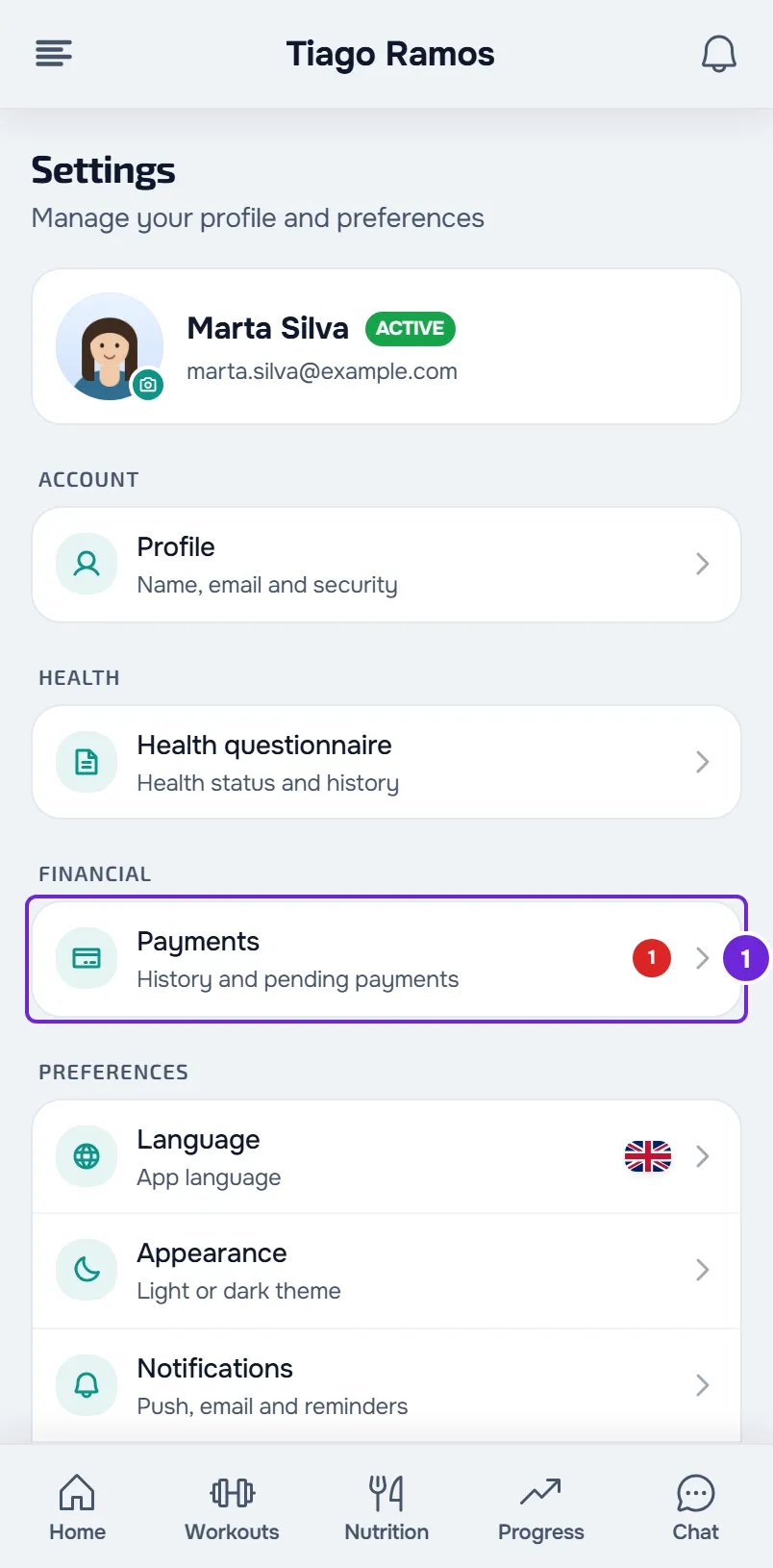
- In Settings, select Payments 1.
- In the Your plan section, select Cancel plan on the plan card. On the website, if the plan appears in a row of the section and not on the card, select Cancel subscription in that row.
- In the confirmation window, select Cancel plan or Cancel subscription again. To close without canceling, select Keep.
The plan continues until the last paid day and you keep access until then; after that day you are not charged again. On the card, the date changes to “Access until” followed by the last paid day, or to “Ends on” (in the app, “Ends”) for a plan that does not take your access away when it ends, and the button changes to Resume. In a row of the section, “Ends on” followed by the date appears, with the Resume button.
In the app
- The Your plan card is in Settings, in the Financial group, under Payments. It has Cancel plan, with the same confirmation as on the website.
- All your subscriptions, including the one on the card, are in Settings > Plans, in the My subscriptions list. To cancel one, select Cancel and confirm with Cancel subscription. “Subscription will be canceled at the end of the paid period.” appears.
- In Payments, the subscriptions that are not on the card appear under Your plans while they are active or have a payment due. Selecting one opens the Plans screen.
Resume the plan
Until the last paid day has passed, you can undo the cancellation: in the same place where you canceled, select Resume. Nothing is charged at that moment. The plan renews again on the date it was already going to renew, and the card shows “Renews on” (in the app, “Renews”) followed by that date again.
- After the last paid day, Resume disappears and the plan ends. To get the plan back, choose it again: see Choose and pay for a plan from your professional.
- When coaching with that plan's professional ends, whether by you, by them or on the end date, you can no longer resume: Resume stops appearing, on the website and in the app.
- If your professional is closing their account, you can no longer resume either: a message appears saying that they are closing their account.
Withdraw in the first 14 days
There is no button to withdraw on the website. On a plan you chose and paid for yourself, you can withdraw within 14 days of the purchase, without giving a reason: tell your professional using the contact shown on the Stripe payment page. You can use the model on the Legal information page, in the Right of withdrawal section.
The professional has 14 days to refund what you paid, minus the part already provided if you asked them to start earlier. To avoid being charged again, also cancel the subscription. In an older version of the app, Settings > Plans may still show “Withdraw from contract”: a request made there ends the plan right away.
Common problems
Cancel plan and Cancel subscription do not appear
- The plan is paid manually or is a one-off access pack: it has no automatic renewal to cancel. Talk to your professional.
- You already cancelled: Resume may be where the button was. See “Resume does not appear”.
- The last paid day has already passed: the plan ended and there is nothing to cancel.
Resume does not appear
Resume only appears on a subscription that you cancelled yourself and that is still in the paid period. It does not appear if your professional ended it, if the last paid day has already passed, if the coaching has ended, if the payment was disputed with the bank and the dispute is still open or was lost by your professional, or if your professional no longer takes online payments, is closing their account or no longer has an active account. In these cases, choose the plan again or talk to your professional. In the latest version of the app it is the same. In an earlier version, Resume only stops appearing if the coaching has ended or the last paid day has passed; in the other cases it appears and, when you select it, an error message appears, for example “This subscription can no longer be resumed.”
“Couldn't cancel the plan. Try again in a moment.”
The cancellation was not accepted, for example because Stripe did not respond or because the subscription had already ended. In the website's subscription list, the messages are “Couldn't cancel. Try again in a moment.” or “This subscription cannot be canceled in its current state.” On the app's Plans screen, the second one is “This subscription can no longer be canceled.” Reload the page (in the app, pull the screen down) to see the current status. If the plan is still active, try again in a moment.
“Couldn't resume the plan. Try again.”
The subscription can no longer be resumed: the last paid day has passed, the subscription is not active (for example, it is Paused or Under review), or coaching with that professional has ended. It can also be a Stripe failure: in that case, try again in a moment. In the website's subscription list, “This subscription cannot be resumed.” appears and, on the app's Plans screen, “This subscription can no longer be resumed.” In both places, the Stripe failure appears as a message that starts with “The subscription could not be resumed.” Reload the page to see the current status.
“You already have an active package with this professional.”
It appears when you select Resume and you already have another plan that renews with the same professional: there can only be one at a time. In the website's subscription list, the message is “You already have another active package with this professional.” Keep the plan that is active or talk to your professional.
If the problem continues, talk to your professional first. Then write to the MyFitnessClient team through the contact shown in the Help Center, with your professional's name, the name of the plan, the exact message and whether it happened on the website or in the app. For other payment problems, see Fix payment problems: Pay now, confirmation and plan.
Questions
Do I lose access when I cancel?
No. The plan continues until the last paid day and you keep access until then. After that day, the plan ends and you are not charged again.
Do I get back what I already paid?
Cancelling does not refund anything: the period you already paid for runs to the end. To withdraw in the first 14 days, tell your professional, who has to refund what you paid, minus the part already provided if you asked them to start earlier.
Can I cancel a plan that has not charged anything yet?
Yes. If the first charge of a new plan has not happened yet, for example because a plan you already paid for still gives you access, cancel it like any other: it ends on the day of the first charge, without you ever being charged. See Fix payment problems: Pay now, confirmation and plan.